 AI Tool
Ye tool kya hai?
Adviserry ek AI-powered archive hai un newsletters aur YouTube channels ke liye jinhe tum pehle se follow karte ho. Iski pitch seedhi hai: “turn the experts you follow into your advisory panel.” Matlab — tum 20 newsletters subscribe karke effectively 20 advisors hire kar chuke ho, jinhe tumne kabhi call hi nahi kiya. Adviserry wahi call hai.
Ise banaya hai Adam Casson ne (Casson Technologies Inc, Oakland, California) — solo founder — aur ye isi hafte Product Hunt par launch hua hai (5 October 2026).
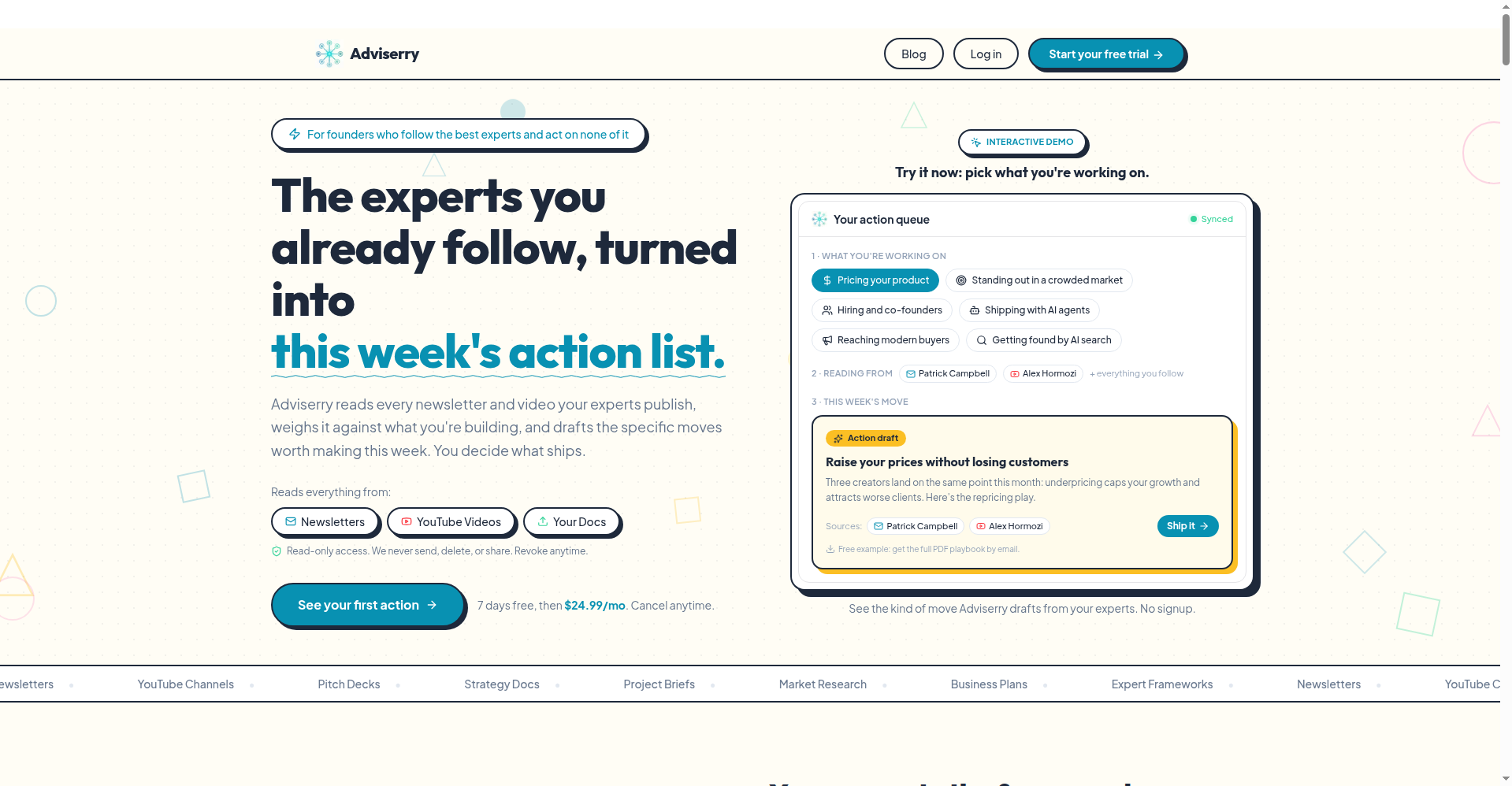
Normal AI tools tumhare question ka wait karte hain. Adviserry proactive hai: ye tumhare experts ka har newsletter aur video padhta hai, use tumhare projects ke against weigh karta hai, aur har hafte specific moves draft karta hai — “test this pricing change”, “send this email”, “try this framework on the stuck deal.” Sirf summary nahi — copy-paste ready actions, har ek ke saath source cited.
Khaas features (jo ise alag banate hain)
1. Action drafts — summary nahi, move
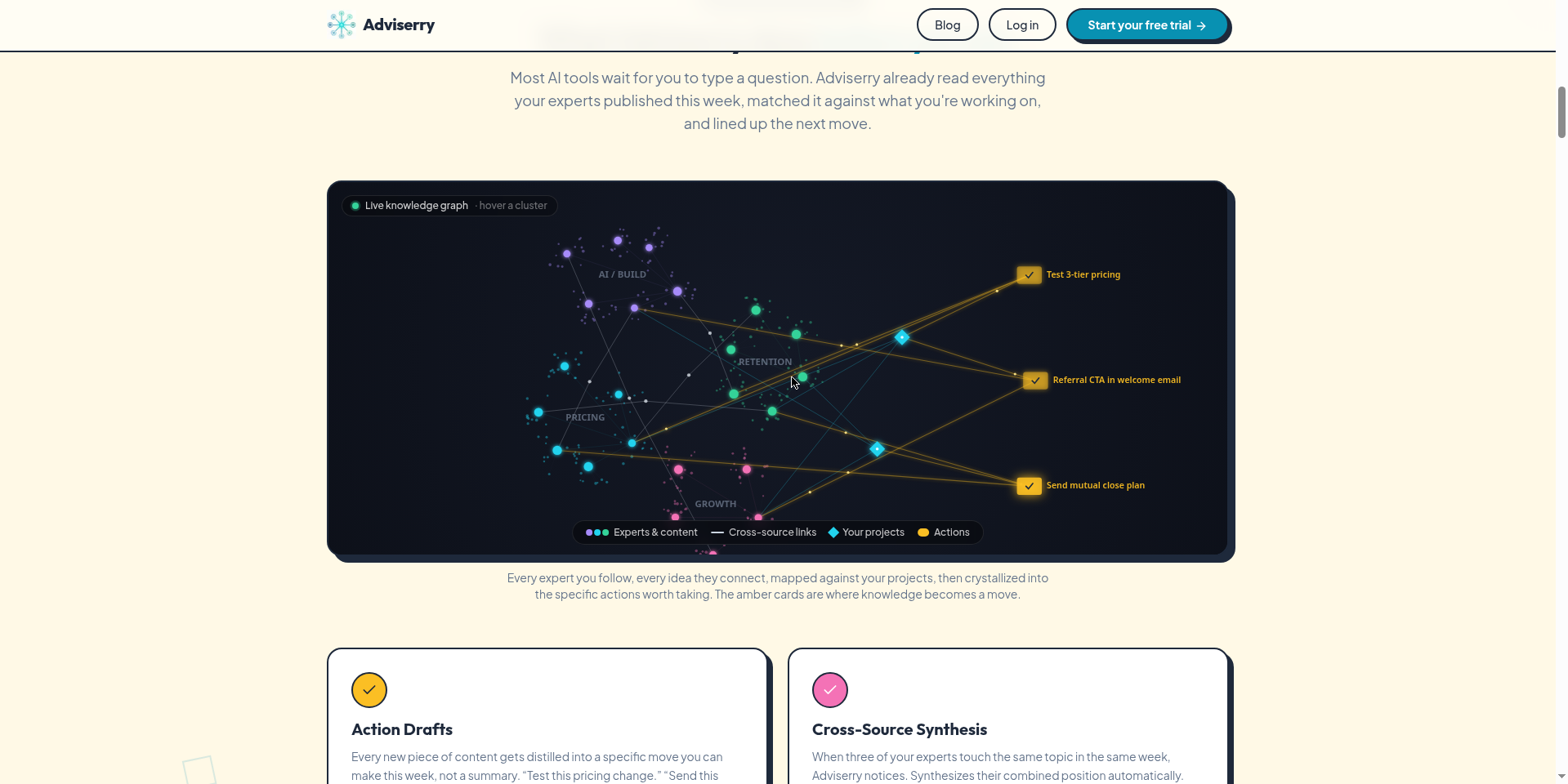
Har naye content piece ko Adviserry ek specific move me distill karta hai jo tum is hafte kar sakte ho. Har action ke saath exact source cited hota hai, taaki tum reasoning check kar sako. Core plan me ye har Friday milta hai, Pro me har weekday (plus Friday ko deeper pass).
2. Cross-source synthesis — jab experts agree karein
Jab tumhare 3 experts ek hi hafte me same topic chhute hain, Adviserry notice karta hai aur unki combined position synthesize karta hai. Tumhe wo milta hai jo wo collectively recommend karte hain — wo nahi jo tumne galti se padh liya.
3. Working memory — tumhare projects yaad rakhta hai (Pro)
Adviserry yaad rakhta hai tum kya bana rahe ho, tumne kya try kiya, kya kaam kiya. Har answer tumhari actual situation se pull hota hai, generic advice nahi. Jitna zyada use karoge, recommendations utni sharp.
4. Apne favorite experts se chat (Pro)
“How would Hormozi price my SaaS?” ya “Lenny mere retention problem ke liye kaunsa framework recommend karta hai?” — jawab grounded hote hain unhone actually kya kaha, hallucinated generic gyaan nahi.
5. MCP server — Claude/Cursor me tumhara archive
Har user ko personal MCP server milta hai. Settings se token lekar Claude Desktop, Claude Code ya Cursor se connect karo — phir tumhara assistant tumhare newsletter archive ko search kar sakta hai, panels list kar sakta hai, topics extract kar sakta hai. Core plan me bhi included hai.
Setup: 5 minute, 3 steps
- Sources connect karo — Gmail inbox link karo aur favorite YouTube channels add karo. Adviserry sab kuch automatically sync karta hai; naye newsletters aur videos bina manual kaam ke archive me aate hain.
- Topic panels banao — creators ko focused panels me group karo: “Marketing” (Hormozi, Godin, GaryVee), “AI” (Lenny, Greg Isenberg). Apne project docs upload karo taaki answers tumhari situation me grounded hon.
- Kuch bhi poocho — archive se chat karo, ya Claude Desktop/Cursor/Claude Code se MCP ke through query karo. Har answer exact newsletter ya video cite karta hai.
Pricing — free me kitna milega?
Seedhi baat: free tier nahi hai. Har plan par 7 din ka free trial hai, lekin card up front lagta hai (day 8 se billing, usse pehle cancel = zero charge).
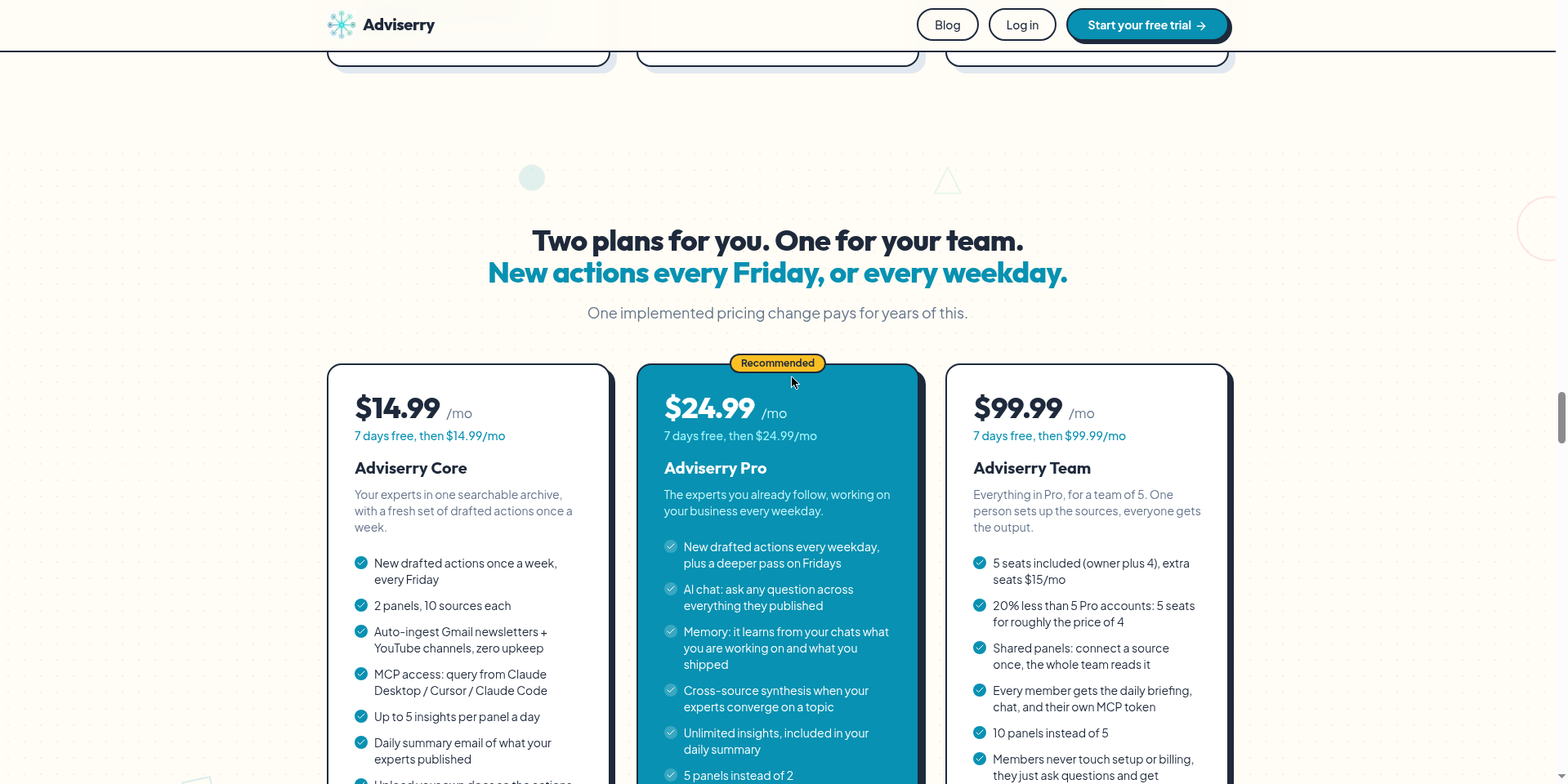
- Core ($14.99/month): Gmail + YouTube auto-ingest; 2 panels (har panel me 10 sources tak); har Friday drafted actions; daily summary email; apne docs upload; MCP server; 5 insights/panel/day. AI chat aur memory isme nahi — wo Pro me hain.
- Pro ($24.99/month): Core wala sab + har weekday drafted actions + Friday deeper pass; AI chat; working memory; unlimited insights; 5 panels.
- Team ($99.99/month, 5 seats): Pro wala sab 5 seats ke liye; 10 shared panels — ek baar source connect karo, poori team use kare; har member ko daily briefing, chat aur apna MCP token. Extra seat $15/month.
Privacy ka kya scene hai?
Gmail access mangne wale har tool par ye sawal banta hai — aur yahan jawab solid hai:
- Read-only access. Site clearly bolti hai: “We never send, delete, or share. Revoke anytime.” Sirf newsletter-detect hone wale senders ingest hote hain — tumhara personal email kabhi store ya process nahi hota.
- Google ne independently audit kiya hai — CASA Tier 2 assessment, TAC Security dwara, ESOF platform par, OWASP Application Security Verification Standard ke against. Passed.
- OAuth tokens AES-256-GCM se encrypted; content Postgres row-level security ke peeche — sirf tumhara account padh sakta hai.
- Data kabhi becha nahi jata, share nahi hota, aur models ko train karne me use nahi hota.
Kaun use kare, kaun na kare?
- Solo founders & consultants: Jo 20 newsletters padhte hain lekin Friday ko kuch implement nahi hota — yehi iska core user hai (founder ne khud apne liye banaya hai).
- Students & creators: Apne niche ke experts ka personal knowledge base — exam prep, content ideas, ya skill building ke liye.
- Claude/Cursor power users: MCP server tumhare archive ko tumhare existing AI workflow me daal deta hai.
- Free-tool dhoondhne wale: Skip — free tier nahi hai, trial ke liye bhi card chahiye.
- AI chat chahne wale: Core mat lo — chat aur memory sirf Pro me hai.
Final verdict
Adviserry “AI notetaker/summarizer” bheed se alag sochta hai — ye content ko archive + action engine me badalta hai. Concept genuinely useful hai (newsletter overload real problem hai), security posture ek solo-founder product ke liye impressive hai, aur MCP integration power users ke liye killer feature hai. Aadha number isliye kata: free tier nahi hai, trial ke liye card chahiye, aur Core me chat/memory nahi — jo do sabse attractive features hain, wo paywall ke peeche hain. Baaki aadha: product bilkul naya hai.
Humari rating: 4.0/5. Agar tum newsletters/YouTube se seekhte ho lekin implement nahi kar paate — 7-day trial try karne layak hai. Bas day 8 se pehle cancel karna mat bhoolna agar fit na lage.
Note: Ye first-look review official site (adviserry.com) aur Product Hunt launch information par based hai. Hum ise hands-on test karke update jald jodenge.


