 AI Tool
 30-second me faisla
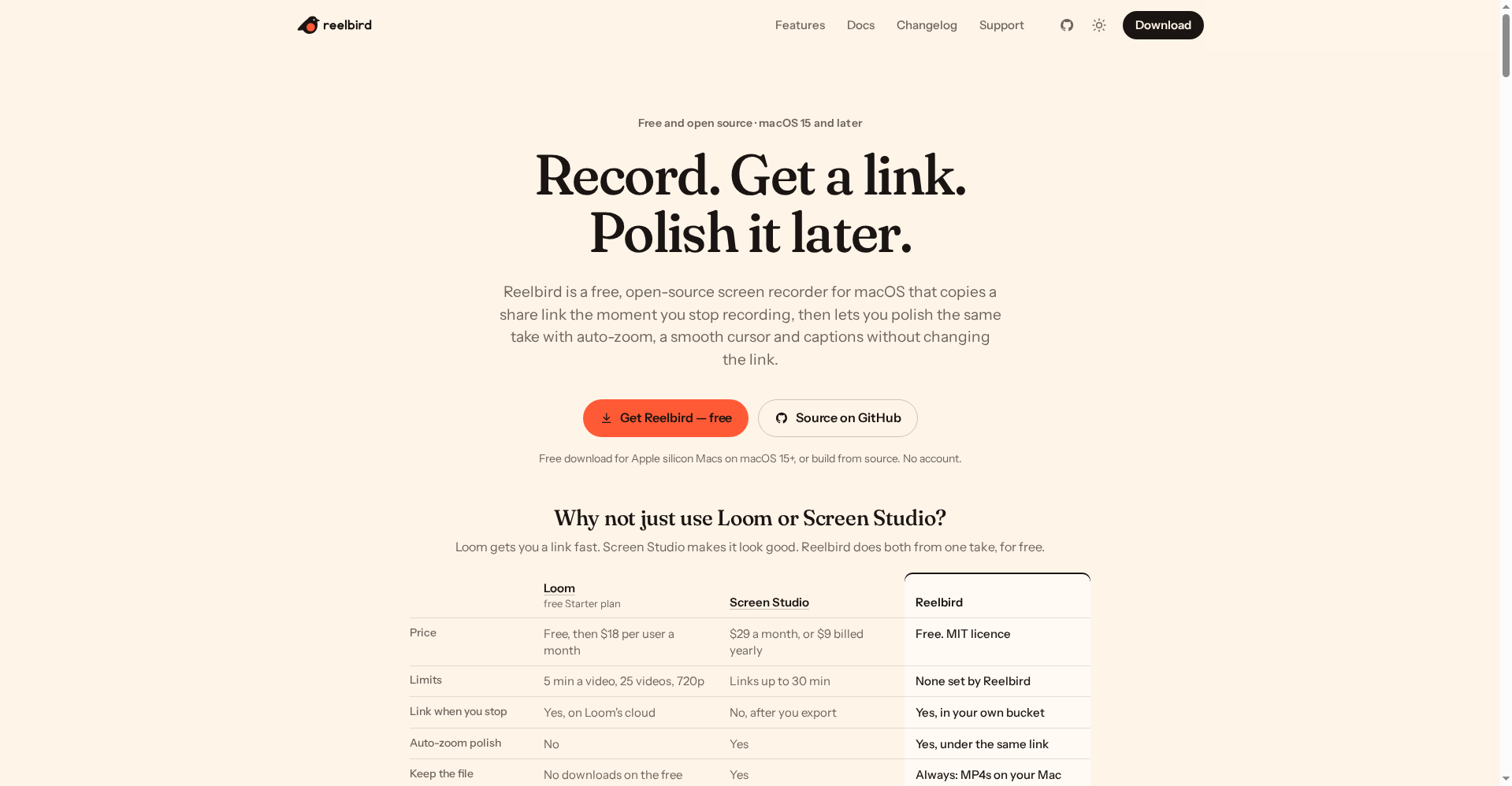
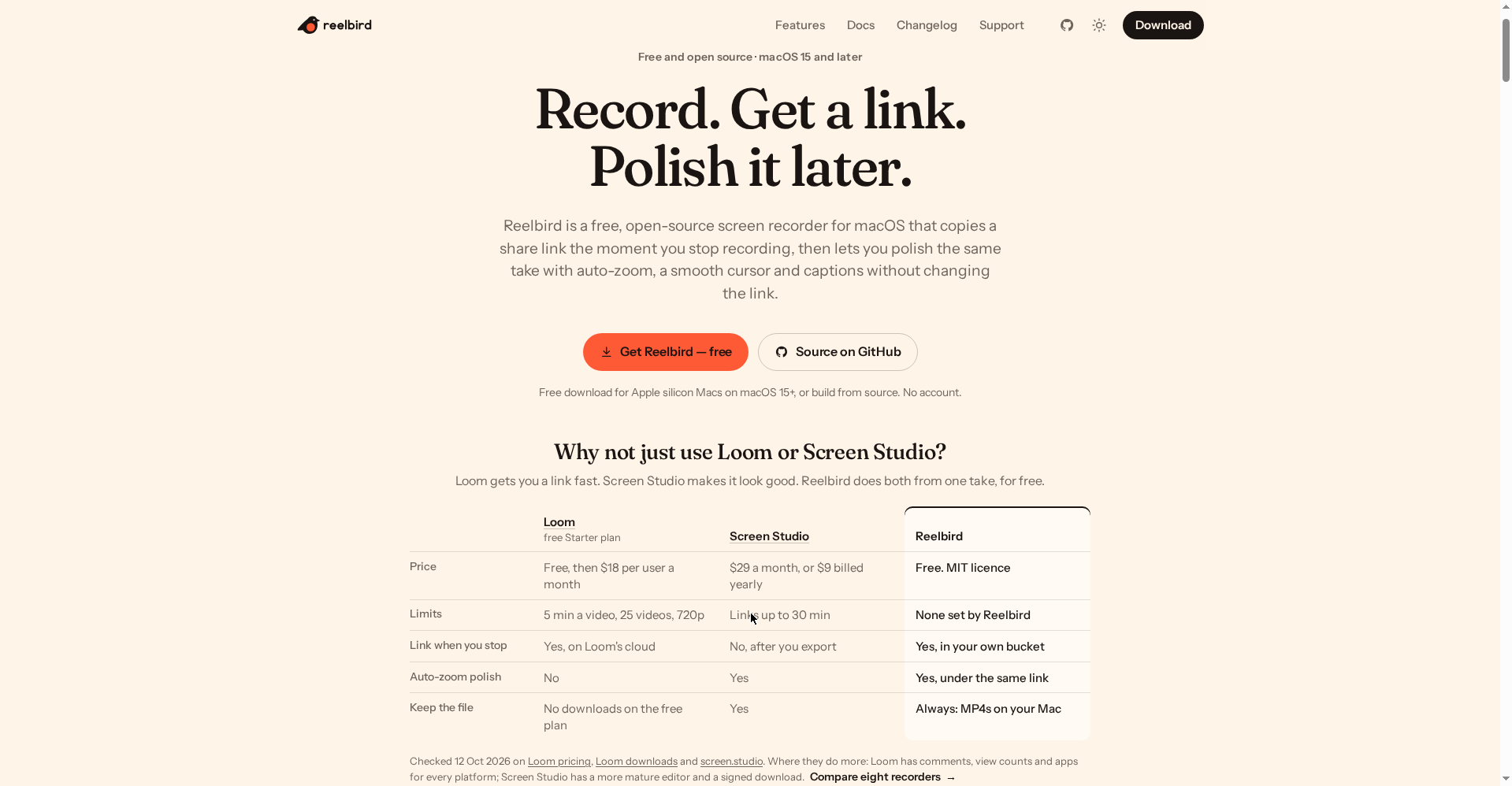
Reelbird (reelbird.app) ek free, open-source Mac screen recorder hai jo 16 Oct 2026 ko Product Hunt par launch hua. Iska idea simple hai: Loom wali speed (stop dabate hi share link clipboard par) + Screen Studio wala polish (auto-zoom, smooth cursor, captions) — ek hi recording se, bilkul free.
Free me milega: sab kuch — unlimited recordings, koi length limit nahi, MP4/HEVC/ProRes/GIF export, auto-zoom polish, on-device captions. Koi paid plan hai hi nahi (MIT licence). Sharing ke liye tumhara apna storage bucket chahiye (Cloudflare R2 ka free tier kaafi hai, ~10 min ka ek-baari setup).
Try karo agar: tum Mac user ho aur tutorials, demo videos, client walkthroughs ya launch videos banate ho — aur Loom ke 5-minute free limit ya Screen Studio ke $29/month se pareshan ho. Skip karo agar: tum Windows/Linux par ho (support hai hi nahi, plan bhi nahi), ya tumhe team comments + viewer analytics chahiye (wo Loom me hai, yahan nahi).
⚠️ Ek zaroori baat: Share links unlisted hain, secret nahi — jiske paas link hai wo video dekh sakta hai. Sensitive client work share karne se pehle ye samajh lo.
Ye tool kya hai?
Har creator ki kahani same hai: quick demo bhejna ho to Loom kholo — link turant milta hai, lekin free plan me 5-minute ki limit, 25 videos, 720p, aur apna video download bhi nahi kar sakte. Achha-looking video chahiye to Screen Studio kholo — auto-zoom polish kamaal hai, lekin $29/month aur share link export ke baad milta hai.
Reelbird ke maker (GitHub par btahir) ko yehi do problems hui — ek launch video banate waqt Loom ki 5-minute limit se takraye, phir pata chala free plan me apna video download bhi nahi hota. To unhone apna recorder bana diya aur open source kar diya.
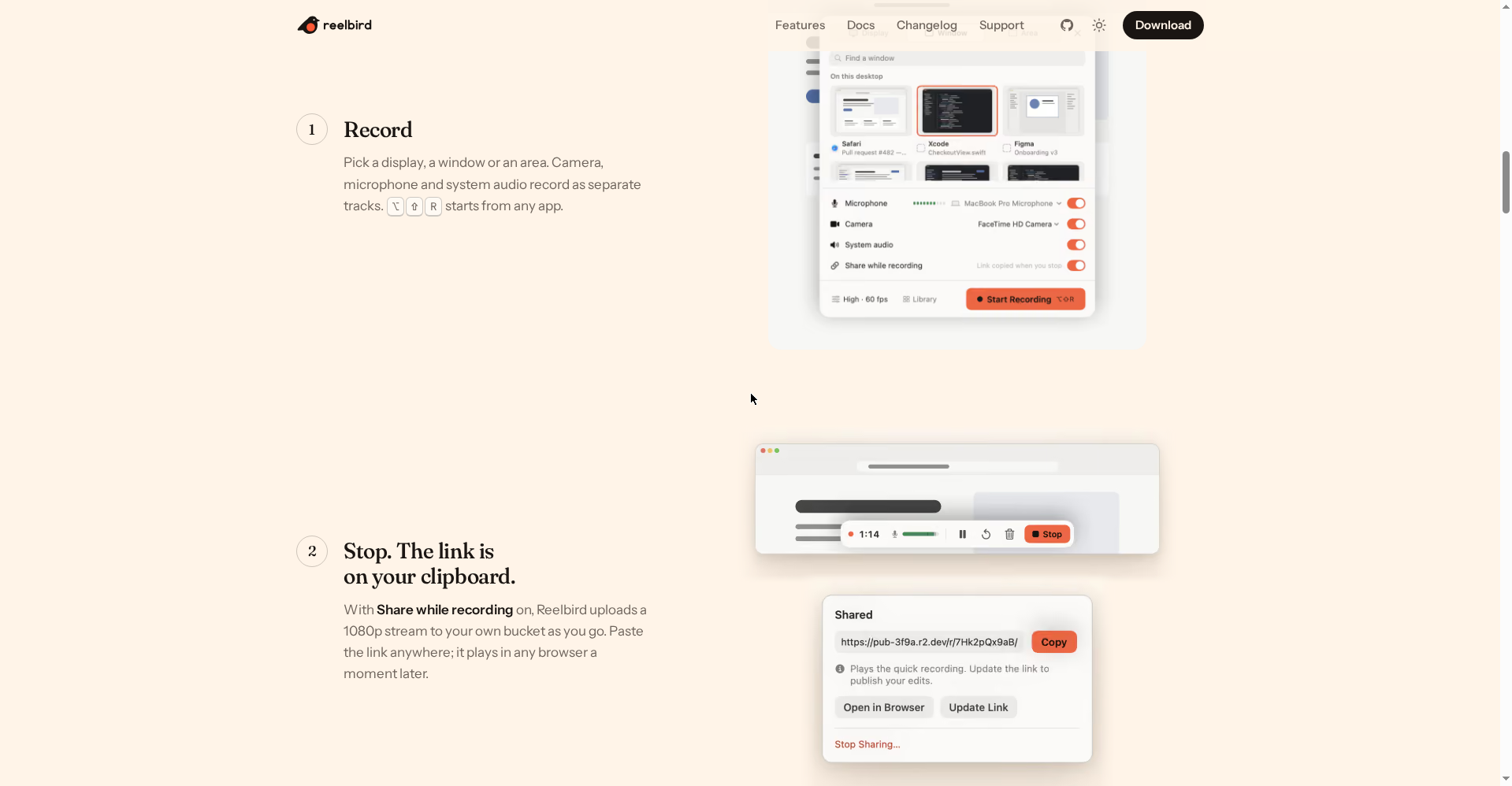
Concept: record karo → stop dabao → link clipboard par (Loom jaisa). Baad me take kholo → auto-zoom, smooth cursor, captions lagao → “Update link” dabao (Screen Studio jaisa) — aur link wahi rehta hai. Jinko tumne link bheja tha, unhe ab polished version dikhega. Dono kaam ek hi take se, zero rupees me.
Khaas features (jo ise alag banate hain)
1. Stop dabate hi link — tumhare apne bucket par
“Share while recording” on karne par Reelbird record hote waqt hi 1080p stream tumhare apne storage bucket (S3, Cloudflare R2, B2 ya MinIO) me upload karta hai. Stop dabate hi link clipboard par — kahin paste karo, kisi bhi browser me khul jayega, koi app ya sign-in nahi chahiye.
Farak samjho: Loom ka link Loom ke cloud par rehta hai (unki marzi, unki limits). Reelbird ka link tumhare bucket par hai — video tumhara, storage tumhara, link tumhara. Setup ek baar karna hai (~10 minute: ek bucket, ek scoped API token, ek public URL). Cloudflare R2 ka free tier (10 GB, free egress) zyadatar logon ke liye kaafi hai — haan, R2 account ke liye payment method dena padta hai.
2. Polish baad me — same link par
Ye woh feature hai jo Reelbird ko clever banata hai. Jaldi me link bhej diya? Koi baat nahi — baad me take kholo:
- Auto-zoom tumhare clicks aur typing ko follow karta hai
- Cursor event log se dobara draw hota hai — jitter ki jagah smooth glide; size badlo ya chhupao
- Captions tumhare Mac par hi bante hain (Apple speech recognition — koi cloud, koi API key nahi); burn-in karo ya viewer ke liye toggleable track rakho
- Background, padding, rounded corners, shadow aur camera bubble (baad me move kar sakte ho)
Phir “Update link” dabao — URL same, video naya. Official site kehti hai: “the link never changes, even when you update the video.”
3. Audio jo khud saaf ho jata hai
Voiceovers ke liye chhote lekin kaam ke tools built-in hain:
- Auto level: tumhari awaaz -16 LUFS par set — dheemi recording normal level par aa jati hai
- Voice enhance: Apple sound isolation + gentle compressor, de-esser aur presence lift
- Ducking: bolte waqt system audio ~12 dB dab jata hai, rukne par wapas
- Cut long silences: khaamosh hisson ko ek baar me hatao (restore bhi ho sakta hai)
- Safe peaks: har track par limiter (-1.5 dBFS ceiling) — kuch clip nahi hoga
4. Alag-alag tracks, khula format
Screen, camera, microphone aur system audio alag tracks par record hote hain — baad me camera bubble hatao, system sound mute karo, jo chaaho. Har take .reelbird folder me hota hai: standard MP4s + JSON + event log. Kuch lock-in nahi — files tumhari, format khula. Export: MP4 (H.264), HEVC, ProRes, GIF — landscape, square, vertical ya 4:3.
Aur ek practical cheez: har track disk par 2-second segments me likha jata hai — Mac crash bhi ho jaye to agli launch par take recover ho jata hai (zyada se zyada 2 second ka loss).
5. CLI + MCP server — AI agents ke liye
Developers ke liye interesting hissa: Reelbird ka CLI aur MCP server hai. Matlab Claude Code, Codex ya Cursor se keh sakte ho — “settings page me jo change kiya uska 20-second demo record karke share link de do” — aur agent khud record karke link de dega. Launch videos aur PR demos ke liye genuinely naya workflow hai.
6. Privacy — kuch Mac se bahar nahi jata (jab tak tum share na karo)
- Recordings
~/Movies/Reelbirdme rehti hain - Koi account, analytics, telemetry, crash reporting ya update check nahi
- Captions on-device; share links tumhari keys se signed, secret tumhare Keychain me
- Native Swift, ScreenCaptureKit, Metal — koi Electron nahi, koi third-party dependency nahi
- MIT licence — code padho, badlo, apna build ship karo
Pricing — free me kitna milega?
Yahan pricing section chhota hai kyunki paid plan hai hi nahi:
- Free — $0 (MIT licence, hamesha ke liye): unlimited recordings, koi length/video-count limit nahi, saare exports (MP4/HEVC/ProRes/GIF), auto-zoom + smooth cursor + captions + audio tools, files hamesha tumhare Mac par.
Ek hi “cost” hai: share links ke liye tumhara apna bucket. Cloudflare R2 ka free tier (10 GB storage, free egress) zyadatar ke liye kaafi hai — lekin R2 signup par payment method maangta hai. Recording aur export bina bucket ke bhi kaam karte hain.
Reference ke liye (official site ne 12 Oct 2026 ko vendor pages par check kiya): Loom free Starter — 5 min/video, 25 videos, 720p, no downloads, phir $18/user/month; Screen Studio — $29/month ($9/month yearly billing). Reelbird dono ki paid cheezon ko free me deta hai.
Kaun use kare, kaun na kare?
- YouTubers & course creators: Tutorials me auto-zoom polish bina $29/month diye — captions on-device me free.
- Freelancers: Client ko quick walkthrough bhejna ho — stop dabate hi link, baad me polish karke same link update.
- Indie makers & developers: Launch video ya PR demo — CLI/MCP se AI agent khud demo record kar de.
- Students: Project demo ya assignment walkthrough — free, koi watermark nahi.
- Skip karo agar: Windows/Linux par ho (support nahi, plan bhi nahi), ya team ko comments + viewer analytics chahiye (Loom aage hai), ya bilkul zero-setup chahiye (bucket setup ~10 min lagta hai).
Final verdict
Reelbird “free screen recorder” category ka woh rare case hai jahan free ka matlab compromised nahi. Loom ki speed aur Screen Studio ka polish — dono ek take me, koi account nahi, koi tracking nahi, files tumhari. Aadha number isliye kata: Mac-only hona sabse badi deewar hai (aur ye kabhi tootegi nahi — Apple frameworks par bana hai), share links ke liye bucket setup non-technical users ko rokega, aur product abhi 0.1.1 hai — rough edges expected hain.
Humari rating: 4.5/5. Mac hai aur screen recordings tumhare kaam ka hissa hain to ye download karne me sochne wali koi baat nahi — Loom ka free plan iske saamne mazak lagta hai.
Note: Ye first-look review official site (reelbird.app), GitHub repo (btahir/reelbird) aur Product Hunt launch (16 Oct 2026) par based hai. Hum ise hands-on test karke update jald jodenge.