 AI Tool
 The 30-second verdict
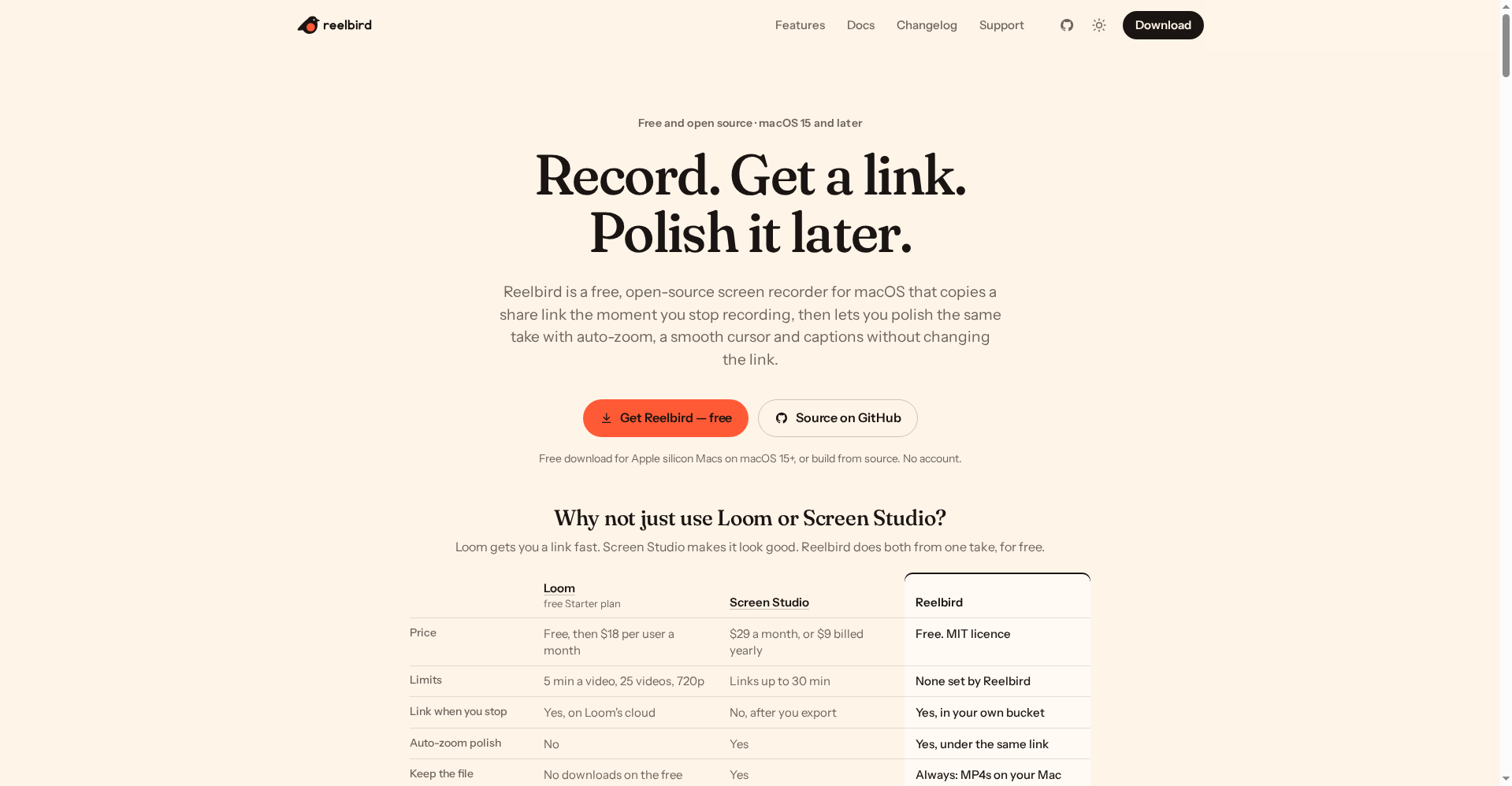
Reelbird (reelbird.app) is a free, open-source Mac screen recorder that launched on Product Hunt on October 16, 2026. The pitch is simple: Loom’s speed (a share link on your clipboard the moment you stop) + Screen Studio’s polish (auto-zoom, smooth cursor, captions) — from one recording, for free.
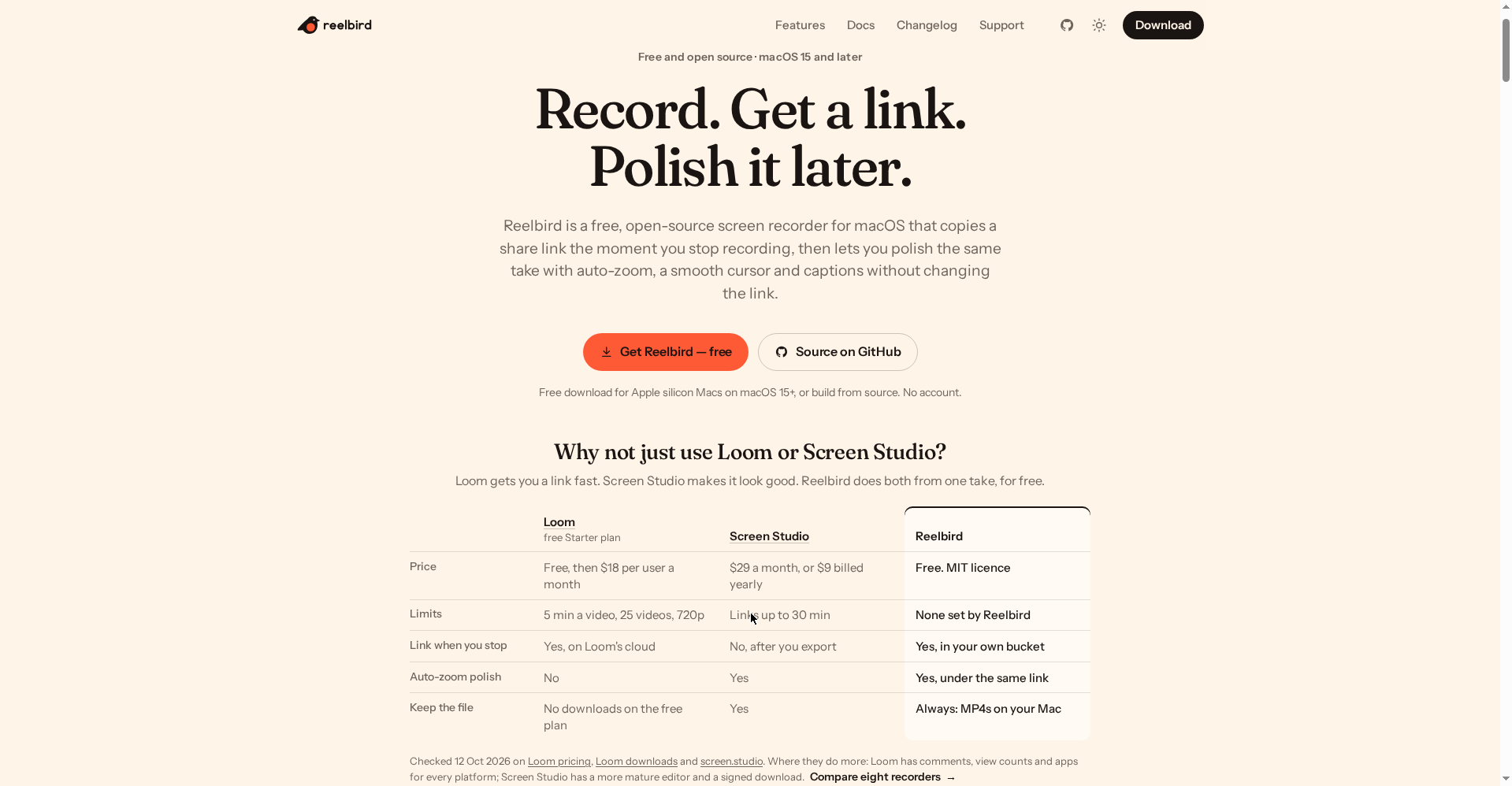
Free means everything: unlimited recordings, no length limits, MP4/HEVC/ProRes/GIF export, auto-zoom polish, on-device captions. There is no paid plan (MIT licence). Sharing needs your own storage bucket (Cloudflare R2’s free tier covers most people; ~10 minutes of one-time setup).
Try it if: you’re on a Mac and you make tutorials, demo videos, client walkthroughs or launch videos — and you’re tired of Loom’s 5-minute free cap or Screen Studio’s $29/month. Skip it if: you’re on Windows/Linux (unsupported, and not planned), you need team comments and viewer analytics (that’s Loom’s turf), or you want absolute zero setup (the bucket takes ~10 minutes).
⚠️ One important caveat: share links are unlisted, not secret — anyone with the link can watch. Keep that in mind before sharing sensitive client work.
What is it?
Every creator knows the same two stories. Need to send a quick demo? Open Loom — the link is instant, but the free plan gives you a 5-minute limit, 25 videos, 720p, and you can’t even download your own video. Want it to look good? Open Screen Studio — the auto-zoom polish is superb, but it’s $29/month and the share link only arrives after export.
Reelbird’s maker (GitHub’s btahir) lived both problems — hit Loom’s 5-minute wall while making a launch video for another project, then discovered the free plan wouldn’t let him download his own recording. So he built his own recorder and open-sourced it.
The concept: record → stop → link on your clipboard (the Loom part). Later, open the take → add auto-zoom, a smooth cursor, captions → hit “Update link” (the Screen Studio part) — and the link stays the same. Whoever you already sent it to now sees the polished version. Both jobs from one take, for zero dollars.
Standout features
1. Link the moment you stop — on your own bucket
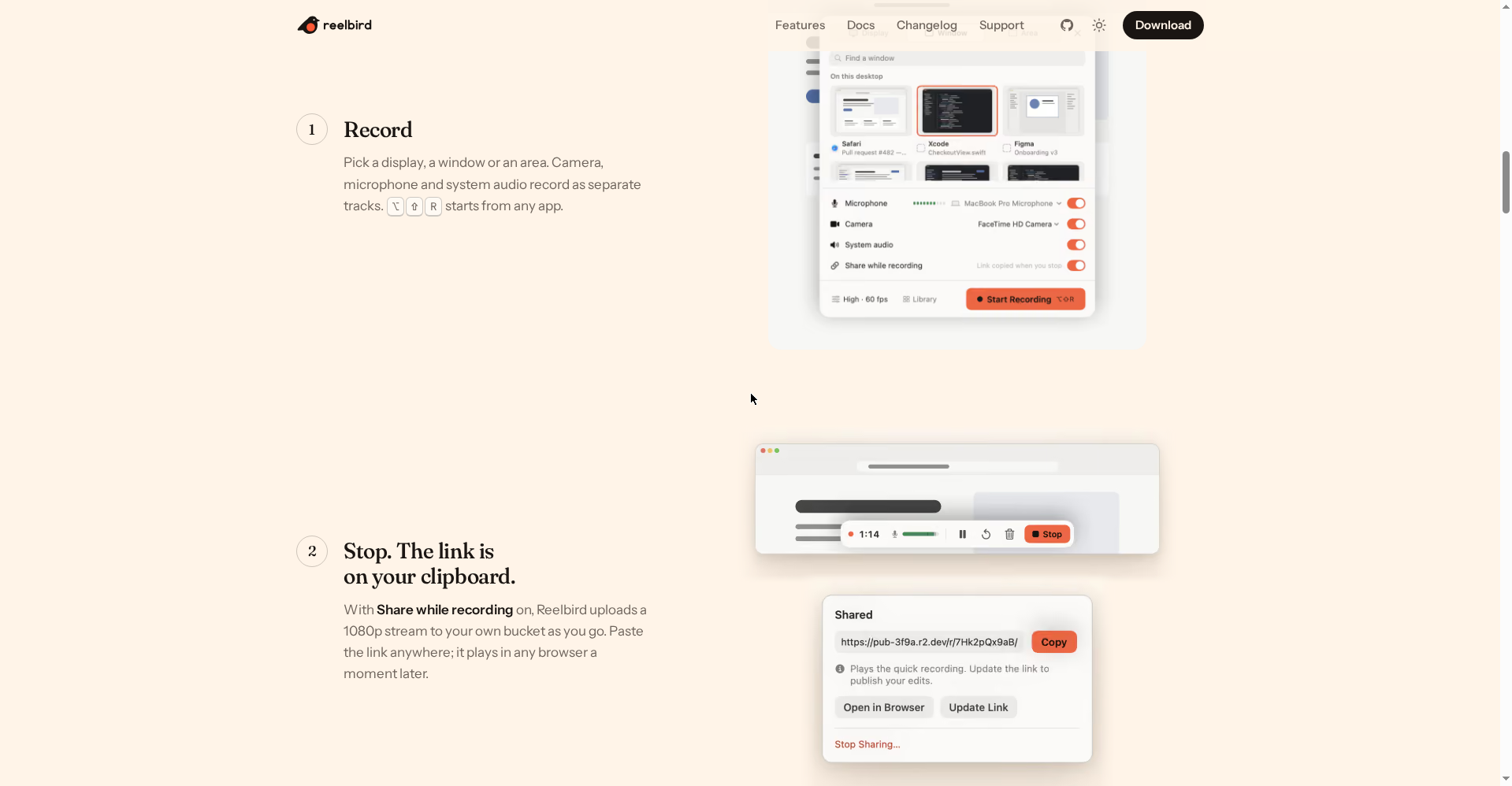
With “Share while recording” on, Reelbird uploads a 1080p stream to your own storage bucket (S3, Cloudflare R2, B2 or MinIO) as you record. Hit stop and the link is on your clipboard — paste it anywhere; it plays in any browser, no app or sign-in needed.
See the difference: Loom’s link lives on Loom’s cloud (their rules, their limits). Reelbird’s link lives on your bucket — your video, your storage, your link. Setup is once (~10 minutes: a bucket, a scoped API token, a public URL). Cloudflare R2’s free tier (10 GB, free egress) covers most people — though R2 does ask for a payment method at signup.
2. Polish later — under the same link
This is the feature that makes Reelbird clever. Sent the link in a hurry? No problem — open the take later:
- Auto-zoom follows your clicks and typing
- The cursor is redrawn from the event log — a smooth glide instead of jitter; resize or hide it
- Captions are made on your Mac (Apple’s speech recognition — no cloud, no API keys); burn them in or offer them as a viewer-toggleable track
- Background, padding, rounded corners, shadow, and a camera bubble you can reposition after the fact
Then hit “Update link” — the URL is unchanged, the video is new. As the official site puts it: “the link never changes, even when you update the video.”
3. Audio that cleans itself up
Small but genuinely useful tools for voiceovers, all built in:
- Auto level: your voice is measured and set to −16 LUFS — a quiet take comes out at a normal level
- Voice enhance: Apple’s sound isolation plus a gentle compressor, de-esser and presence lift
- Ducking: system audio dips ~12 dB while you speak, returns when you stop
- Cut long silences: pauses removed in one pass (restorable)
- Safe peaks: a limiter on every track (−1.5 dBFS ceiling) — nothing clips
4. Separate tracks, open format
Screen, camera, microphone and system audio record as separate tracks — remove the camera bubble later, mute the system sound, whatever you need. Every take is a .reelbird folder: standard MP4s plus JSON plus an event log. Nothing is locked in. Exports: MP4 (H.264), HEVC, ProRes, GIF — landscape, square, vertical or 4:3.
One practical detail: every track is written to disk in 2-second segments — if your Mac crashes, the take recovers on next launch (at most two seconds lost).
5. CLI + MCP server — for AI agents
The interesting part for developers: Reelbird ships a CLI and an MCP server. Ask Claude Code, Codex or Cursor — “record a 20-second demo of the settings page I just changed and give me the share link” — and the agent records it itself and hands you the link. A genuinely new workflow for launch videos and PR demos.
6. Privacy — nothing leaves your Mac unless you share it
- Recordings stay in
~/Movies/Reelbird - No account, analytics, telemetry, crash reporting or update checks
- Captions are on-device; shares are signed with your own keys, the secret in your Keychain
- Native Swift, ScreenCaptureKit, Metal — no Electron, no third-party dependencies
- MIT licensed — read the code, change it, ship your own build
Pricing — what does free get you?
This section is short because there is no paid plan:
- Free — $0 (MIT licence, forever): unlimited recordings, no length or count limits, every export format (MP4/HEVC/ProRes/GIF), auto-zoom + smooth cursor + captions + audio tools, files always on your Mac.
The only “cost”: your own bucket for share links. Cloudflare R2’s free tier (10 GB storage, free egress) covers most people — though signup needs a payment method. Recording and exporting work without any bucket at all.
For reference (the official site checked vendor pages on 12 Oct 2026): Loom’s free Starter — 5 min/video, 25 videos, 720p, no downloads, then $18/user/month; Screen Studio — $29/month ($9/month on yearly billing). Reelbird gives away for free what both charge for.
Who should use it, who shouldn’t?
- YouTubers & course creators: auto-zoom polish in tutorials without $29/month — captions free and on-device.
- Freelancers: send a client walkthrough — link the second you stop, polish later and update the same link.
- Indie makers & developers: launch videos or PR demos — the CLI/MCP lets an AI agent record the demo itself.
- Students: project demos or assignment walkthroughs — free, no watermark.
- Skip it if: you’re on Windows/Linux (unsupported, and not planned), your team needs comments + viewer analytics (Loom wins there), or you want literally zero setup (the bucket takes ~10 minutes).
Final verdict
Reelbird is the rare case where free doesn’t mean compromised. Loom’s speed and Screen Studio’s polish — both from one take, no account, no tracking, your files. Half a point off: being Mac-only is the biggest wall (and it’ll never come down — it’s built on Apple frameworks), the bucket setup will stop non-technical users, and the product is at 0.1.1 — rough edges are expected.
Our rating: 4.5/5. If you’re on a Mac and screen recordings are part of your work, there’s nothing to think about — Loom’s free plan looks like a joke next to this.
Note: This first-look review is based on the official site (reelbird.app), the GitHub repo (btahir/reelbird) and the Product Hunt launch (Oct 16, 2026). We’ll update it after hands-on testing.