 AI Tool
⚡ 30-second me faisla
Spiik ek AI voice recorder aur transcription app hai (iPhone, iPad aur Mac) jo meeting, lecture ya interview record karke transcript, structured notes, quiz, flashcards aur mind map bana deti hai. Mac par Zoom, Meet ya Teams ki dono taraf ki recording bina kisi bot ke hoti hai — call me koi bot dikhta hi nahi. Free download hai aur recording time ki koi limit nahi, lekin dhyaan rakho: full transcript aur AI tools Spiik Pro me hain ($9.99/month ya $59.99/year) — free me third-party listing ke mutabik sirf pehle 60 seconds ki transcription milti hai. Students jo lecture se seedha quiz aur flashcards banana chahte hain, aur Mac users jo bot-free meeting recording chahte hain, unke liye ye try karne layak hai — pehle free download karke ek chhoti recording test karo, phir Pro decide karo.
Ye tool kya hai?
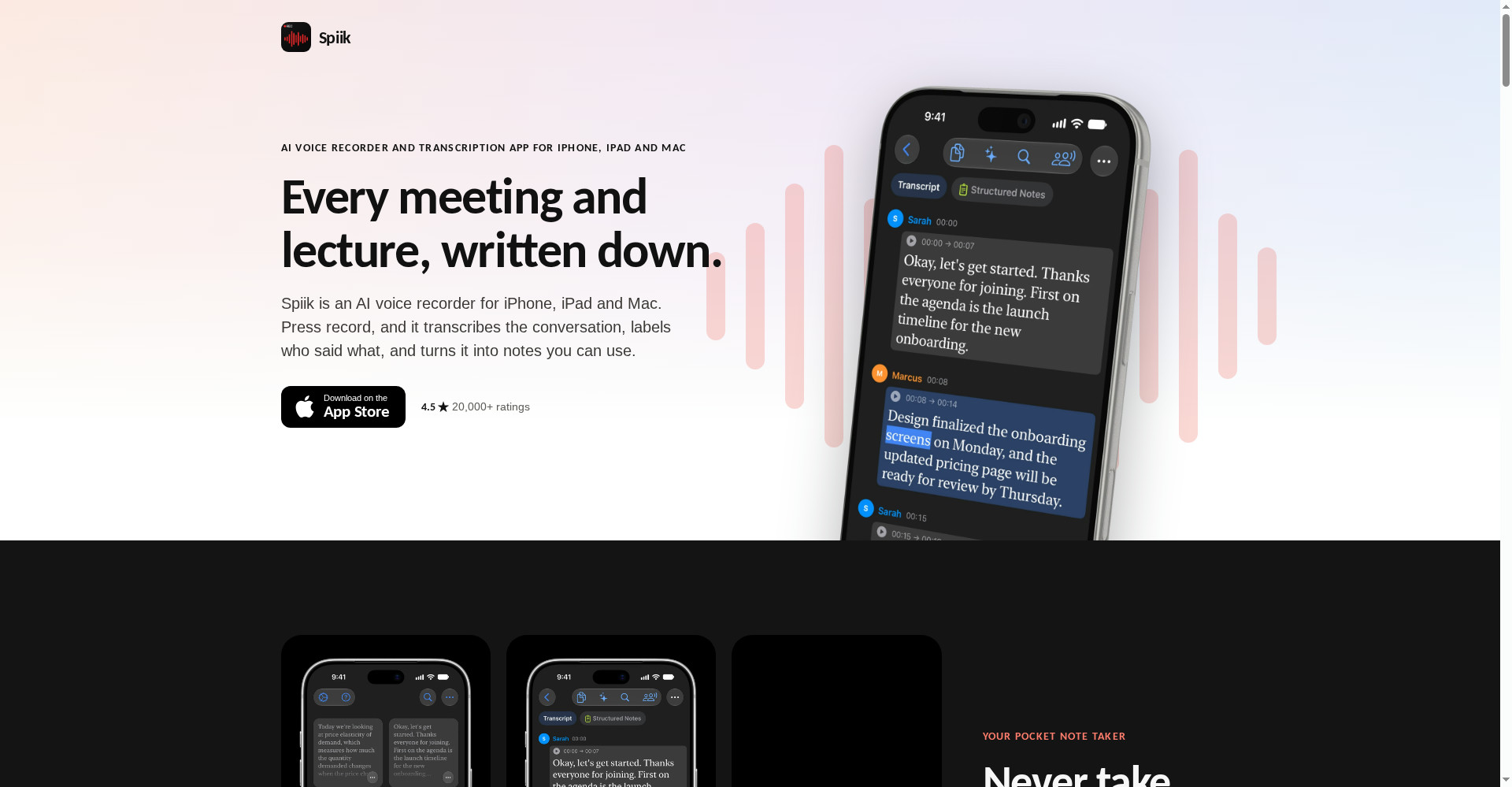
Meeting me baithe ho to do kaam ek saath nahi hote — suno ya likho. Lecture me bhi wahi: professor bol raha hai, tum notes likhne me lage ho, aur samajhna reh jata hai. Spiik is problem ko seedha solve karta hai: tum sirf record dabao aur suno — transcript, notes, quiz, flashcards aur mind map app khud bana deti hai.
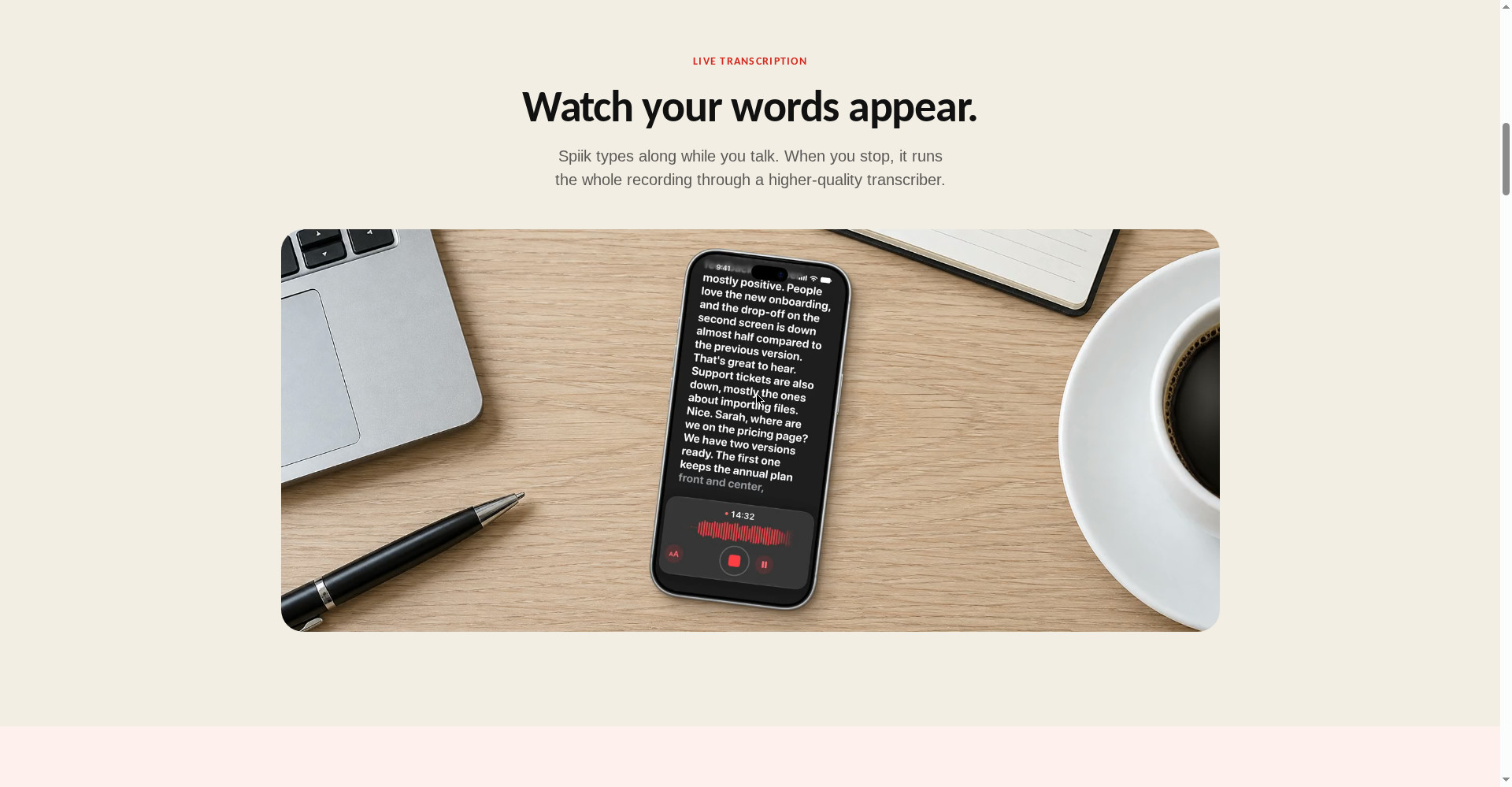
Official site ki tagline hai: “Every meeting and lecture, written down.” App kholte hi library dikhti hai — har recording ek card. Recording ke dauraan live transcription chalti hai (shabd screen par aate jate hain), aur rukne par poori recording ek higher-quality transcriber se dobara process hoti hai.
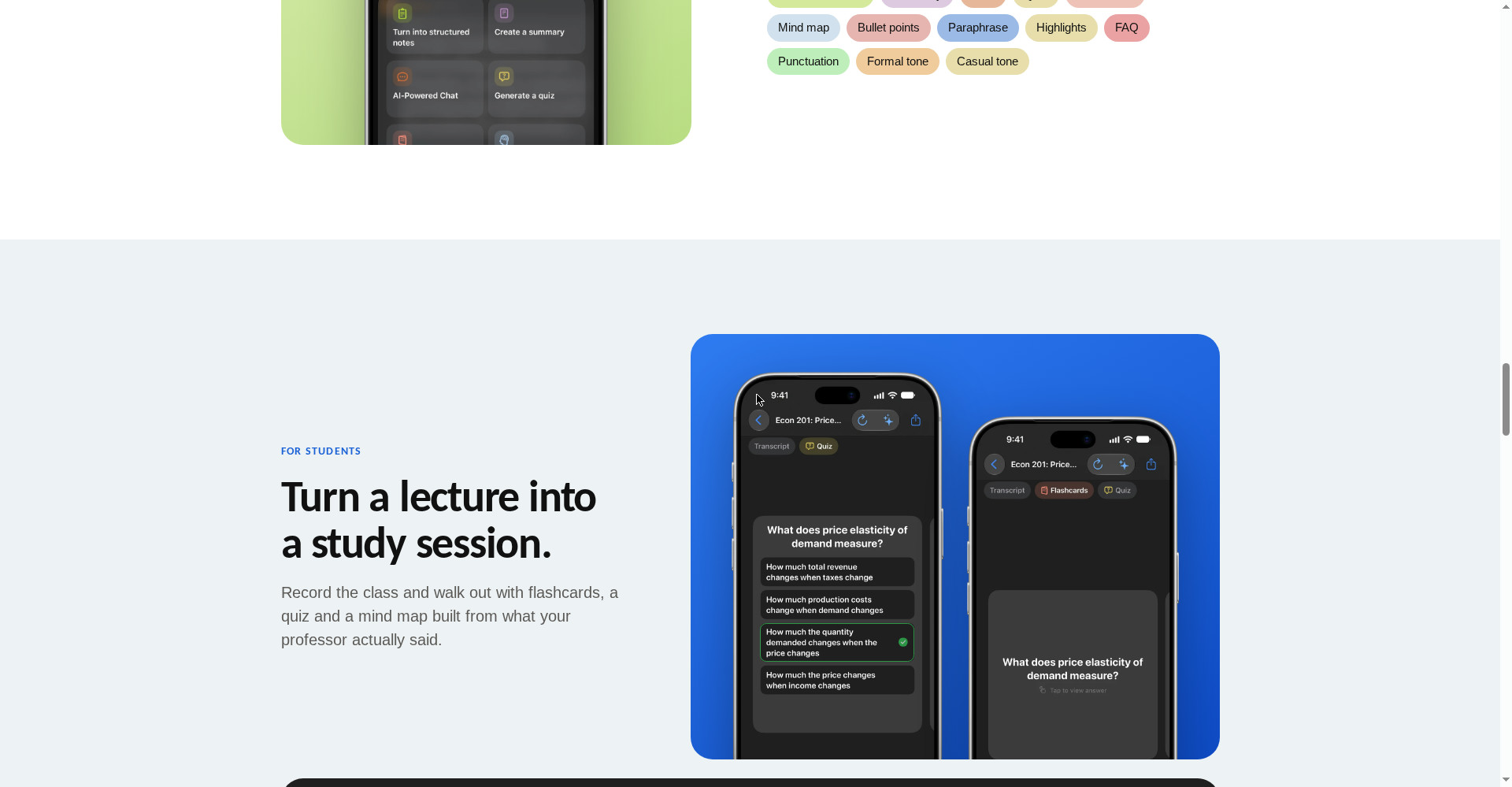
Aur ye sirf transcript tak nahi hai — ek hi recording se structured notes, summary, quiz, flashcards, mind map, bullet points, highlights, FAQ, paraphrase tak ban jate hain. Students ke liye to ye seedha study session hai: lecture record karo, class se niklo, aur professor ne jo bola usi se quiz aur flashcards tayyar.
Aasaan bhasha me: Spiik tumhari sunne wali aur likhne wali dono duty ek saath nibhata hai — tum sirf dhyaan do, likhna uska kaam.
Khaas features (jo ise alag banate hain)
1. Mac par bina bot ke call recording
Ye Spiik ki sabse badi khaasiyat hai. Otter aur Fathom jaise tools meeting me ek bot participant ke roop me join karte hain — sabko dikhta hai, kuch logon ko ajeeb lagta hai, aur Teams lobby me bhi atak sakta hai. Spiik Mac par mic + system audio se Zoom, Meet aur Teams ki dono taraf ki awaaz seedha record karta hai — call me koi bot aata hi nahi. Client call ho ya interview, kisi ko pata bhi nahi chalega ki recording ho rahi hai (lekin recording se pehle batana tumhari zimmedari hai).
2. Live transcription — bolte hi shabd screen par
Spiik bolte waqt hi type karta rehta hai — tum dekh sakte ho kya likha ja raha hai. Recording rukne par poori file ek higher-quality transcriber se dobara guzarti hai, taaki final transcript zyada accurate ho. Accents, crosstalk aur shor wale kamron me bhi accurate transcript ka daava hai, aur 100+ languages me transcribe aur translate karta hai.
3. Lecture se seedha study session — quiz, flashcards, mind map
Students ke liye ye feature sabse kaam ka hai. Ek lecture record karo — usi se quiz, flashcards aur mind map ban jate hain. Official site par example hai: price elasticity of demand wale lecture se quiz question, flashcard aur poora mind map. Exam se pehle dobara lecture sunne ki jagah, flashcards revise karo.
4. AI chat — recording se sawal poocho
“Ask your recording anything” — transcript se seedha sawal poocho: “launch se pehle kaun kya karega?”, “date ke baare me kya decide hua?” Spiik transcript se jawab deta hai. 2.5 ghante ki meeting dobara sunne ki zaroorat nahi — ek sawal poocho, jawab mil gaya.
5. Speaker labels — kaun kya bola
Transcript me har speaker ka naam label hota hai — Sarah ne kya kaha, Marcus ne kya kaha, saaf dikhta hai. Naam ek baar badlo, poora transcript update ho jata hai. Kisi bhi line par tap karke usi jagah ka audio dobara sun sakte ho — word-by-word follow karte hue.
6. Import — jo hai, wahi se shuru karo
Files ya Photos se audio-video import karo, YouTube link paste karo, ya PDF kholo. Voice Memos aur WhatsApp se bhi seedha share karke recording bhej sakte ho. Matlab purani recordings bhi bekaar nahi — unhe bhi transcript aur notes me badlo.
7. Lock Screen se control, iCloud sync
Phone lock karke bhi recording chalti rehti hai — Dynamic Island me timer dikhta hai, Lock Screen se pause ya stop karo. Pro me iCloud sync hai — iPhone par record karo, Mac par padho. Export TXT, PDF, SRT ya VTT me hota hai, timestamps ke saath ya bina.
Pricing — free me kitna milega?
- Free ($0): Download free, recording aur replay ki koi time limit nahi. Lekin asli baat ye hai: full transcript aur AI tools Pro me hain. Third-party listing (SourceForge) ke mutabik free version me 10 recordings tak aur har recording ke pehle 60 seconds ki transcription milti hai — official site par ye limits clearly mentioned nahi hain, isliye free try karte waqt khud check karo.
- Spiik Pro — Monthly ($9.99/month): Full transcripts, saare AI tools (structured notes, summary, quiz, flashcards, mind map, chat), iCloud sync, 7-day free trial.
- Spiik Pro — Yearly ($59.99/year): Monthly wali saari cheezein, yearly billing par.
- Unlimited Transcription ($3.99/week ya $5.99/month): Sirf unlimited transcription ka add-on; AI tools isme alag se nahi aate.
Imaandaar baat: Free download aur unlimited recording time achha hai, lekin jis kaam ke liye tum app loge — transcript aur notes — wo Pro ke peeche hai. $9.99/month students ke liye thoda mehenga hai; 7-day free trial se pehle ek asli lecture ya meeting par test karo, phir decide karo. Yearly plan lene se pehle monthly se shuru karna samajhdari hai.
Platforms
- iPhone: iOS 16.4 ya naya — App Store se free download
- iPad: iPadOS 16.4 ya naya
- Mac: macOS 13.3 ya naya — bot-free call recording yahi milti hai
- Apple Vision / Apple Watch: App Store par listed hain
- Android: Nahi — koi version nahi hai
- Windows / Web: Nahi — sirf Apple devices par
- Company: Fadel.io OU — Maker Rony
- App Store rating: 4.5★ (official site ke mutabik 20,000+ ratings; App Store page par current version 4.7★, 773 ratings)
- Version: 1.0.151 (November 2026)
Kaun use kare, kaun na kare?
- Students: Lecture record karo, quiz aur flashcards se revise karo — exam prep ka sabse seedha rasta. Free me recording karo, Pro trial se AI tools test karo.
- Freelancers: Client calls record karo — bot ke bina, notes aur action items khud ban jayenge.
- Journalists / Researchers: Interview record karo, speaker labels ke saath transcript lo, quotes dhoondhna aasaan.
- Professionals: Meeting me sirf suno — notes, summary aur action items app bana degi.
- Creators: Voice notes aur ideas record karo, phir unhe structured notes me badlo.
- Na kare: Jinke paas Android ya Windows hai (app hi nahi hai), jinhe team ke liye shared workspace chahiye (ye personal app hai), ya jinki meetings me sensitive data hai aur server-side transcription se parhez hai.
Comparison: Otter.ai / Fathom / Notta
- Otter.ai: Sabse mashhoor AI note taker — cross-platform (Android, Windows, web), live meeting me bot join karke transcribe karta hai. Free tier 300 minutes/month. Spiik se behtar hai agar tum Android/Windows par ho ya team ke saath kaam karte ho; Spiik behtar hai agar tum Mac par bot-free recording chahte ho.
- Fathom: Free tier me unlimited recordings aur transcripts — meeting recording ke liye sabse generous free plan. Lekin bot by default join karta hai (no-bot mode sirf Mac beta hai), aur advanced AI summaries free me sirf 5/month. Spiik ka no-bot Mac recording isse seedha behtar hai.
- Notta: 58 languages, real-time transcription, cross-platform. Free tier 120 minutes transcription. Spiik ke 100+ languages isse zyada hain, lekin Notta har platform par hai.
- Spiik: Sirf Apple, lekin bot-free Mac recording + lecture se quiz/flashcards/mind map — students aur Mac users ke liye ye combination kisi aur me nahi hai.
🔍 Log Ye Bhi Search Karte Hain
- spiik ai
- spiik ai free
- spiik ai download
- spiik ai pricing
- spiik ai vs otter
- spiik ai review
- spiik ai for android
- spiik pro price
- spiik ai alternatives
- spiik app for mac
- spiik ai login
- ai note taker for students
- ai note taker no bot
- best ai note taker app
- free ai note taker
- loqui review
- openbroca review
- fleeep review
- whisperbrain review
- sponkly review
Final verdict
Spiik ek genuinely useful idea hai — record dabao, suno, aur notes khud ban jayenge. Mac par bot-free call recording, unlimited recording time, 100+ languages, aur lecture se quiz-flashcards-mind map — ye combination students aur Mac users ke liye kaam ka hai. Isliye thoda kata: free tier me full transcript aur AI tools nahi milte (pehle 60 seconds ki limit third-party listing se), sirf Apple par hai, aur transcription server-side hoti hai.
Humari rating: 4/5. Agar tum iPhone ya Mac use karte ho aur lecture ya meeting ki notes se pareshan ho — to spiik.io se app download karo aur free me ek chhoti recording test karo. Pehle free version me recording aur 60-second transcription check karo, phir 7-day Pro trial se quiz aur flashcards test karo — ye do cheezein decide karengi ki ye tumhare kaam ka hai ya nahi. Jinko Android ya Windows chahiye, wo Otter ya Notta dekhein; jinhe sirf free transcription chahiye, wo Fathom try karein.
Note: Ye first-look review official site (spiik.io), App Store listing aur Product Hunt launch post (16 November 2026) par based hai. Hum ise khud use karke hands-on update jald jodenge.


