 AI Tool
⚡ The 30-second verdict
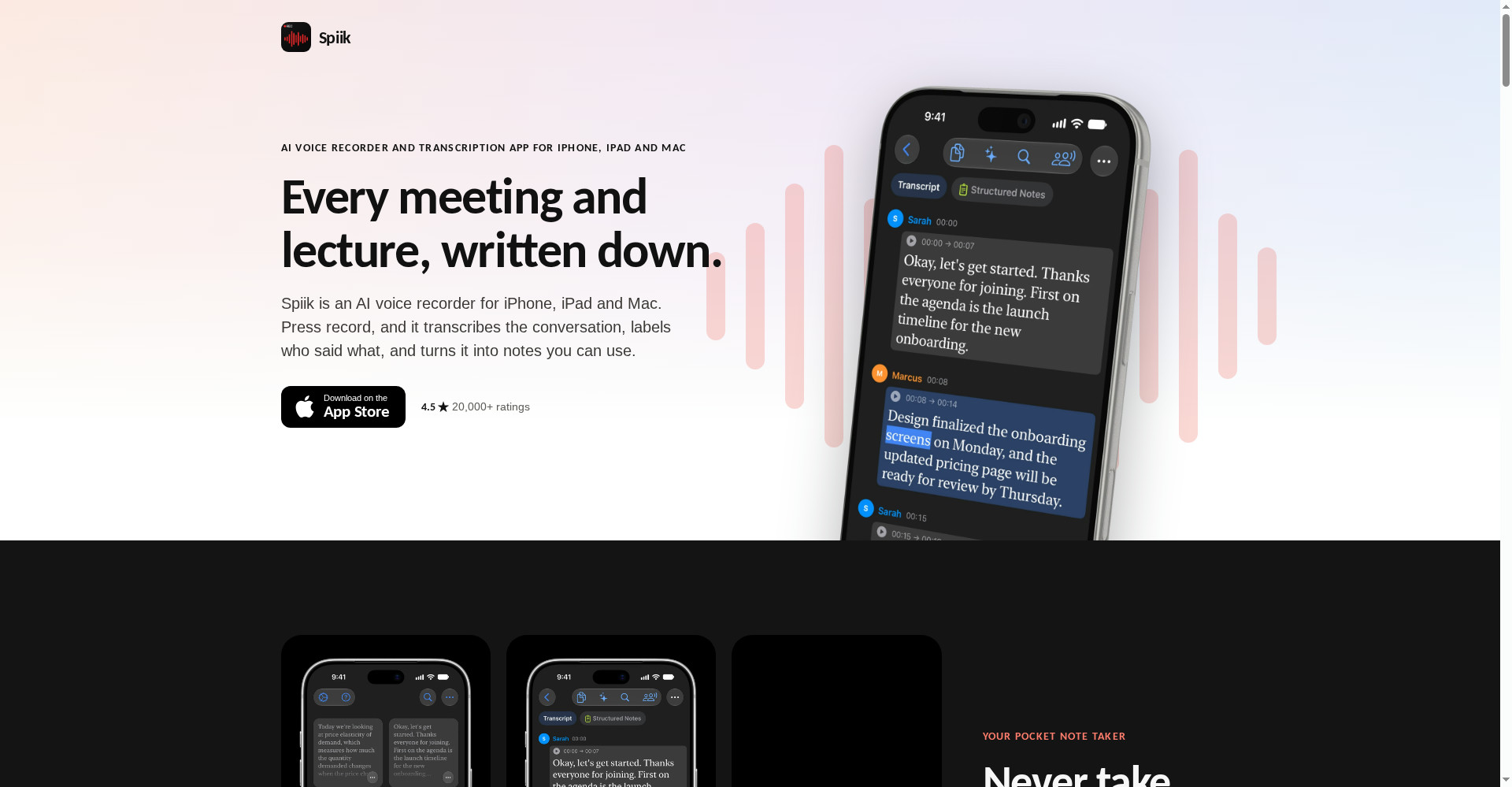
Spiik is an AI voice recorder and transcription app for iPhone, iPad and Mac that records a meeting, lecture or interview and turns it into a transcript, structured notes, a quiz, flashcards and a mind map. On a Mac, both sides of a Zoom, Meet or Teams call are recorded with no bot joining — nobody sees a bot in the call. The download is free and recording time is unlimited, but note the catch: full transcripts and AI tools are in Spiik Pro ($9.99/month or $59.99/year) — the free tier reportedly transcribes only the first 60 seconds per recording. For students who want quizzes and flashcards straight from a lecture, and Mac users who want bot-free meeting recording, this is worth trying — download it free, test one short recording first, then decide on Pro.
What is it?
In a meeting you cannot do two jobs at once — listen or write. The same is true in a lecture: the professor is talking, you are busy writing notes, and understanding slips away. Spiik solves that directly: press record and just listen — the transcript, notes, quiz, flashcards and mind map make themselves.
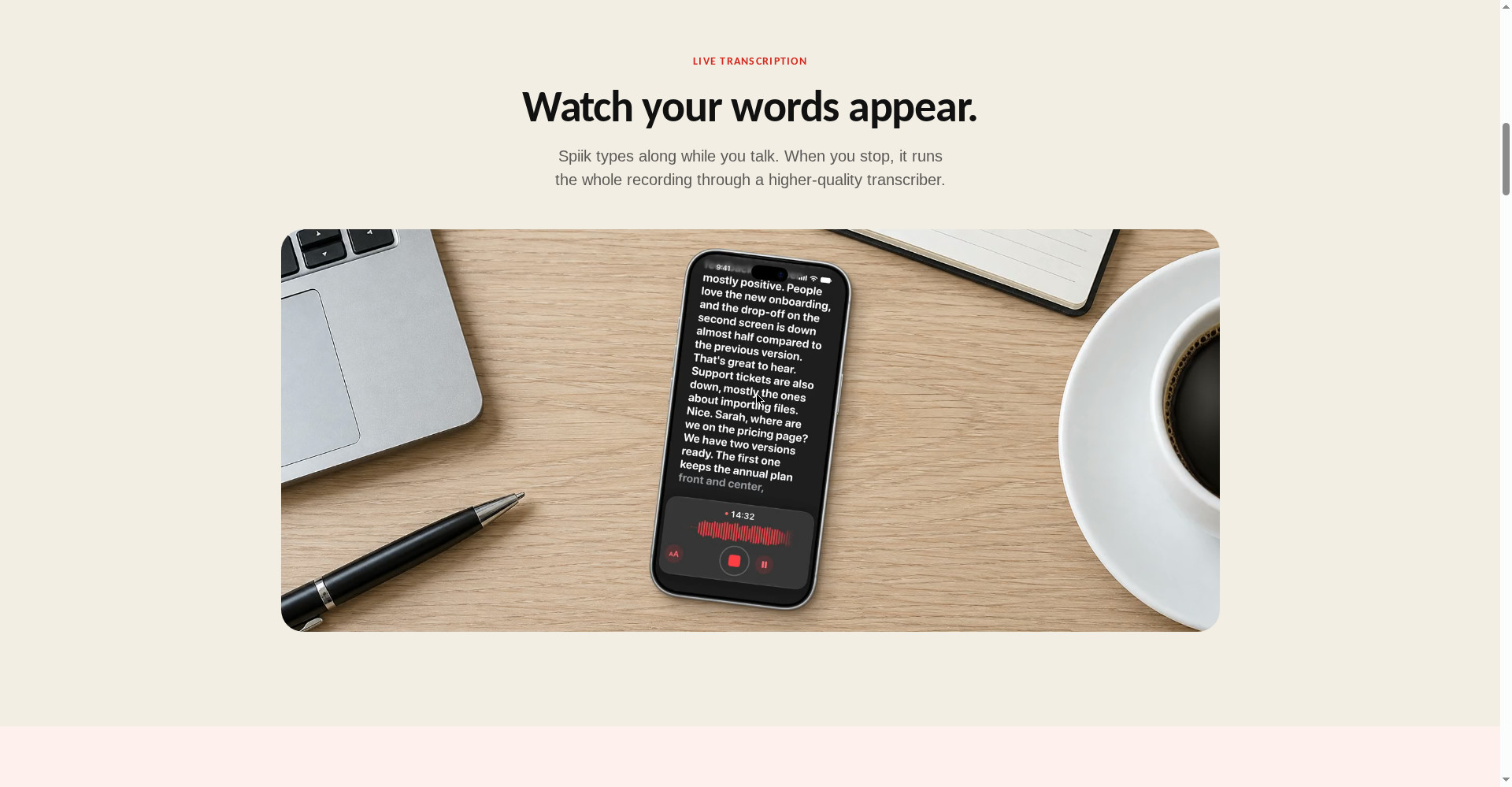
The official site puts it plainly: “Every meeting and lecture, written down.” Open the app and you see a library — every recording is a card. While you record, live transcription runs (words appear on screen as you speak), and when you stop, the whole file goes through a higher-quality transcriber for the final transcript.
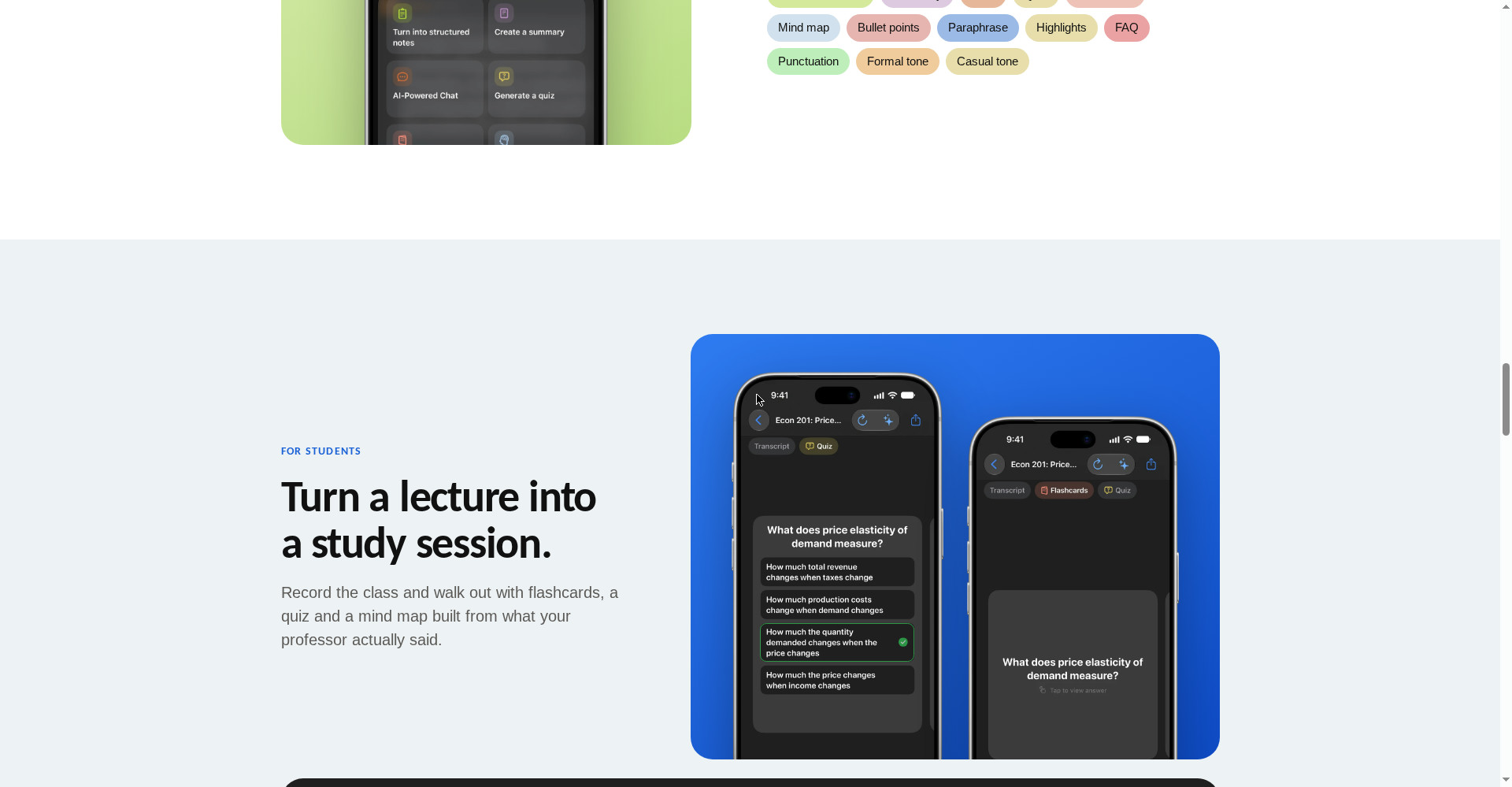
And it does not stop at transcripts — one recording becomes structured notes, a summary, a quiz, flashcards, a mind map, bullet points, highlights, an FAQ and a paraphrase. For students it is a ready-made study session: record the lecture, walk out of class, and revise from flashcards built from what your professor actually said.
In short: Spiik does both of your jobs — listening and writing — so you only have to pay attention.
Key features (what makes it different)
1. Bot-free call recording on Mac
This is Spiik’s biggest selling point. Tools such as Otter and Fathom join your meeting as a bot participant — everyone sees it, some people find it awkward, and it can get stuck in a Teams lobby. Spiik records both sides of a Zoom, Meet or Teams call directly from mic plus system audio on a Mac — no bot ever enters the call. Whether it is a client call or an interview, nobody even knows recording is happening (though telling people first is your responsibility).
2. Live transcription — words appear as you speak
Spiik types along while you talk, so you can watch the words land. When the recording stops, the full file passes through a higher-quality transcriber for a more accurate final transcript. It claims accuracy through accents, crosstalk and noisy rooms, and it transcribes and translates in 100+ languages.
3. A lecture becomes a study session — quiz, flashcards, mind map
This is the feature that matters most for students. Record one lecture — get a quiz, flashcards and a mind map from it. The official site shows the example: a lecture on price elasticity of demand turned into a quiz question, a flashcard and a full mind map. Revise from flashcards before the exam instead of re-listening to the whole lecture.
4. AI chat — ask your recording anything
“Ask your recording anything” — ask the transcript directly: “Who is doing what before launch?”, “What did we decide about the date?” Spiik answers from the transcript. No need to re-listen to a 2.5-hour meeting — ask one question, get the answer.
5. Speaker labels — who said what
Every speaker is labelled in the transcript — what Sarah said, what Marcus said, all clear. Rename someone once and the whole transcript updates. Tap any line to hear that exact bit of audio again, following along word by word.
6. Import — start with what you already have
Import audio and video from Files or Photos, paste a YouTube link, or open a PDF. You can also share straight from Voice Memos and WhatsApp. Old recordings are not wasted either — turn them into transcripts and notes too.
7. Lock Screen controls, iCloud sync
Recording keeps going with the phone locked — the timer shows in the Dynamic Island, and you can pause or stop from the Lock Screen. Pro adds iCloud sync — record on iPhone, read on Mac. Export is in TXT, PDF, SRT or VTT, with or without timestamps.
Pricing — how much is free?
- Free ($0): The download is free, with no time limit on recording and replay. But here is the honest part: full transcripts and AI tools are in Pro. A third-party listing (SourceForge) reports the free version covers up to 10 recordings, with transcription of the first 60 seconds of each — the official site does not state these limits clearly, so check for yourself when you try it free.
- Spiik Pro — Monthly ($9.99/month): Full transcripts, all AI tools (structured notes, summary, quiz, flashcards, mind map, chat), iCloud sync, 7-day free trial.
- Spiik Pro — Yearly ($59.99/year): Everything in monthly Pro, billed yearly.
- Unlimited Transcription ($3.99/week or $5.99/month): An add-on for unlimited transcription only; AI tools are not included.
The honest math: a free download with unlimited recording time is good, but the thing you would download it for — transcripts and notes — sits behind Pro. $9.99/month is a little steep for students; test a real lecture or meeting on the 7-day free trial first, then decide. Starting monthly before committing to yearly is the sensible route.
Platforms
- iPhone: iOS 16.4 or later — free download from the App Store
- iPad: iPadOS 16.4 or later
- Mac: macOS 13.3 or later — bot-free call recording lives here
- Apple Vision / Apple Watch: Listed on the App Store
- Android: No — there is no version
- Windows / Web: No — Apple devices only
- Company: Fadel.io OU — Maker Rony
- App Store rating: 4.5 stars from 20,000+ ratings, according to the official site (the App Store page shows 4.7 stars, 773 ratings, for the current version)
- Version: 1.0.151 (November 2026)
Who should use it, and who should not?
- Students: Record the lecture, revise from quizzes and flashcards — the most direct route through exam prep. Record free, test the AI tools on the Pro trial.
- Freelancers: Record client calls with no bot — notes and action items make themselves.
- Journalists / Researchers: Record interviews, get a transcript with speaker labels, and find quotes fast.
- Professionals: Just listen in the meeting — notes, summaries and action items get made for you.
- Creators: Record voice notes and ideas, then turn them into structured notes.
- Do not use it if: You are on Android or Windows (there is no app), you need a shared team workspace (this is a personal app), or your meetings carry sensitive data and server-side transcription worries you.
Comparison: Otter.ai / Fathom / Notta
- Otter.ai: The best-known AI note taker — cross-platform (Android, Windows, web), joins live meetings as a bot to transcribe. Free tier is 300 minutes a month. Better than Spiik if you are on Android or Windows or work in a team; Spiik is better if you are on a Mac and want bot-free recording.
- Fathom: Unlimited recordings and transcripts on its free tier — the most generous free plan for meeting recording. But a bot joins by default (no-bot mode is a Mac-only beta), and advanced AI summaries are capped at 5 a month on free. Spiik’s no-bot Mac recording is plainly better here.
- Notta: 58 languages, real-time transcription, cross-platform. Free tier is 120 minutes of transcription. Spiik covers 100+ languages, but Notta runs on every platform.
- Spiik: Apple-only, but bot-free Mac recording plus quiz, flashcards and mind maps from a lecture — no other tool offers that combination for students and Mac users.
🔍 People also search for
- spiik ai
- spiik ai free
- spiik ai download
- spiik ai pricing
- spiik ai vs otter
- spiik ai review
- spiik ai for android
- spiik pro price
- spiik ai alternatives
- spiik app for mac
- spiik ai login
- ai note taker for students
- ai note taker no bot
- best ai note taker app
- free ai note taker
- loqui review
- openbroca review
- fleeep review
- whisperbrain review
- sponkly review
Final verdict
Spiik is a genuinely useful idea — press record, listen, and the notes write themselves. Bot-free call recording on Mac, unlimited recording time, 100+ languages, and quizzes, flashcards and mind maps from a lecture — that combination works for students and Mac users. The honest cuts: the free tier does not include full transcripts or AI tools (the 60-second limit comes from a third-party listing), it is Apple-only, and transcription runs server-side.
Our rating: 4/5. If you use an iPhone or Mac and are tired of taking notes in lectures or meetings — download the app from spiik.io and test one short recording for free. Check the free recording and the 60-second transcription first, then test quizzes and flashcards on the 7-day Pro trial — those two will decide whether it fits your work. If you need Android or Windows, look at Otter or Notta; if you want free transcription only, try Fathom.
Note: This first-look review is based on the official site (spiik.io), the App Store listing and the Product Hunt launch post (16 November 2026). We will add a hands-on update after using it ourselves.


