AI Tool
⚡ The 30-second verdict
Inbox Hero is an AI email manager (joininboxhero.com) that checks every new email for scams and quarantines dangerous mail in a Fraud folder — without deleting it — and drafts replies in your voice, sending only when you approve. 7 days free (no card needed), then $99/year — about 27¢/day. It works with Gmail, Yahoo, iCloud and AOL, and the iPhone app is included. For freelancers and professionals whose inboxes get daily phishing, fake invoices and AI-written cold pitches, this is worth trying — connect your real inbox for the trial week, watch the Fraud folder and the drafts, then decide whether $99/year is worth it.
What is it?
Email is no longer just messages — it has become the biggest route for scams. And scammers use AI now: the official site says it plainly, “Scam emails are written by AI now, so typos no longer give them away.” The days of spotting a scam by its bad spelling are over. Inbox Hero is built for exactly this problem — it is a bodyguard for your inbox.
The job is simple: every new email is checked the moment it arrives — who sent it, where its links go, what its attachments are — and suspicious mail is quarantined in the Fraud folder, not deleted. Alongside that you get reply drafts in your voice, an AI-written score and auto-sorting — so your inbox stays clean and half your reply work arrives pre-written.
In short: Inbox Hero is a safety and sense-making layer on top of your Gmail — scams are caught first, and replies arrive drafted in your style.

Key features (what makes it different)
1. Scam protection — it checks real signals, not the writing
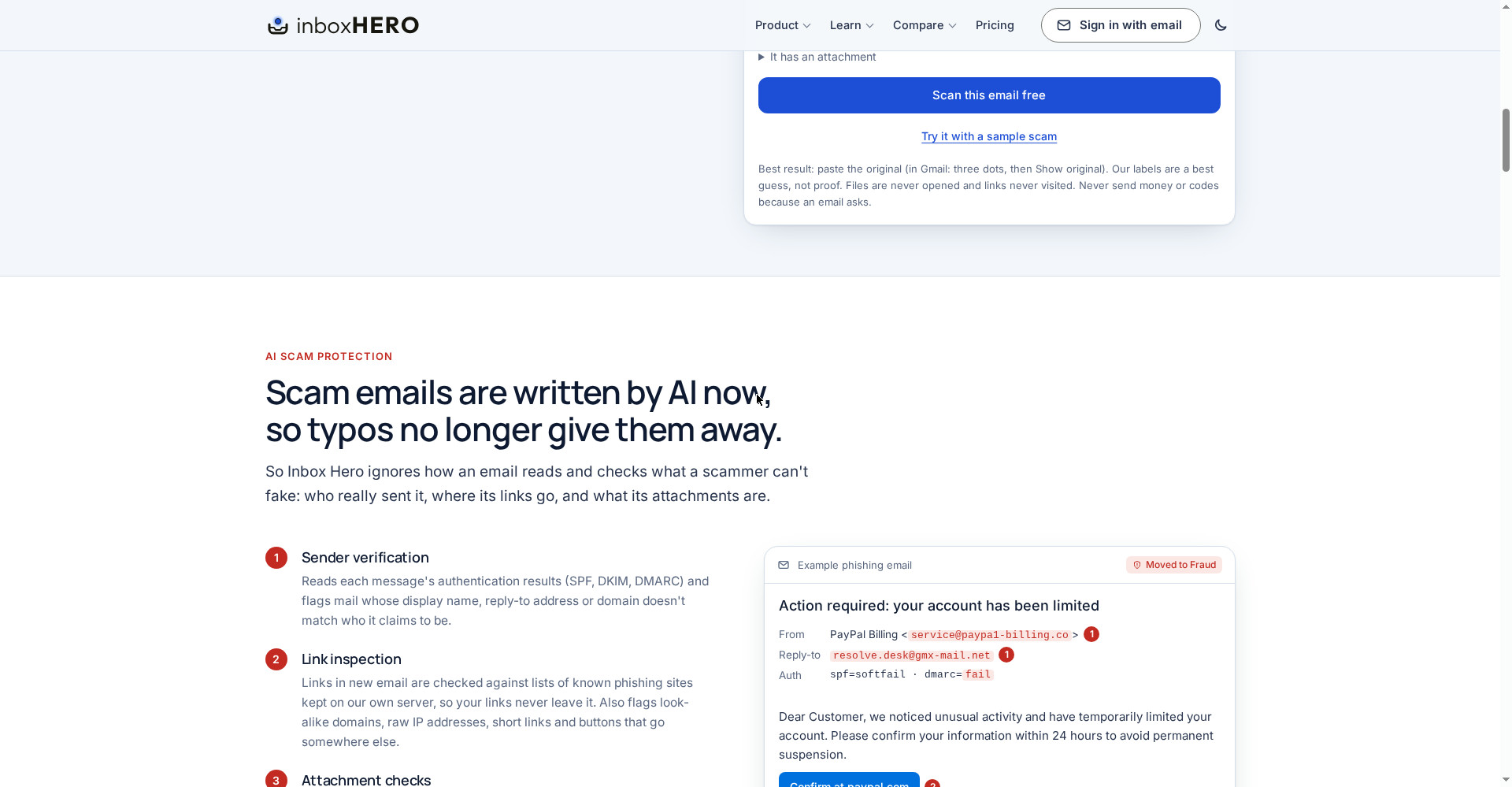
This is Inbox Hero’s core, and its approach is sensible: a scammer can perfect the writing with AI, but cannot fake these things — who really sent it, where its links go, and what its attachments are. So Inbox Hero checks in five ways:
- Sender verification: It reads each message’s authentication results (SPF, DKIM, DMARC) and flags mail whose display name, reply-to address or domain does not match who it claims to be.
- Link inspection: Links are checked against lists of known phishing sites kept on their own server, so your links never leave it. It also flags look-alike domains, raw IP addresses, short links and buttons that go somewhere else.
- Attachment checks: It catches “invoices” that are really programs — like
Statement.pdf.exe— macro-enabled Office files, attached fake sign-in pages and password-locked archives. Attachments are judged by name and type and are never opened or downloaded. - AI intent review: Suspicious mail gets a second look from an AI that judges intent, not writing quality — credential theft, fake invoices, gift-card, wire and crypto requests, CEO and vendor impersonation.
- Quarantine, not deletion: Clear threats, and mail with several warning signs from a sender that fails email checks, move into InboxHero/Fraud — review them, bring one back with a tap, and Inbox Hero learns from it.
2. AI-written score — see which emails AI wrote, at a glance
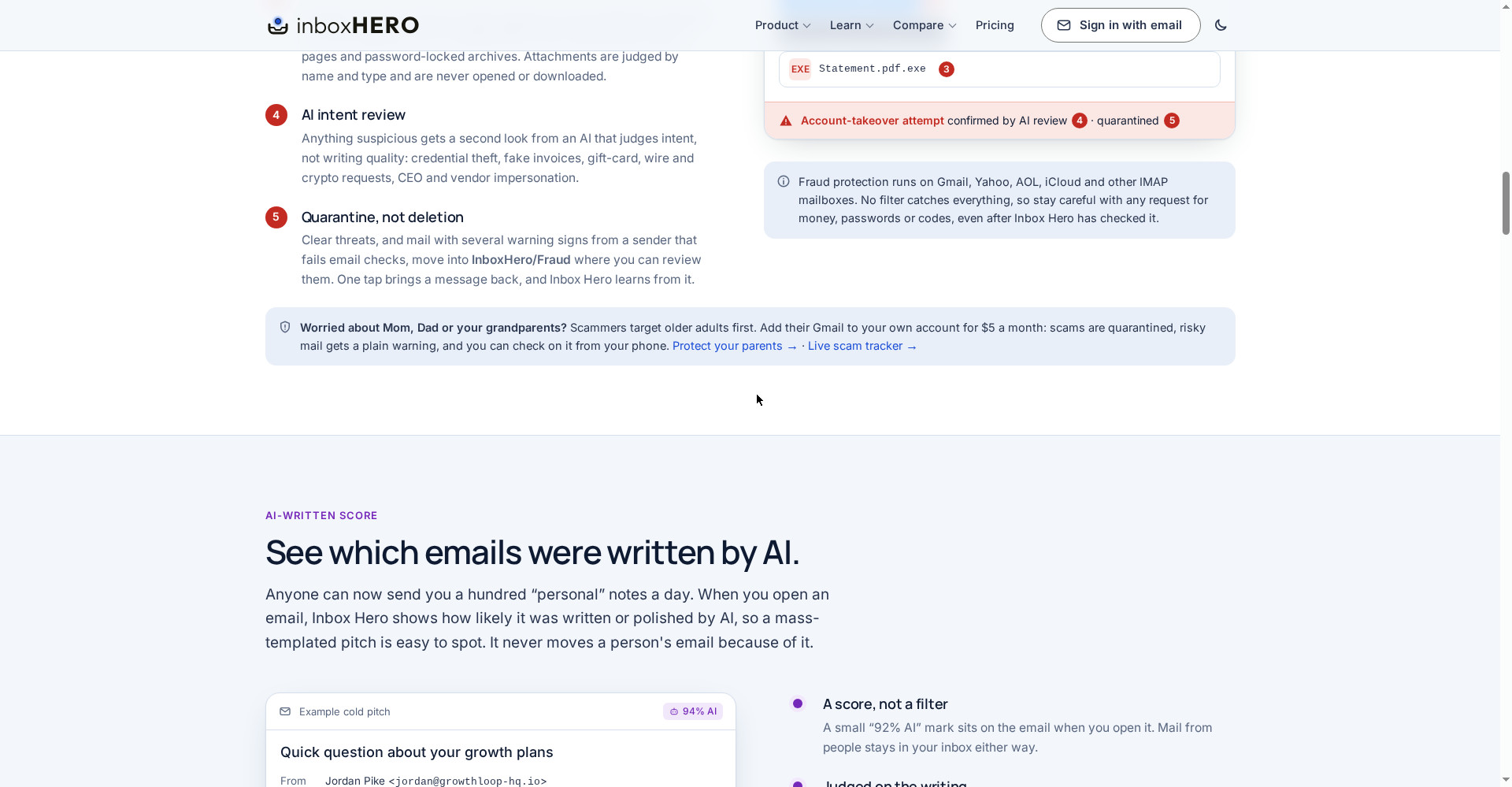
Anyone can now send you a hundred “personal” notes a day — all written by AI. When you open an email, Inbox Hero shows how likely it was written or polished by AI — a small mark like “94% AI”. That makes a mass-templated pitch easy to spot. Importantly, no person’s email is ever moved because of this score — it stays in your inbox and you decide. The score is on by default and can be turned off in Settings.
3. Insights — a verdict, meters and one-tap actions on every suspicious email
When an email deserves a second look, Inbox Hero gives it a verdict — Likely scam, Check before paying, AI-written pitch, AI-assisted (known sender), Trusted contact — plus three meters: Scam risk, AI-written and Relationship strength (how many emails you have traded, how fast you reply, when you last talked). The reason, in plain words — like “your last 4 invoices from Brightline went to an account ending 4417; this one asks for 9032” — and one-tap actions: draft a reply, hold a payment request and draft a check-in, move it to Fraud, mark it safe, add the deadline to your calendar. The panel shows in the app and the daily brief; an optional setting adds it to the top of the flagged email inside Gmail (the original is kept in Trash for 30 days).
4. Quick Reply — drafts in your voice, nothing sent without your tap
Inbox Hero drafts replies that match how you write — your greeting, your sign-off, your length. Glance, tweak and send. Nothing goes out until you tap send — not from the app, not from the daily brief. This is different from Gmail’s Smart Reply: that gives short generic replies, while this writes a full draft in your style.
5. Ask your inbox + daily brief — ask questions, get a morning brief
- Ask your inbox: Ask in plain English — “what am I waiting on?”, “when does the package arrive?”, “what did they say last month?” — Inbox Hero reads your mail and answers.
- Daily brief: Every morning at 9 your time, a short email — what was filed, what was caught, which replies are ready. Turn it off with one click.
Pricing — how much is free?
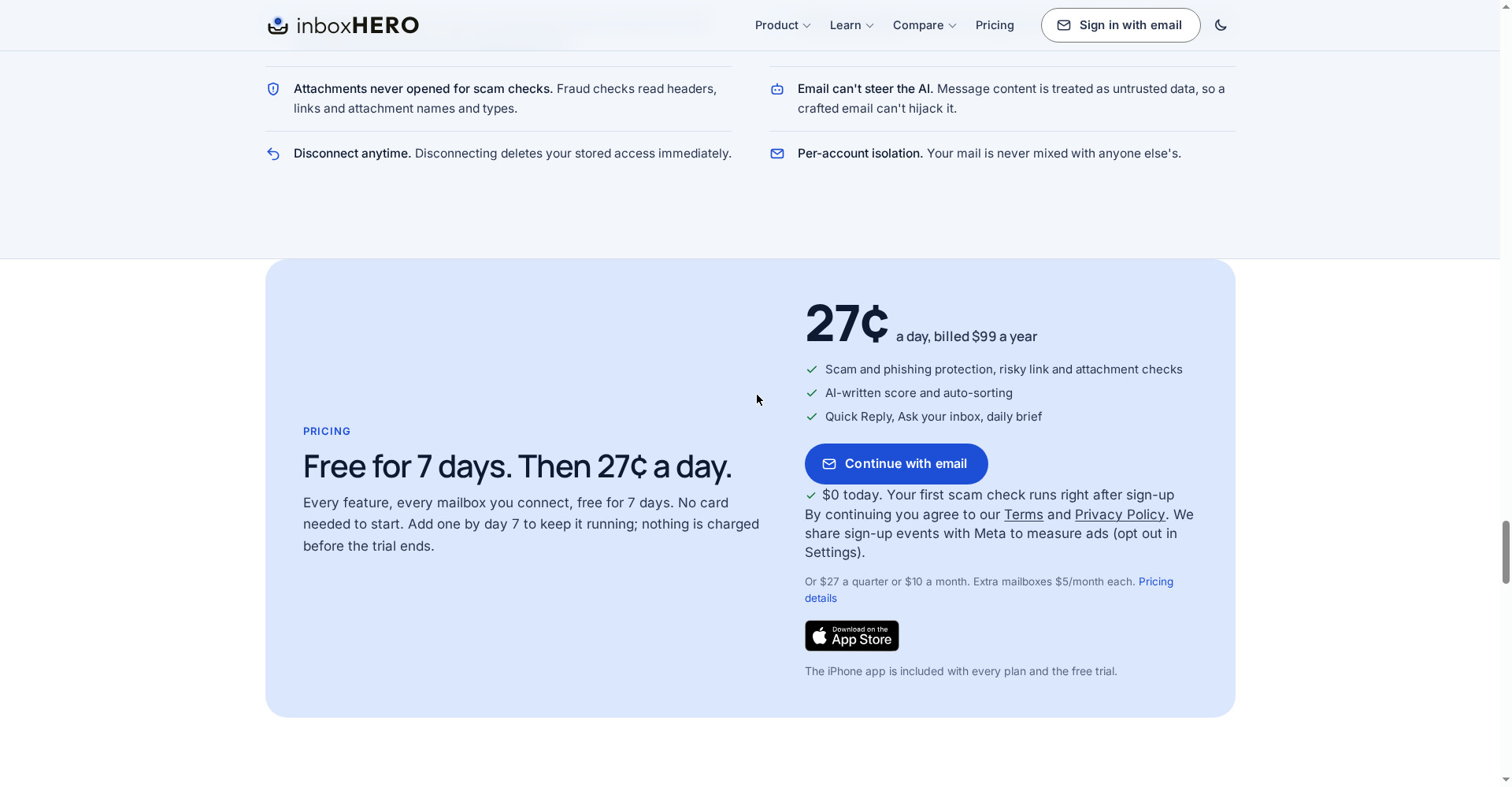
- Free trial ($0, 7 days): Every feature, every mailbox you connect — 7 days free, no card needed. The first scam check runs right after sign-up. Note: the App Store listing and the Product Hunt post say a 14-day free trial — the site says 7 days. After the trial, the App Store says scam quarantine for 1 mailbox stays free.
- Annual — $99/year (about 27¢/day, best value): Everything — scam and phishing protection, risky link and attachment checks, AI-written score and auto-sorting, Quick Reply, Ask your inbox, daily brief. iPhone app included.
- Quarterly — $27/quarter: The same features; cheaper than monthly, more expensive than annual.
- Monthly — $10/month: The same features; month-to-month, cancel anytime in Settings.
- Extra mailbox — $5/month each extra: Every extra mailbox is $5/month. The parents add-on is also $5/month — add their Gmail to your account: scams are quarantined, risky mail gets a plain warning, and you can check on it from your phone.
The honest math: $99/year is not small change for an inbox tool — roughly ₹8,000+ a year. But here is the calculation: if you are a freelancer and it catches even one fake invoice or “our bank details changed” scam, that single catch saves more than the whole year’s price. And the trial is free, with no card — so the risk is zero: connect your real inbox for a week, see what lands in the Fraud folder and how the drafts feel, then decide.
Platforms
- Gmail / Google Workspace: Full features — fraud protection, sorting, and Insights (verdicts and meters) run only here
- Yahoo, iCloud, AOL, Fastmail and other IMAP: Fraud protection, sorting, Ask your inbox and Quick Reply (connected with an app password); no Insights
- iPhone app: Included with every plan and the trial; designed for iPad too (App Store, version 1.0.2)
- Android app: No Android app is mentioned on the official site
- Web: joininboxhero.com — sign in by email, a 6-digit code arrives, no password
- Runs in the background: No app to open — filtering runs in the background and you keep reading mail in Gmail; Gmail stays the source of truth, so if Inbox Hero ever went down your email would keep working exactly as it does today
- Company: App Store seller Science Mobile, LLC; the site says “Trusted by Mike Jones, CEO of Science Inc., the company behind Dollar Shave Club”
- Launch: Launched on Product Hunt on 14 November 2026
Who should use it, and who should not?
- Freelancers: Client invoices and payment emails arrive daily — catching a “bank details changed” scam directly saves money; replies also come drafted in your voice.
- Professionals / founders: Daily AI-written cold pitches and vendor emails — the AI-written score shows at a glance who is real and who is a template.
- Students: Scholarship, internship and “verify your account” phishing emails — test any suspicious email with the free scam checker, no sign-up needed.
- Parents / older adults: The $5/month add-on protects their Gmail too — scammers target older adults first.
- Do not use it if: Your inbox is light and only basic spam arrives — Gmail’s free spam filter is enough, do not pay $99/year. If you need an Android app — confirm first whether one exists. If you need team features — the site mentions no team plans; this looks like a solo tool.
Comparison: Gmail / Superhuman
- Gmail (free, built-in): Good enough for everyday spam, and completely free. But it does not tell you why an email looks suspicious, does not flag AI-written pitches, does not write full drafts in your voice, and does not send a daily brief. Inbox Hero is a layer on top of Gmail — it does not replace Gmail, it runs with it.
- Superhuman: The AI email client famous for speed and drafts — Starter $30/user/month ($25/month on annual billing, $300/year), Business $40/user/month ($33/month on annual billing, $396/year), no free plan. Superhuman is a whole new email app (a client on top of Gmail/Outlook), while Inbox Hero stays inside Gmail and focuses on scam protection. Inbox Hero ($99/year) is about 3x cheaper than Superhuman — but Superhuman is ahead on keyboard speed and CRM integrations. If you want scam protection and to stay in Gmail, pick Inbox Hero; if you want a full fast email client with team features and will pay $300/year, look at Superhuman.
🔍 People also search for
- inbox hero
- inbox hero free
- inbox hero pricing
- inbox hero review
- inbox hero vs gmail
- inbox hero login
- inbox hero app
- inbox hero alternatives
- ai email assistant free
- best ai email app
- gmail scam protection
- superhuman pricing
- ai email organizer
- free email scam checker
- scape review
- stitch review
- mepersona review
- spiik review
- readywhen review
Final verdict
Inbox Hero is a simple and necessary idea — in the age of AI-written scams, an inbox needs a bodyguard. Scam quarantine (not deletion), real signals from sender, links and attachments, the AI-written score, Insights with verdicts, drafts in your voice, and a 7-day free trial with no card — that combination works for people whose inboxes get daily phishing and fake invoices. The honest cuts: the tool is very new (launched 14 November 2026), there is no free-forever plan, $99/year is real money, Insights run on Gmail only, and the Android app is unknown.
Our rating: 4/5. If you are a freelancer, founder or professional and your inbox gets daily scams or AI pitches — start the free trial at joininboxhero.com (no card) and watch the Fraud folder and the drafts for a week. Test one suspicious email first with the site’s free scam checker — no sign-up needed. If your inbox is light, stay on Gmail’s free filter; if you want a full fast email client, look at Superhuman — but it costs 3x as much.
Note: This first-look review is based on the official site (joininboxhero.com), its pricing page, the App Store listing and the Product Hunt launch post (14 November 2026). We will add a hands-on update after using it ourselves.