 AI Tool
 ⚡ Decide in 30 seconds
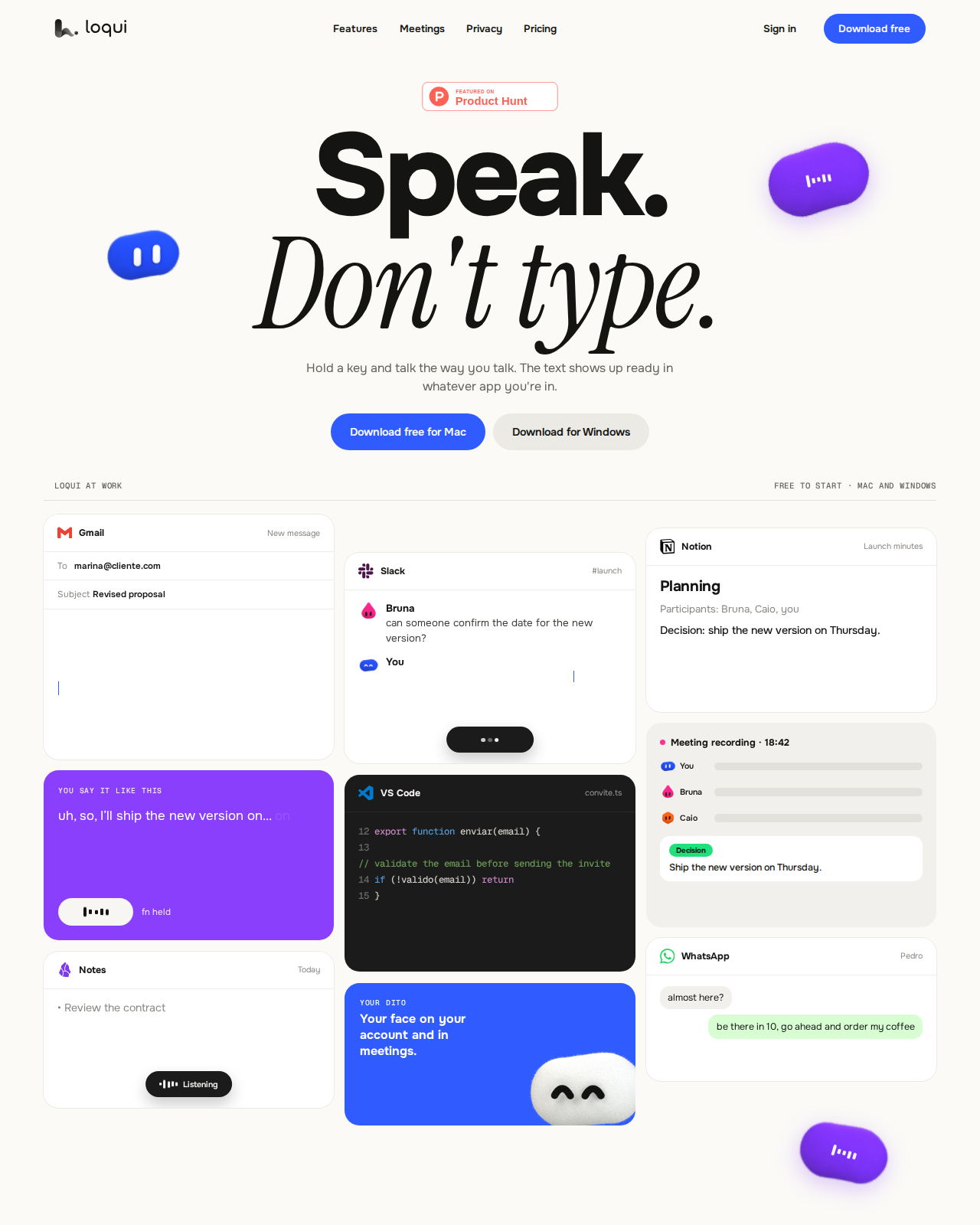
Loqui is a Mac + Windows voice-typing app: hold one key, talk, text lands at your cursor — Gmail, Slack, Notion, VS Code, anywhere, no plugins, no copy-paste. While you speak it drops fillers, fixes changed numbers, and adapts its tone to the app (casual in chat, formal in email). Bonus: it records meetings and writes decisions-and-actions minutes, with a contradiction radar. Price: Free $0 forever (no card), Pro $8/month, Pro + Meetings $16/month. Honest warnings: it launched 24 October 2026 (brand new), has no mobile apps, audio passes through the cloud (discarded, not stored, but not offline), and the free plan’s weekly quota limit is not published. Students, freelancers and creators who write a lot every day — worth starting on the free plan.
What is this tool?
Typing is the most boring bottleneck in knowledge work — especially when the whole email or note is already formed in your head and your fingers are the slow part. Loqui attacks exactly that: speak, and get finished text.
The flow is simple: hold the key → talk the way you talk (hesitate, backtrack, say ‘uh’ — it doesn’t matter) → release → clean text at your cursor. No window switching, no copy-paste, no saying “comma” and “full stop”. Amounts, dates and lists format themselves — “fifteen thousand” becomes “$15k” on its own.
Key features (what sets it apart)
1. It edits while you speak — fillers and corrections handled automatically
This is Loqui’s biggest difference. Say this — “I need to tell the client the budget is uh… like, wait, twelve thousand, no, fifteen thousand, and delivery is on Friday” — and get this: “I need to tell the client the budget is $15k and delivery is on Friday.” 3 fillers removed, 1 correction applied. You don’t have to perform; you just talk, and Loqui does the cleanup.
2. One tone for every app — one voice, the right style everywhere
Talk the same way, and Loqui notices where the text is going: casual in Slack (“deal, I’ll ship the new version Thursday”), professional in Gmail (“Hi Marina, here’s the revised proposal”), technical in VS Code (as a comment), structured in Notion. No per-app prompts or settings to change.
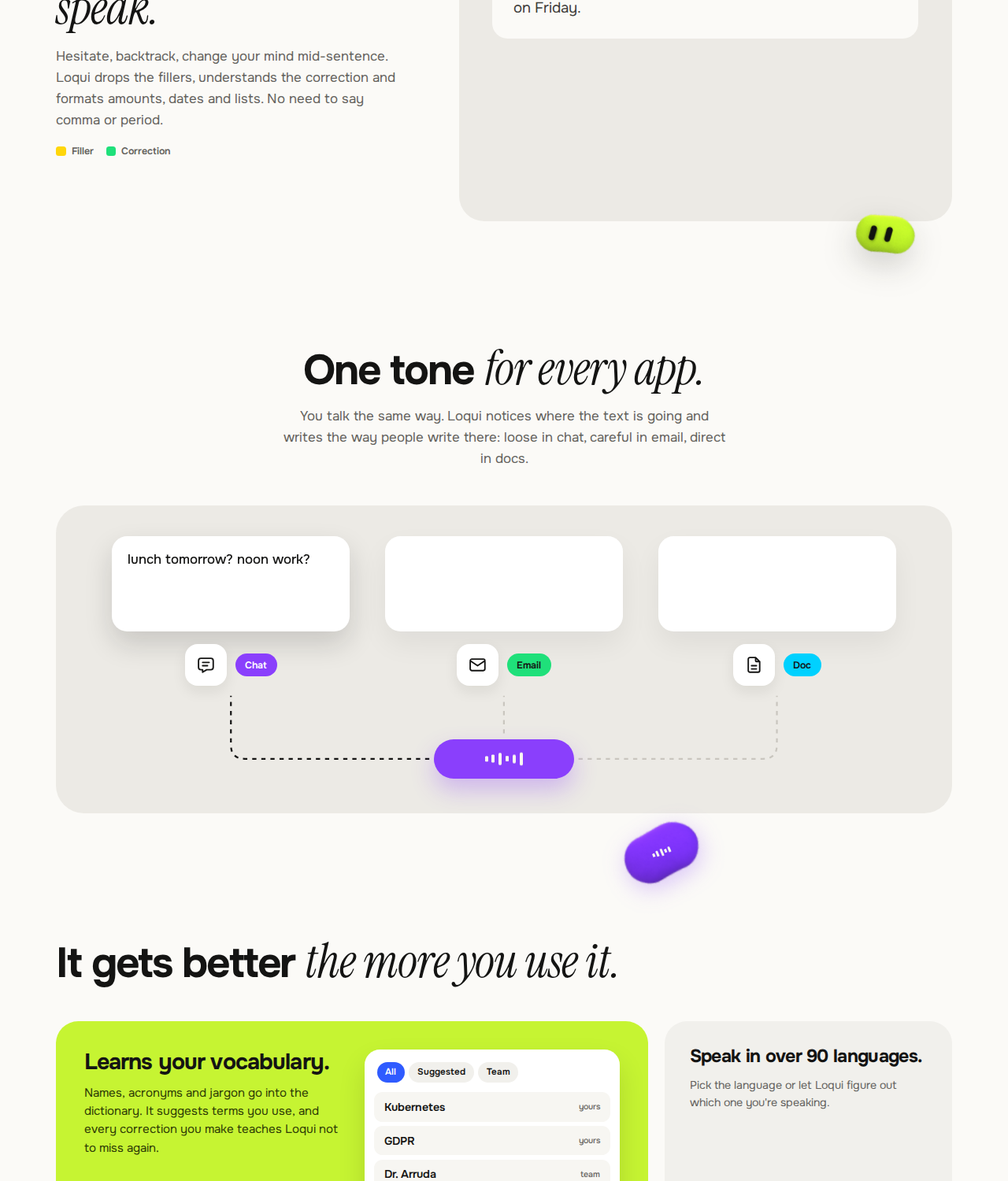
3. Meeting minutes — decisions, actions and risks, separated
Record a meeting and every speaker gets a separate track and a name. At the end, the minutes tell you: what was decided, who agreed to do what, what the risks are, what is still open — and each item carries the audio clip where it was said, so proof is one click away. Contradiction radar alerts you when a new meeting clashes with an earlier decision — and you choose whether the old decision retires or not; Loqui never changes anything on its own. The next agenda is suggested from the previous meeting’s open points.
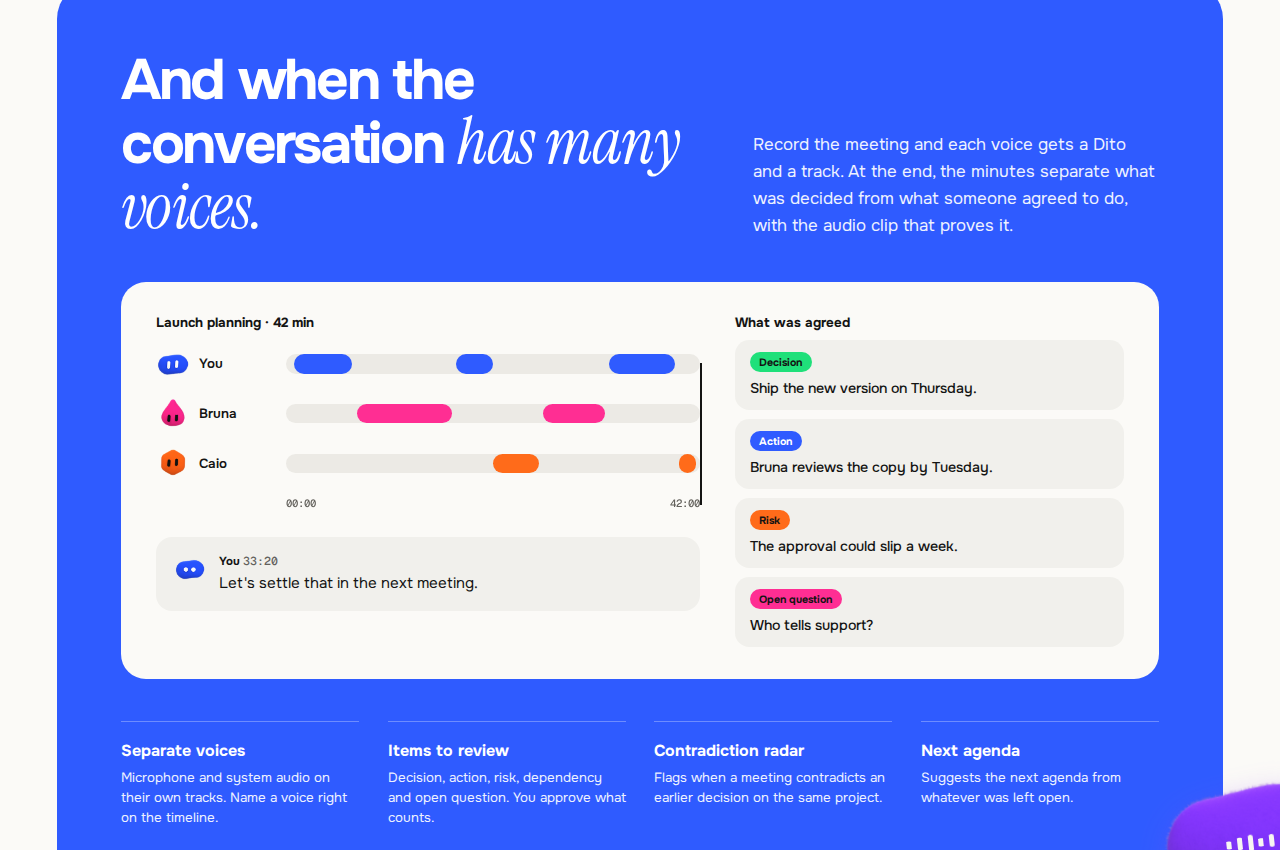
4. Dictionary, Spectros and Seals — it gets smarter as you use it
The dictionary learns your names, acronyms and jargon — every correction teaches it not to miss again, and teams get a shared glossary. Spectros turn dictation into a translation, a summary or an email as it lands. Seals let you call up text you repeat often (like a signature) by voice. Hands-free mode keeps the mic open with a double-tap of the key.
5. 90+ languages — no need to switch languages manually
Pick a language or leave it on auto-detect — Loqui figures out which language you are speaking, even when you switch mid-conversation. For Hindi-English mixed speakers, that matters, because changing settings every time is not practical.
6. Privacy — your voice passes through, it doesn’t stay
The official policy is clear: audio is never stored on servers — not from dictation, not from meetings. Your history lives only on your computer, and sync is off by default. The single exception is opt-in: turning on product improvement donates text samples (never audio) for up to 90 days. The app also reminds you to notify everyone before a meeting records — telling them is your responsibility.
Pricing — how much do you get free?
The straightforward math:
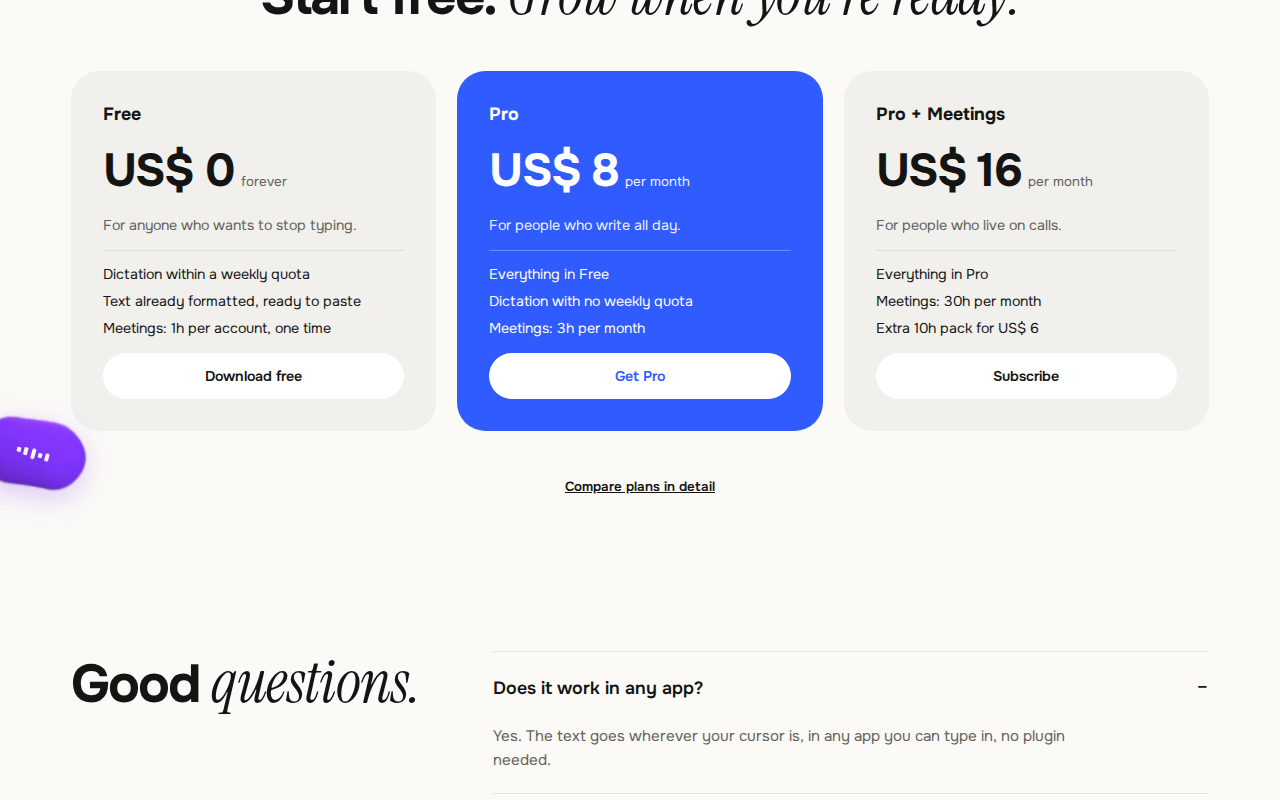
- Free — $0 forever, no card: Dictation within a weekly quota (exact limit not clearly stated on the site), formatted text, tones, dictionary, 90+ languages; meetings 1 hour per account, one-time. Enough for light daily writing.
- Pro — $8/month: Dictation with no weekly quota, meetings 3 hours/month. For people who write for hours every day.
- Pro + Meetings — $16/month: Meetings 30 hours/month, extra 10-hour pack $6. For people who live on calls.
The comparison that matters: Wispr Flow Pro is $15/month (nearly double Loqui’s Pro), and Superwhisper Pro is $8.49/month but its meetings are Mac-only. Loqui gives you dictation + meetings for $8 — no big competitor offers that combination at this price.
Platforms
- Mac (fn key for dictation) and Windows (Right Ctrl for dictation) — desktop app, same experience on both
- Mobile (iOS/Android): not yet
- Works in any app you can type in — Gmail, Slack, Notion, WhatsApp, Docs, Teams, Figma, Linear, Zoom, Outlook, Discord, Telegram, VS Code, Cursor, GitHub, Obsidian, Sheets, Trello, Word, Jira, Meet, Asana
Who should use it, and who should skip it?
- Students: Dictate assignments, notes and emails — start on the free plan and stop worrying about typing speed.
- Freelancers: Get client emails, proposals and Slack messages done by voice; meeting minutes give you proof for follow-ups.
- Creators and writers: Dictate drafts, captions and scripts — speaking is faster than typing, and the tone fixes itself.
- Developers: Dictate comments, PR descriptions and docs in VS Code/Cursor; the technical tone applies itself.
- Meeting-heavy professionals: Take Pro + Meetings — decisions-and-actions minutes plus contradiction radar are built for you.
- Not for mobile dictation: There are no phone apps — look at Wispr Flow instead.
- Not for fully offline use: Audio passes through the cloud (discarded, not stored, but no offline mode) — Superwhisper’s local models are the alternative here.
Comparison: Wispr Flow / Superwhisper / Openbroca
- Wispr Flow: The most polished option, on all four platforms (Mac, Windows, iOS, Android), but Pro is $15/month and audio is processed in the cloud. If you need mobile, this is the answer.
- Superwhisper: Local/offline models, a one-time $249.99 licence option, but meetings are Mac-only and setup is a bit technical. Best for privacy-first Mac users.
- Openbroca: Another AI dictation option we reviewed earlier — compare it with Loqui to see which fits your workflow; Loqui’s edge is its meeting minutes and contradiction radar.
🔍 People also search for
- Loqui pricing and free plan details
- is Loqui free to use
- Loqui vs Wispr Flow comparison
- Loqui vs Superwhisper for Mac users
- Loqui download for Mac and Windows
- Loqui meeting minutes and contradiction radar
- Loqui languages supported
- openbroca AI dictation review
Final verdict
Loqui is the best value new option in the “speak, don’t type” category — because it gives you dictation + meeting minutes for $8, while competitors are either pricier or need a separate tool for meetings. Cursor-level typing in every app, editing while you speak, app-aware tones and contradiction radar — nobody else offers that combination at this price.
More than half a point came off for this: no mobile apps, audio is not fully offline, the free plan’s weekly quota limit is unpublished, and this is a 3-day-old launch — long-term support and updates are still to be proven.
Our rating: 4.0/5. If you are on Mac or Windows, write a lot every day, and want meeting minutes too — start on the free plan, use it for a week, then decide on the $8 Pro. If you need mobile dictation or fully offline use, this is not for you.
Note: This first-look review is based on the official site (loquime.com) and the Product Hunt launch page (24 October 2026). We will add a hands-on update after testing it ourselves on Mac/Windows.