 AI Tool
 What is this tool?
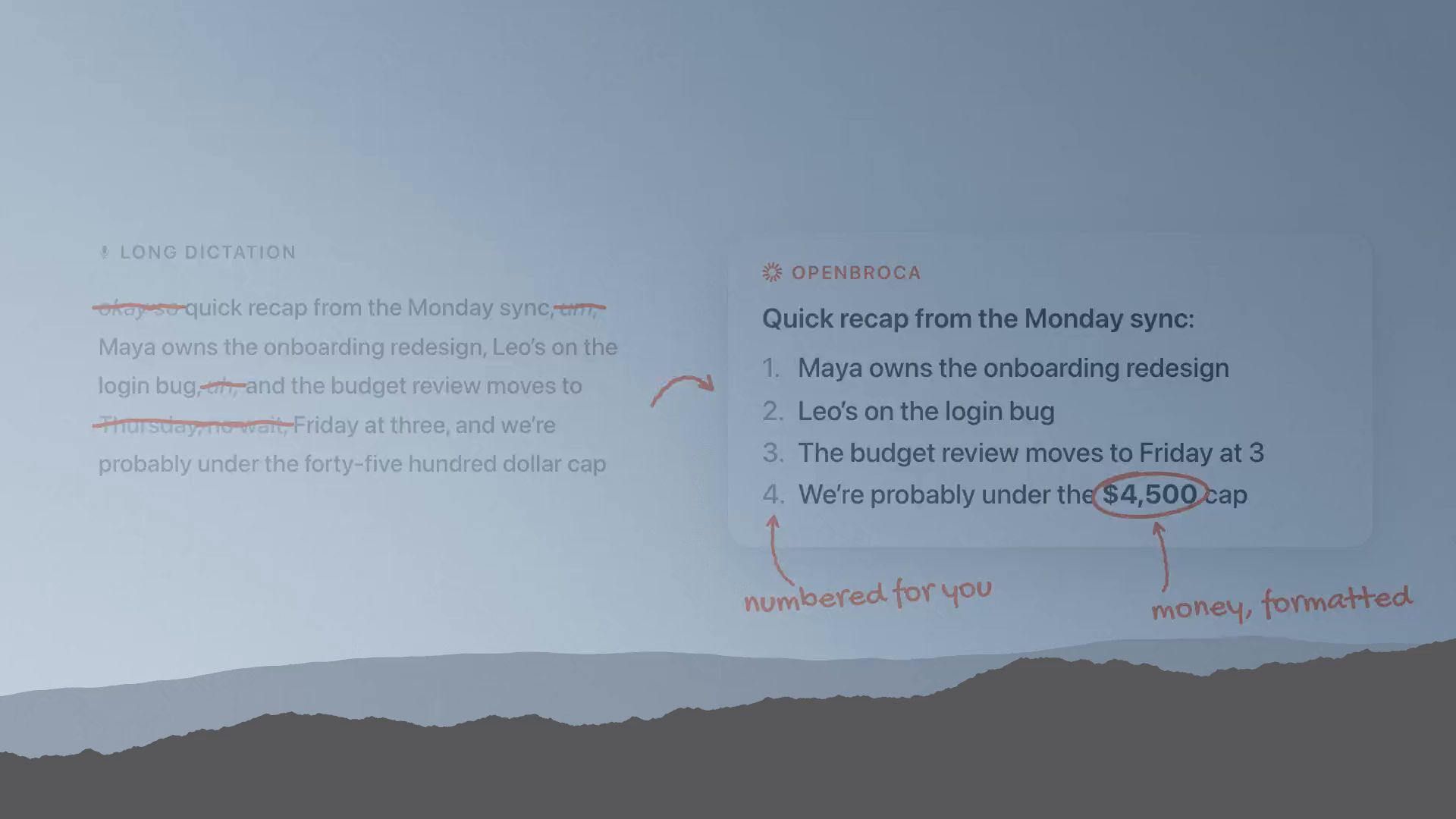
Openbroca is a native Mac AI dictation app with a one-line pitch that tells you everything: “Talk messy. Read clean.” You press ⌥ Space, talk the way you normally talk — the “um”s, the “uh”s, the half-restarted sentences, the mid-sentence self-corrections — and Openbroca turns it into clean, ready-to-send text at your cursor. Anywhere you can type, you can dictate: emails, messages, notes, docs, AI prompts.
It was built by Timothy Lau — a former loyal Typeless user who found tools like Typeless and Superwhisper “too heavy” for his taste. So he built what he wanted himself: a ~6.5 MB tiny tool that sits quietly on the Mac (not even a Dock icon), in the spirit of Shottr for screenshots — always there, never in the way. It launched on Product Hunt on 12 October 2026. Official site: openbroca.com.
The name is a nice touch too: “Open” + “Broca” — Broca’s area being the brain region tied to language production.
Key features (what sets it apart)
1. Text refinement that doesn’t steal your voice
This is Openbroca’s biggest claim — and the hardest problem in the category. Many AI tools “clean up” so aggressively that the text comes out robotic. The maker’s position: Openbroca drops the “um”s and false starts but keeps the “probably” and the “I think” — so the text says what you meant, in your own tone. No prompt tweaking required.
2. A personal dictionary that learns from you
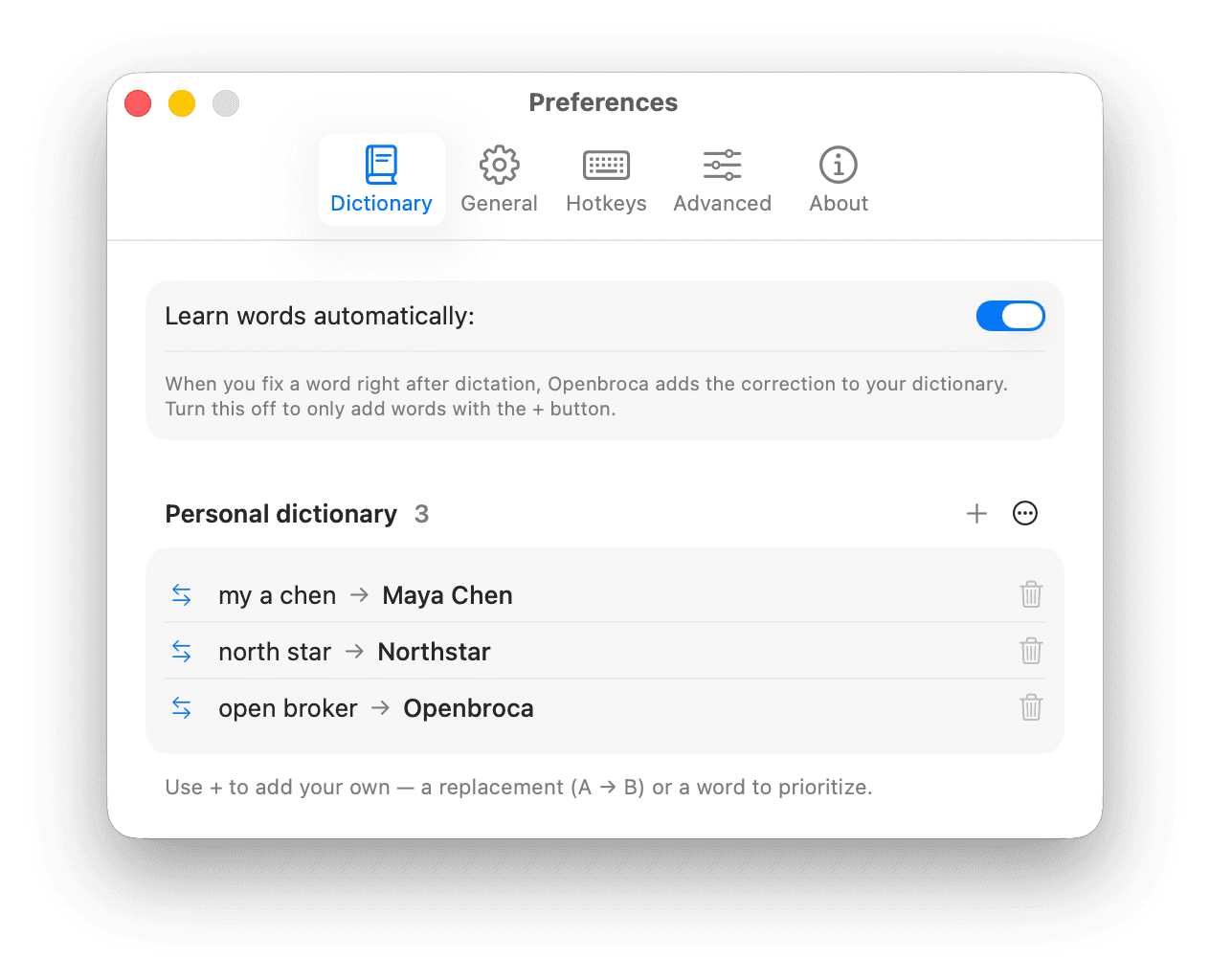
Add names, technical terms, and preferred spellings to your dictionary. The smartest part: “Learn words automatically” — the app picks up vocabulary from corrections you make right after dictating. Coming from Typeless? Import your Typeless dictionary directly. If you work with unusual client names, code jargon, or medical terms, this feature is gold.
3. Speak 30 languages, be understood in 28
Dictation in 30 languages with automatic language detection, plus talk-to-translate: speak one language, get the result in any of 28 output languages at your cursor. Genuinely useful for freelancers emailing international clients.
4. A one-minute setup
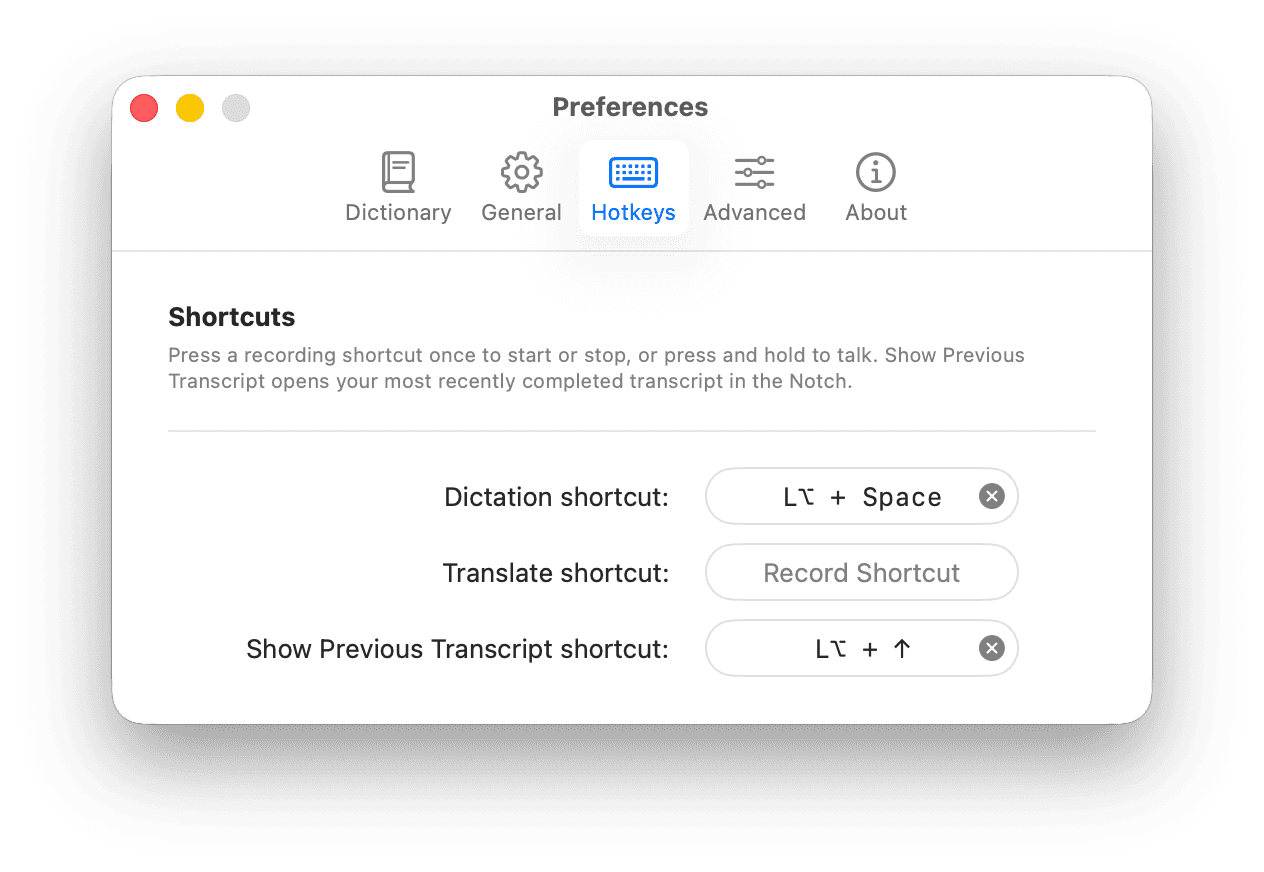
Set your microphone, shortcuts, and translation language in Preferences. ⌥ Space to start/stop (or hold it while talking), a separate shortcut to translate, another to recall your previous transcript. The app lives in the notch/menu bar — placement is your choice (automatic, Dynamic Island, or bottom).
5. Screen Context (optional)
Turn on Screen Context and visible on-screen names and terms become spelling hints. It needs Screen Recording permission and is strictly optional.
Pricing — how much is free?
The pricing page is refreshingly straightforward, and the best part: no feature sits behind a paywall.
- Free — $0: 3,000 text units every week (refreshes every Monday at 00:00 UTC). Latin letters and punctuation count as one unit, CJK characters as two, whitespace is free. Every feature of the Mac app included. No card required.
- Unlimited — $5/month (on the plan card): Per the pricing FAQ, subscriptions run $6.99/month or $59.99/year; choose an auto-renewing subscription or a one-time fixed-period payment — same Unlimited access either way. The weekly quota disappears completely. Secure checkout via Stripe.
- Prepaid credits — CNY 9.90 (one-time): 30,000 usage units that never expire. Occasional heavy use but no appetite for a subscription? This is your option.
“All plans include the same features” — you pay for how much you can dictate, not what you can do. That’s an honest pricing philosophy.
Privacy — an honest warning
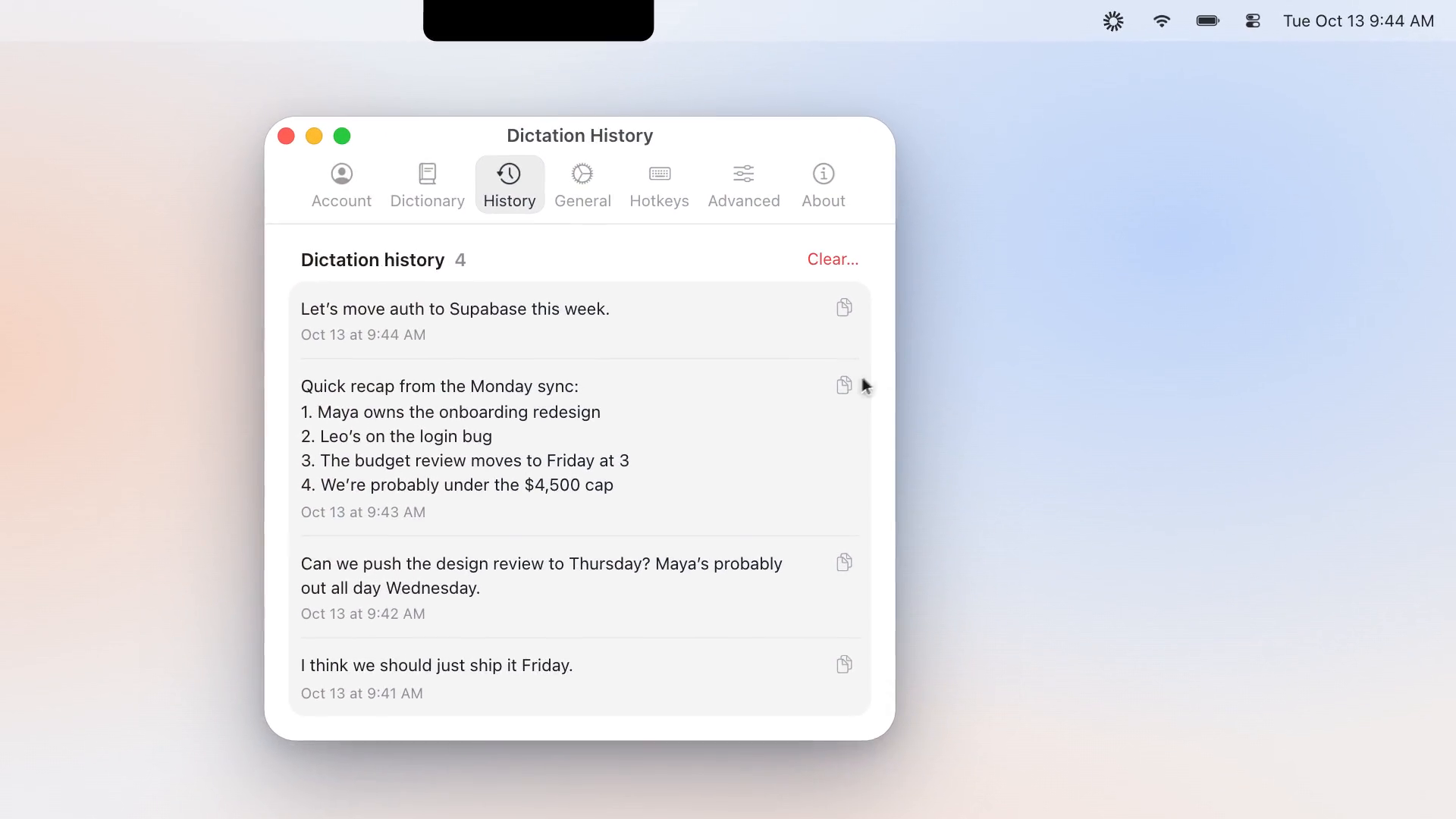
Openbroca is upfront about this, so we’ll be too: this is a cloud app. When you dictate, audio travels from your Mac to a third-party AI provider. It doesn’t work without the internet. Openbroca itself stores no audio (providers process it under their own terms), request logs carry no IP or device information, and payments stay entirely with Stripe. But recognised transcripts and refined text are saved to your account history indefinitely (as long as the account is active).
Bottom line: accept the cloud trade-off for the convenience, but think twice before dictating sensitive, legal, or medical content. If privacy comes first, on-device options (Superwhisper, OpenWhispr) are the better fit — details in the comparison below.
Platforms
- macOS 15 or later — universal build for Apple Silicon and Intel
- Windows: Not yet — join the waitlist
- Linux: Not in the current app; but Openbroca Origin (the maker’s MIT-licensed open-source project) runs on macOS, Windows and Linux — separate codebase, free and maintained
Who should try it — and who shouldn’t
- Writers & bloggers: Get drafts out fast — speaking is ~3x faster than typing, and the cleanup preserves your tone.
- Freelancers: Dictate client emails and proposals; the 28-language translation is a bonus for international clients.
- Students: First drafts of notes and assignments — even with an “um” habit, the output reads clean.
- Developers: Code comments, PR descriptions, docs — the personal dictionary catches technical terms.
- Privacy-sensitive or offline users: Not for you — the cloud requirement is a dealbreaker. Look at Superwhisper or OpenWhispr.
- Windows/Linux users: Try the waitlist or Openbroca Origin.
How it compares: Superwhisper / Typeless / Wispr Flow / built-in macOS dictation
- Superwhisper: The established Mac dictation name. On-device models (offline, audio never leaves your Mac), 100+ languages, SOC 2 Type II + HIPAA. From $8.49/month. Openbroca is lighter and cheaper, but cloud-only.
- Typeless: The tool the maker was inspired by. Cross-platform (Mac/Windows/Linux/iOS/Android), AI cleanup, Pro up to $30/month. Openbroca’s pitch is direct: “like Typeless, but native and light on the Mac.”
- Wispr Flow: Meeting notes + dictation combo at $15/month. Overkill and pricey if you only need dictation.
- Built-in macOS dictation: Free and on-device, but transcribes filler words verbatim and needs you to say “comma”/“period” aloud. Not enough for serious writing.
- OpenWhispr / OpenVoiceFlow: Open-source, on-device, free. Best on privacy and cost, but without Openbroca’s polished tone-preserving cleanup.
People also search for
- best dictation app for mac 2026
- free voice typing app for mac
- superwhisper alternative
- typeless alternative mac
- ai voice to text with filler word removal
- talk to type app mac free
Final verdict
Openbroca belongs to the “just works” school of tools — 6.5 MB, no bloat, no prompt engineering, press ⌥ Space and talk. Its biggest wins: every feature on the free plan and honest pricing (you pay for quantity, not features). Half a point off for genuine limitations: cloud-only (no offline, audio leaves the machine) and Mac-only — plus the usual solo-maker risk.
Our rating: 4.5/5. If you’re a Mac user who talks faster than you type — there’s no downside to trying it free. It doesn’t even ask for a card.
Note: this is a first-look review based on the official site (openbroca.com) and Product Hunt launch information. We’ll update it with hands-on testing on our own systems soon.