 AI Tool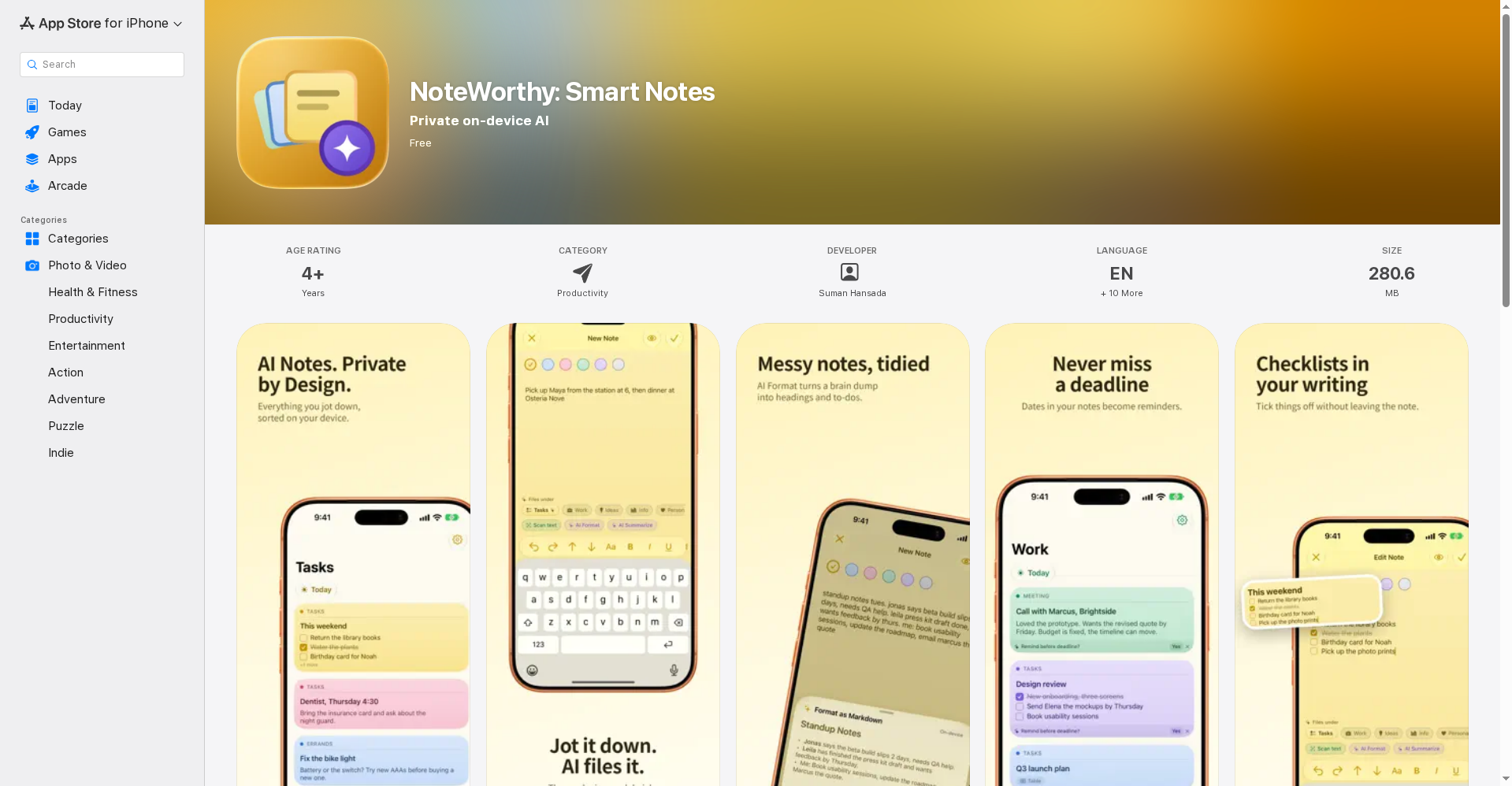
What is this tool?
NoteWorthy is a smart notes app — “Notes supercharged with AI, all on-device”. It was built by Suman Hansada and launched on Product Hunt on October 6, 2026 (version 2.0, which introduced the first native Mac app).
The idea is simple: everyone has built an AI notes app, but those apps ship your notes to their servers. NoteWorthy’s AI runs on your device — the LLM lives inside your phone or Mac, next to your data. No account to create, no server to trust, and you don’t even need an internet connection to use it.
In plain terms: you just write — the app handles the title, the filing, and the cleanup. Your notes organize themselves instead of piling up as an untitled mess.
Standout features
1. Auto titles + auto-organize
Every note gets a title and files itself into Tasks, Work, Ideas, Info or Personal the moment you create it. You can make your own labels and pin the ones you use most. One tap on AI Organize tidies the whole library.
2. AI Format and AI Summarize
Messy, brain-dump notes become properly structured notes — headings, lists, checkboxes — with your wording left completely untouched, and you preview before applying. Long notes condense to a sentence or two with AI Summarize.
3. On-device privacy — literally zero network
This is the big differentiator: the app makes no network requests at all. On Apple Intelligence-capable devices a full on-device LLM runs; older devices fall back to fast built-in heuristics. Face ID/Touch ID app lock, file protection on disk — and the developer officially declares “Data Not Collected” on the App Store.
4. A screen-edge notebook on Mac
The version 2.0 native Mac app sits on the edge of your screen as a notebook of flaps, one per label — pull a flap and its notes slide out. Capture a note without leaving your work, keep a sticky on your desk, reach recent notes from the menu bar.
5. Deeply joined up with the Apple ecosystem
Add to NoteWorthy from any share sheet, clip Safari selections, five Shortcuts actions (for Siri, the Action button and automations), widgets where you can tick checkboxes without opening the app, Spotlight finds your notes, dates become calendar events, people link to contacts, addresses open in Maps, reminders before deadlines. Notes export as Markdown — no lock-in.
Pricing — what do you get free?
Per the official App Store listing:
- Free: The entire app is free — no subscription tier, no in-app purchases listed. One download works on iPhone, iPad and Mac.
That’s rare for privacy-first tools, which usually charge a subscription.
What about privacy?
This is the app’s hero feature:
- AI runs on your device — notes are never uploaded to a server
- The app makes zero network requests — works fully offline
- No account, no signup
- Face ID/Touch ID lock plus file protection
- Notes export as Markdown — your data stays yours
- Officially “Data Not Collected” on the App Store
One real trade-off: each device keeps its own notes — there’s no iCloud-style sync. Perfect for privacy, slightly awkward for convenience.
Platforms
- iPhone — iOS 26.0 or later
- iPad — iPadOS 26.0 or later
- Mac — macOS 26.0+, Apple M1 chip or newer (Intel Macs not supported)
- Apple Vision — visionOS 26.0+
- No Windows, Android or web version
Note: full on-device intelligence needs an Apple Intelligence-capable device. Older devices run on fast built-in heuristics — writing, filing and search still work fine.
Who should use it, who shouldn’t?
- Students: Lecture notes that organize themselves, instant cleanup of messy class notes — solid fit. Hindi interface included.
- Privacy-conscious users: If you’d rather your notes never touch a cloud, this was built for you.
- Apple ecosystem users: If you use both iPhone and Mac, you get the full benefit of widgets, Shortcuts and Spotlight integration.
- Android/Windows users: Not for you — the platform simply isn’t supported.
- Need team collaboration? There’s no sharing and no sync — this is strictly a personal notes app.
Final verdict
NoteWorthy is the most honest implementation of “private AI” we’ve seen — the convenience of AI without the cloud. Being free makes it even more attractive. We docked a point: it’s Apple-only (a major limitation in markets like India where Android dominates), there’s no sync between devices, and full AI needs recent hardware.
Our rating: 4.0/5. If you’re an Apple user who wants privacy in your notes — there’s no downside to trying it free.
Note: This is a first-look review based on the official App Store listing and Product Hunt launch information. We’ll add a hands-on update after testing it on our own devices.