 AI Tool
The 30-second verdict
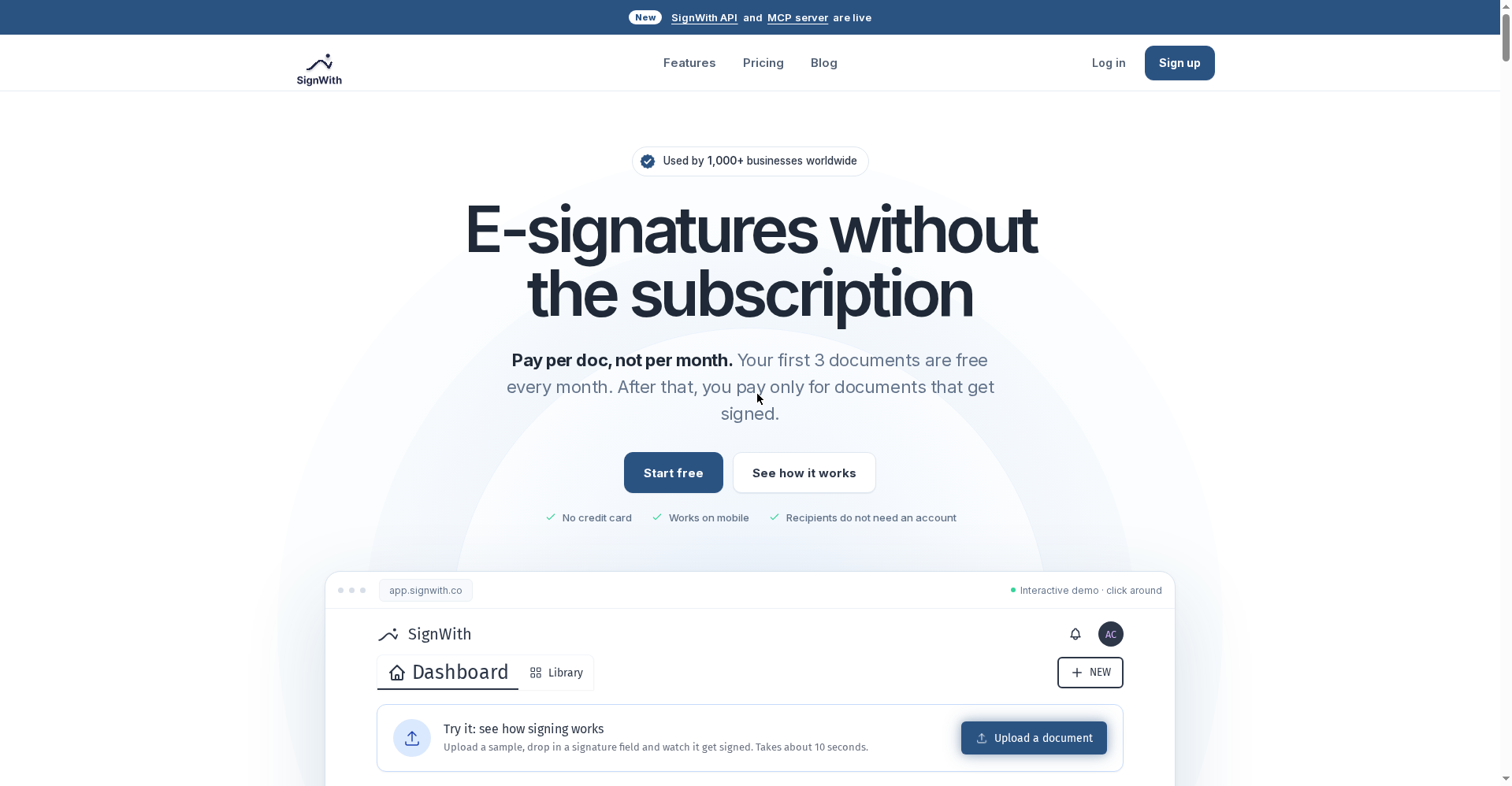
SignWith (signwith.co) is a pay-per-document e-signature tool that launched on Product Hunt on October 12, 2026 — built by Ayush (head of growth at TMAKER). The pitch in one line: DocuSign’s job, without the subscription.
Free means: 3 signed documents every month, no credit card — and the free account is not feature-locked (OTP verification, audit trail, certificate, templates, API + MCP all included). Paid: one-time credit packs — $9 (10 docs), $19 (25 docs), $29 (50 docs), i.e. $0.58–$0.90 per signed document, valid 12 months. One credit = one signed document, however many signers. There’s also a $199 Lifetime Deal (launch price) — unlimited docs, never expires.
Try it if: you’re a freelancer, consultant, CPA or founder who gets a few client contracts, NDAs or offer letters signed each month — and you’re tired of DocuSign’s $15–20/month. Skip it if: you need bulk send (sending one form to 100 people — still ‘coming soon’), team accounts/SSO (also coming soon), or you send 25+ documents a month (per SignWith’s own blog, BoldSign’s free plan may be cheaper then).
What is it?
Every freelancer knows the same story: a client contract needs signing, so you keep a DocuSign subscription — you sign 4 documents a month, but the bill is $15–20 every month. That’s $180–240 a year for a handful of signatures.
SignWith is built on that pain: there is no subscription. Create an account, sign 3 documents free every month. Need more? Buy a one-time credit pack — $9, $19 or $29, valid 12 months. A quiet month? Zero cost. Their official savings calculator says a 5-docs/month user saves ~$221 a year versus a typical $20/month subscription.
And this isn’t a crippled cheap version — the free account gets everything. At launch they claimed 1,000+ businesses and 5,000+ signed documents.
Standout features
1. Pricing that kills the subscription
This is SignWith’s entire story, in practice:
- 3 docs free every month — no card, no trial, no rollover
- After that, one-time packs: $9 → 10 credits ($0.90/doc), $19 → 25 credits ($0.76/doc), $29 → 50 credits ($0.58/doc)
- One credit = one signed document, however many signers — no DocuSign-style envelope math
- Lifetime Deal ($199, launch price): unlimited docs, never expires, priority support
The 3 free docs renew monthly, separate from any packs. So if you sign fewer than 3 documents a month — and most people do — you stay free forever.
2. Signers need no account — with OTP verification
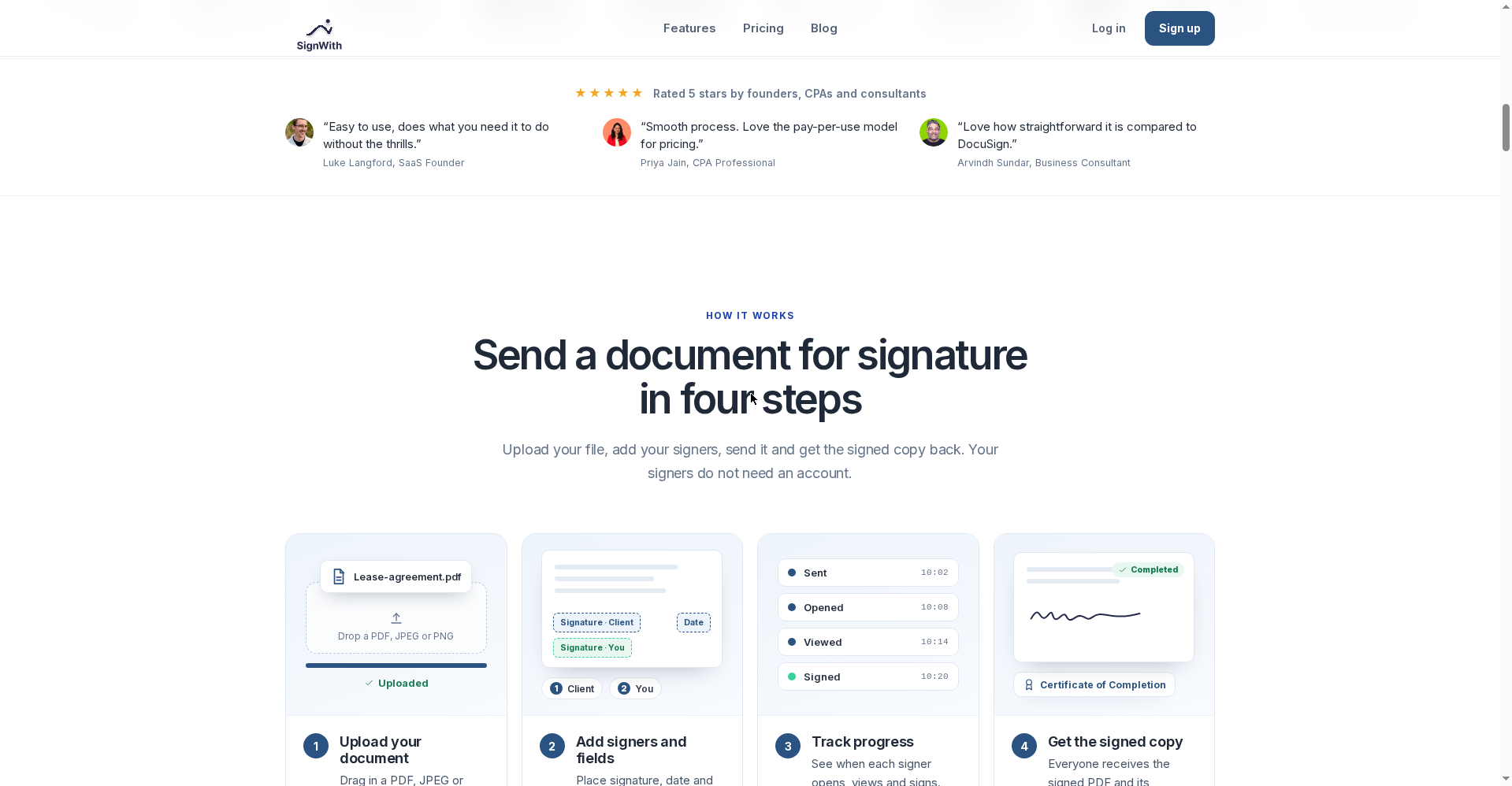
Upload a PDF, JPEG or PNG, drop in signature/date/text/checkbox fields, set the signing order (client first, then you — or everyone at once), and send. The signer gets an email link, opens it in their browser, and signs — no app, no account, no password. Works on phones too.
For security, email OTP verification is free to enable: the signer must enter a 6-digit code from their email before the document opens. A forwarded link alone can’t be signed by the wrong person. There’s also self-sign (only you — done in about a minute) and in-person signing.
3. Proof with every signed document — audit trail + certificate
Every completed document comes with a Certificate of Completion:
- Each signer’s email, IP address, browser and signing time
- Every email event (sent, viewed, signed, declined)
- A SHA-256 fingerprint — any post-signing change gets caught
- The full audit trail with timestamps
Documents are encrypted in transit and at rest, stored on AWS, and stay in your account until you delete it. The signed copy plus certificate is emailed to everyone who signed.
4. Send documents from Claude or ChatGPT — the MCP server
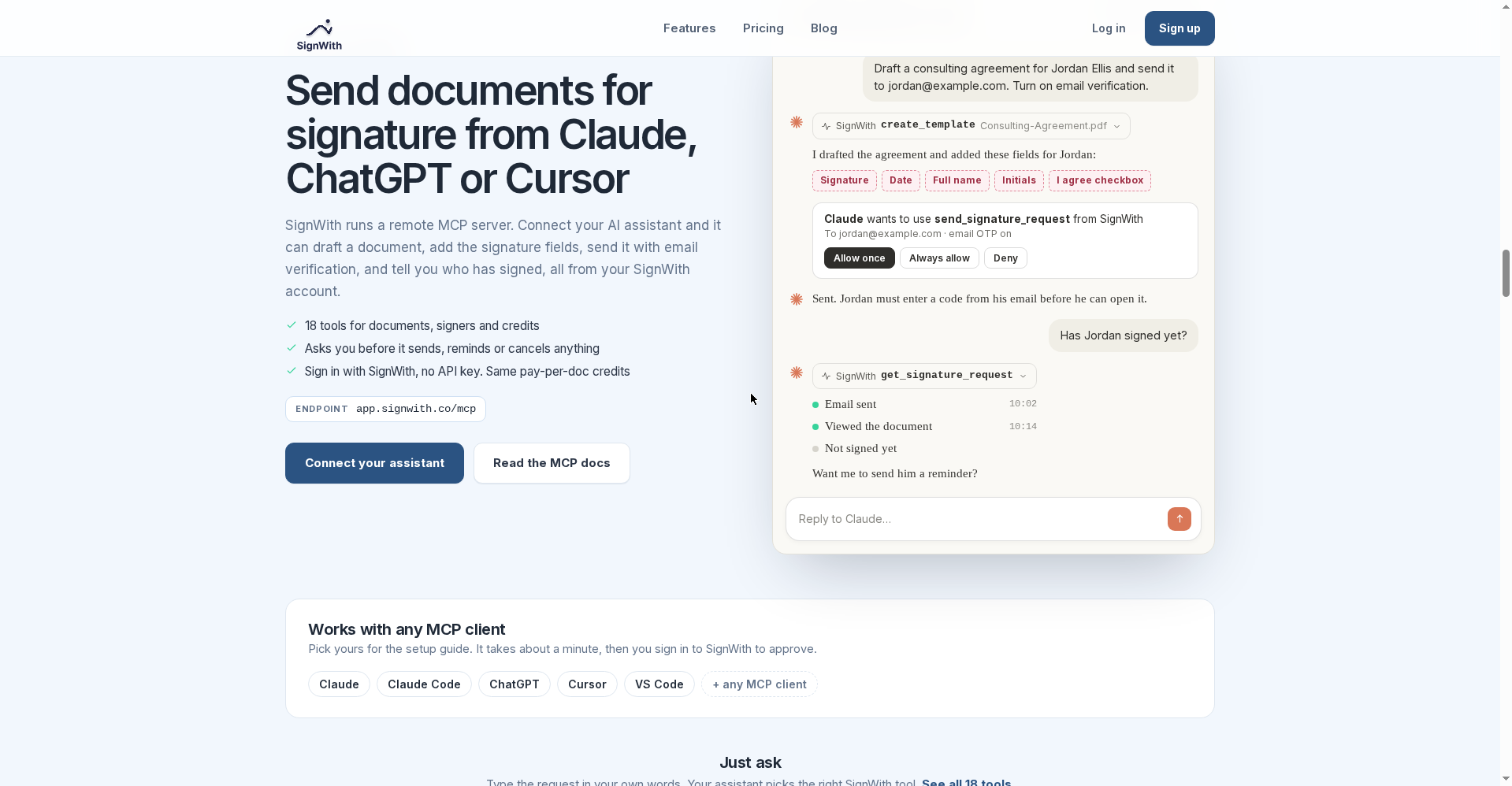
SignWith’s most 2026 feature. Connect its remote MCP server (app.signwith.co/mcp) to Claude, ChatGPT, Cursor or VS Code, then just ask in plain language:
- “Draft a consulting agreement for Jordan and send it, OTP on”
- “Which documents are still waiting for a signature?”
- “Remind everyone who hasn’t signed the office lease”
18 tools cover documents, signers and credits. The reassuring part: the assistant asks your permission BEFORE it sends, reminds or cancels anything — nothing goes out by mistake. And there’s no separate developer plan: the API and MCP use the same pay-per-doc credits. Developers also get a REST API (cURL/Node/Python examples) and signed webhooks (sent, viewed, signed, declined, completed) on every account.
5. What you can sign — the use cases
Client contracts, service agreements, NDAs (one-way and mutual), offer letters, HR documents, leases, tax forms, real estate documents, financial authorizations, sales proposals, waivers. Build templates (an NDA template once, duplicated for every new client), turn on automatic reminders — the forgetful signer gets nudged for you. Folder management keeps documents organized.
Pricing — how much does free get you?
Here, the pricing IS the product, so in detail:
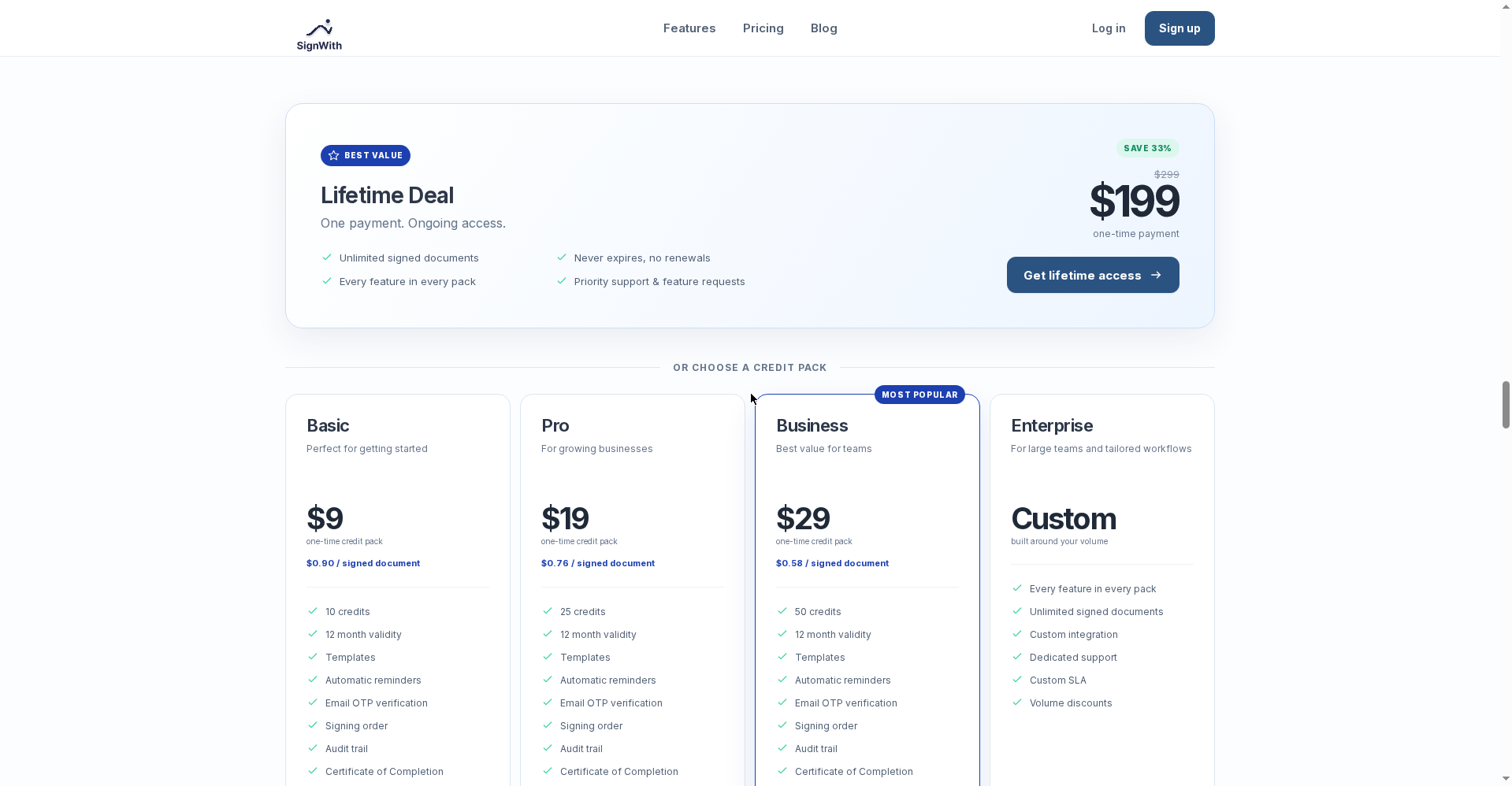
- Free — $0: 3 signed documents every month, no card, no rollover. All features — OTP verification, audit trail, certificate, templates, reminders, API, MCP.
- Basic — $9 one-time: 10 credits → $0.90/doc, valid 12 months.
- Pro — $19 one-time: 25 credits → $0.76/doc, valid 12 months.
- Business — $29 one-time: 50 credits → $0.58/doc, valid 12 months, feature-request priority.
- Lifetime Deal — $199 one-time (launch price, regular $299 — SAVE 33%): unlimited signed documents, never expires, priority support. The launch offered 20% off with code SWPH20 — check the pricing page for current validity.
- Enterprise — custom: volume discounts, dedicated support, custom SLA.
A credit is only consumed when a document gets signed — not when it’s sent. And 10 signers on one document still costs 1 credit.
Who should use it — and who shouldn’t
- Freelancers & consultants: Client contracts and NDAs — under 3 docs a month means free forever.
- Founders & small agencies: Offer letters, service agreements — no subscription weighing you down.
- CPAs & tax professionals: Tax forms and authorizations — with an audit trail as ready proof.
- Developers: REST API + webhooks + MCP — add e-signatures to your product without a monthly dev plan.
- Students: Internship offer letters or project agreements — the free tier is plenty.
- Skip it if: you need bulk send (still coming soon), team accounts/SSO (coming soon), or you send 25+ documents a month (per SignWith’s own blog, BoldSign’s free plan may be cheaper).
Final verdict
SignWith is one of those rare tools where the pricing is the innovation. The whole e-signature market sells subscriptions; SignWith simply removed the model. The 3 docs/month free tier is genuinely free (no card, all features), and the $0.58/doc Business pack makes DocuSign irrelevant for occasional users. The MCP server and a full API on the free tier make it feel future-proof for 2026.
Half a point off: bulk send and team accounts are still coming soon — perfect for solo users, incomplete for teams. And the company is a five-day-old launch — trust for legally binding documents will have to be earned over time. Heavy-volume users (25+/month) may do better on BoldSign’s free plan — SignWith says so on its own blog, which is a point of honesty in its favour.
Our rating: 4.5/5. If you get a few documents signed each month, there’s no reason not to try it — start on the free tier, and grab a $9 pack if you like it.
Note: This is a first-look review based on the official site (signwith.co) and the Product Hunt launch (Oct 12, 2026). We’ll update it after hands-on testing.


