 AI Tool
⚡ The 30-second verdict
Valin is a private memory app — save Instagram reels, YouTube videos, articles and PDFs, and its on-device AI understands what is inside them: the text in video frames, the spoken audio, the caption — all of it. Then search in your own words (“how far did that wall lamp reach?”) and get the answer with its source. No account, no tracking, no subscription — completely free. It launched on Product Hunt on 10 November 2026. But note the catches: it runs only on newer iPhones and iPads (iPhone 15 Pro or newer, iOS 26+), the first launch downloads about 3.43 GB of models, and it is still in TestFlight beta. For people who save reels and articles every day and then cannot find them — students, creators, researchers, home decorators — this can be the most private way to make saved things useful again — if your iPhone is new enough; Android users and owners of older iPhones cannot try it at all right now.
What is it?
You once saved that reel — “tomato pasta in 25 minutes” — and when it was time to cook, you could not find the reel. Or someone recommended a place, you saved the post, and then forgot which app you saved it in.
That is the problem Valin solves. Its maker left a job leading AI engineering at a large cybersecurity company — it started with his wife, who saved recipes, kids’ activities, books and places people recommended across several apps, and then could not find them again. He built this app in five months.
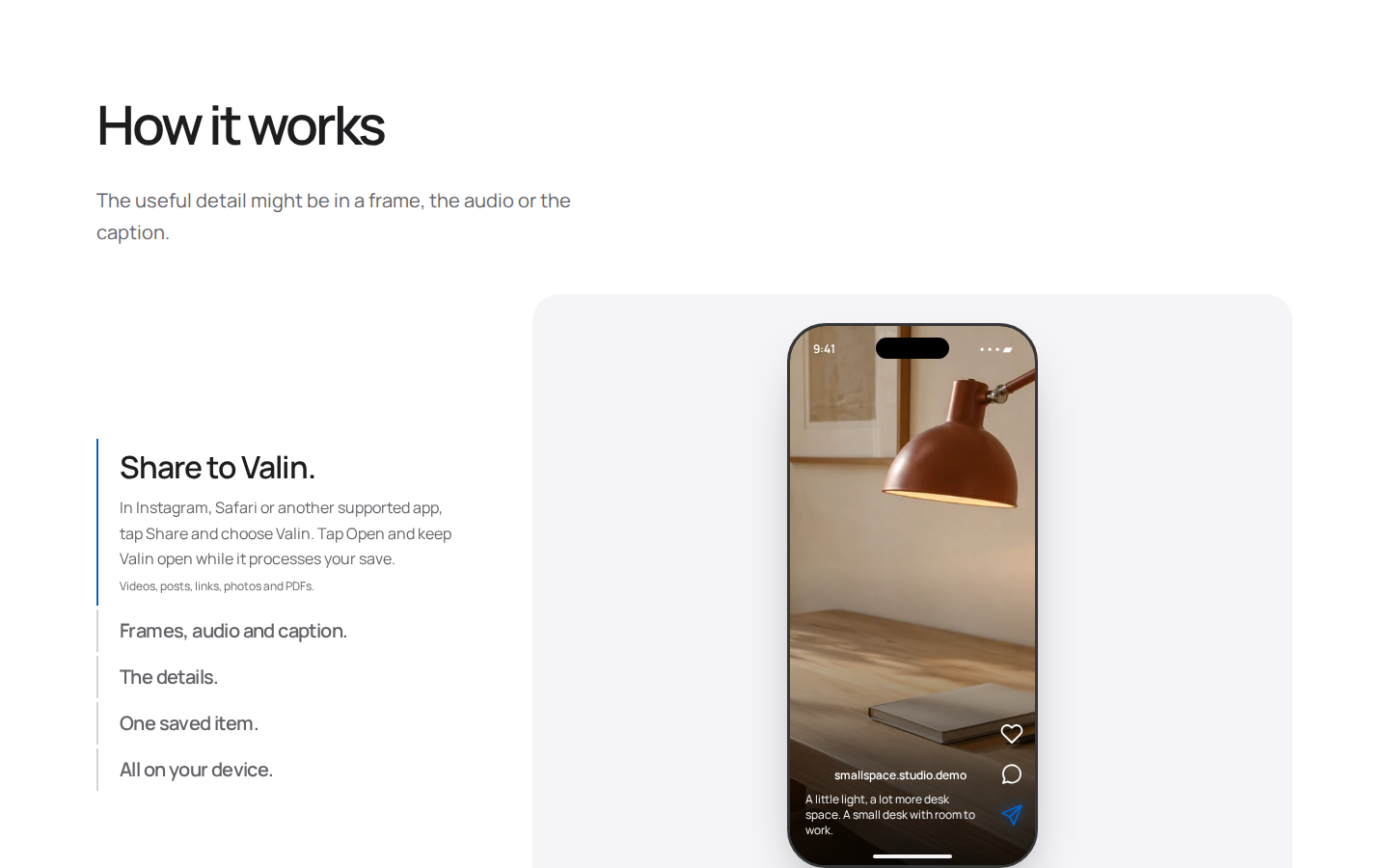
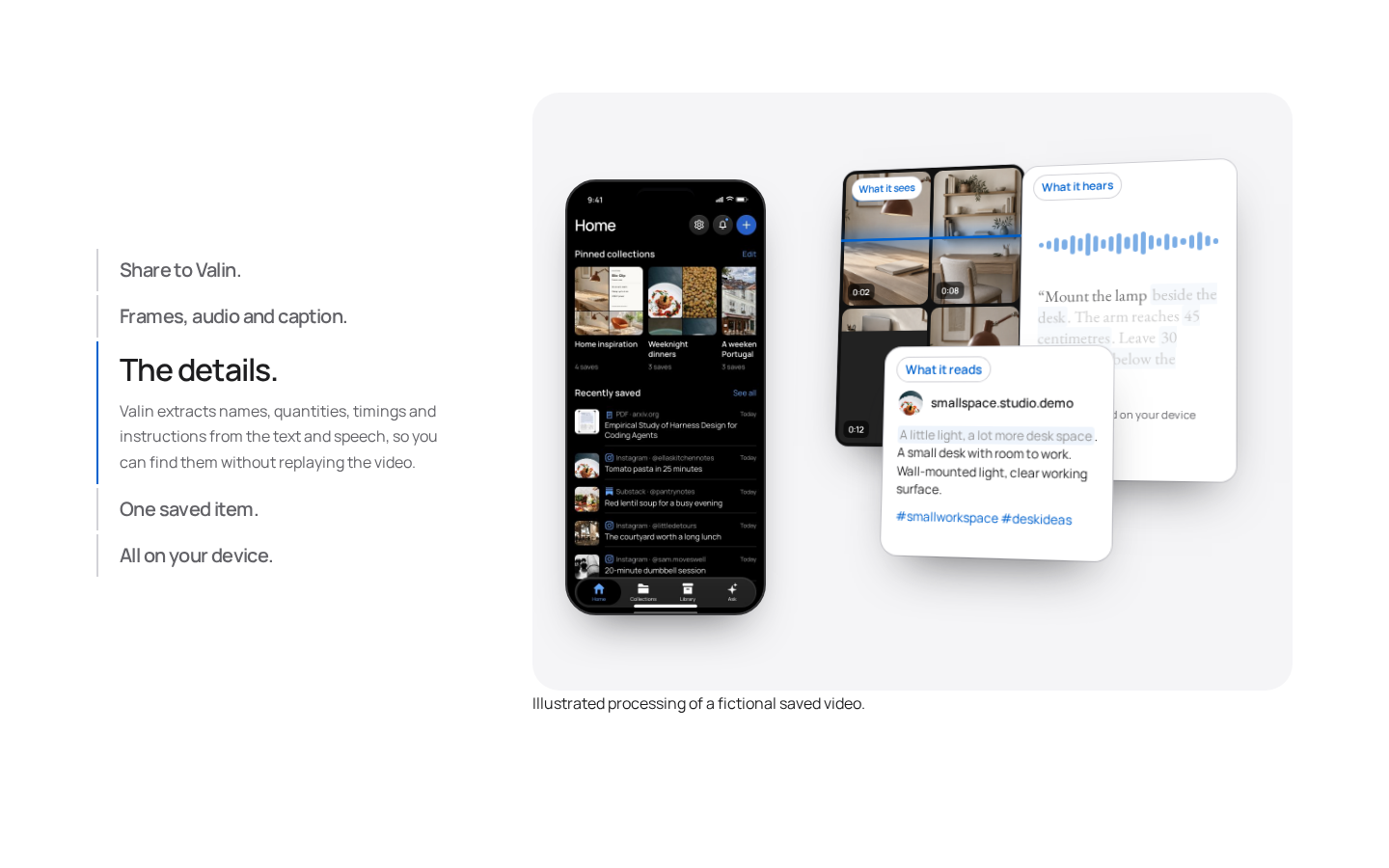
It works simply: share from any app and choose Valin. Valin reads the frames of a video, turns the audio into text, reads the caption — and pulls out names, quantities, timings and instructions. Later you search in your own words — no need to remember the exact title — or ask a question, and the answer comes from your own saves, with citations.
In short: Valin is a memory for the things you saved — it finds what you forgot, and your data never leaves your phone.

Key features (what makes it different)
1. Search in your own words — find by meaning
This is Valin’s hero feature. You do not need to remember the exact title or the words in the caption. “That lamp that mounts beside the desk — how far does it reach?” — Valin understands what you mean and pulls the answer out of the saved post: “45 cm reach · 1.8 m cable · wall-mounted”. Search runs across videos, posts, articles, photos, PDFs and notes at once.
2. Ask — combine several saves into one answer
More than finding one save — Ask brings together relevant saves to answer a question. Save two lamps and it compares them for you. Every answer comes with numbered citations and source cards, so you can open the original save and check it yourself. The official site says it plainly: AI can make mistakes, check the citation.
3. Understands videos from the inside
Valin does not only read titles and captions. It reads on-screen text from video frames, transcribes the spoken audio (Whisper), and reads the caption too. Then it pulls out the useful details — ingredients, instructions, places, ideas. No need to replay a video to find one detail.
4. Recipe extraction — from reel to clean recipe card
For anyone who saves cooking reels, this is the most useful feature. Valin turns a saved recipe into a clean recipe card with ingredients, quantities and step-by-step instructions. No more pausing and rewinding a reel to find each step — the ingredients and steps are in one readable place.
5. Key points from PDFs — takeaway first, then the paper
Save a research paper or a long guide and Valin shows the takeaway and summary first — you know what is inside before reading the whole thing. Need a detail? Ask about it. That saves students and researchers a lot of time.
6. Collections — keep a project moving without filing everything
Valin suggests collections for related saves — a room you are planning, a subject you are learning. You keep or dismiss each suggestion, or create your own collection, and you decide whether Valin adds matching saves automatically. No need to file every item by hand.
7. Notes and checklists — remember why you saved it
Add your own notes and checklists to any save — “for the spare room — measure the desk edge”. Then find it again using your own words. The reason you saved something stays saved too.
8. Privacy — no account, no tracking, no cloud AI
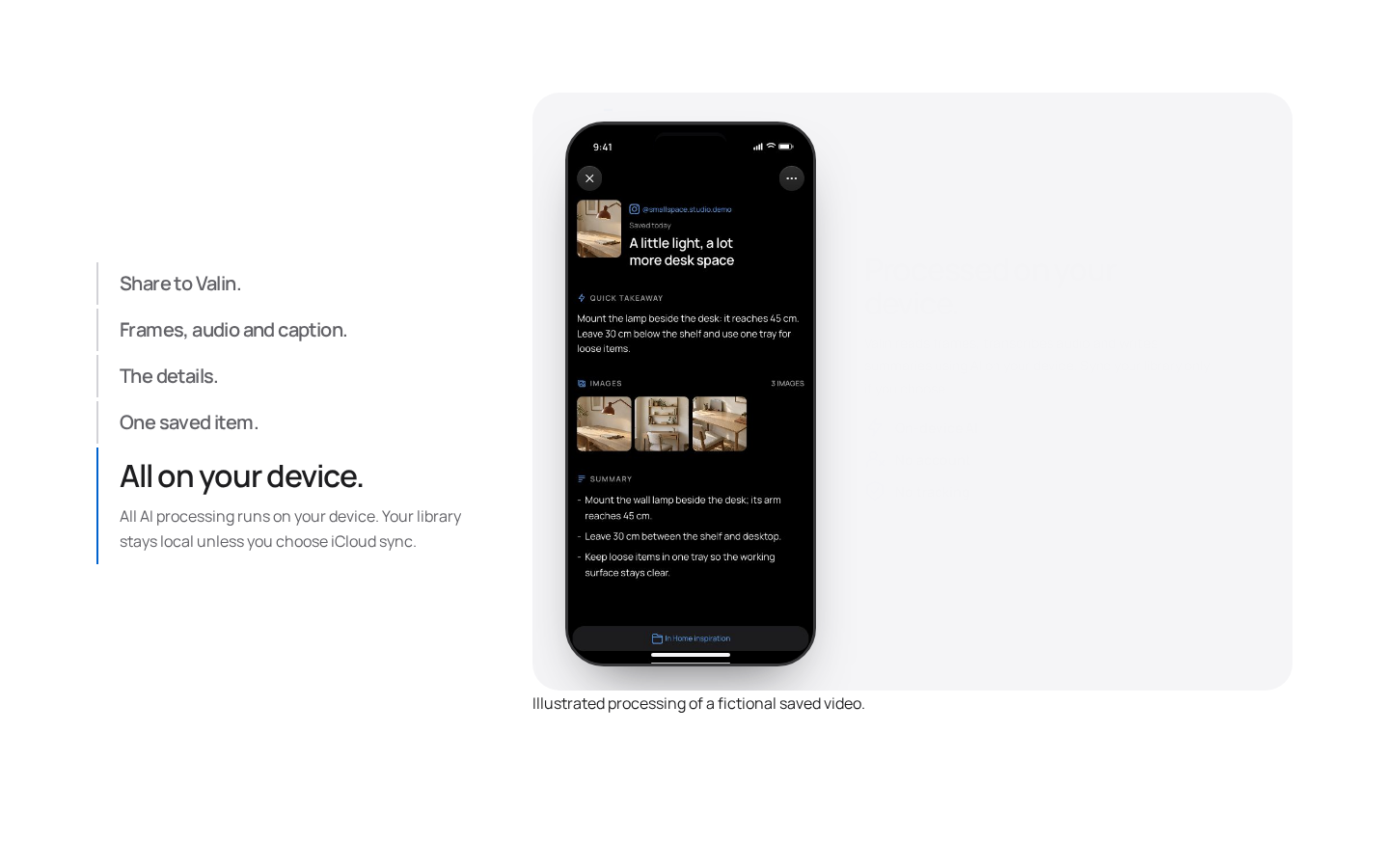
This is Valin’s biggest identity. The AI runs on your iPhone or iPad — Gemma 4 (summaries, Ask), Whisper (transcription) and EmbeddingGemma (meaning-based search) — all three models download to the device. No Valin account is created, nothing is tracked, and no cloud AI reads your saves. Your library stays local; turn on private iCloud sync only if you want it. Once set up, Search, Ask and Reading all work offline.
Pricing — how much is free?
- Free ($0 — TestFlight beta): Unlimited saves, on-device AI (search, Ask, summaries, recipe extraction, collections), no account, no tracking, optional private iCloud sync. No subscription, no paid plan — the official site and Product Hunt both list the price as $0.
The honest math: free does not mean costless — your phone pays the price: about 3.43 GB of models, a newer device, and battery while processing. But in money terms nothing is cheaper right now — and on privacy terms it leads its category.
Platforms
- iPhone: iPhone 15 Pro / 15 Pro Max or newer (including iPhone Duo) — iOS 26 or later, at least 8 GB of memory
- iPad: M1 chip or newer, or the iPad mini with A17 Pro — iPadOS 26 or later
- Install: Through TestFlight beta (no stable App Store release yet)
- Storage: About 3.43 GB of AI models, plus extra space for installation, caches and your saves
- Offline: Once the models are downloaded, Search, Ask, Reading, summaries, recipe extraction and collections all work offline
- Sync: Optional private iCloud sync (videos and files over 20 MB do not sync — they stay on the device where you saved them)
- Share from: Instagram, Safari, Chrome, Threads, TikTok, X, YouTube, Substack, Notes, Voice Memos, Reddit, Facebook, LinkedIn — plus import from Photos and Files
- Import: Instagram saved posts and collections, Safari bookmarks and Reading List
Who should use it, and who should not?
- Students / researchers: You save articles and PDFs — the takeaway and summary tell you what is inside first, then ask about the details.
- Creators / freelancers: You save reels and posts for ideas, references and tutorials — find them later in your own words, without remembering exact titles.
- Cooking lovers: Turn recipe reels into clean recipe cards — ingredients and steps in one place.
- Home decorators / trip planners: Save lamps, furniture and places — group them into collections and compare.
- Privacy-conscious users: If you do not want any cloud AI seeing your saves, this is the safest option there is.
- Do not use it if: You have an Android phone or an older iPhone (you cannot try it at all), you need it on the web or Mac, or you would rather wait for a stable App Store release — the beta is not for you yet.
Comparison: Magpie / Raindrop.io / Apple Notes
- Magpie: A visual library of your saves — it searches by what is inside them. It runs in the cloud and on the web, on every device. Privacy first? Valin. Need it everywhere? Magpie.
- Raindrop.io: The classic bookmark manager — folders, tags, collections; it has a free plan and a paid Pro (check the exact price on the official site). But it does not transcribe video audio to pull out details — that is Valin’s job.
- Apple Notes / Safari Reading List: Free and built in — save and search. But meaning-based search, Ask with citations, recipe extraction and video transcription are not included.
- CuriousLM: Another on-device AI app — runs on your phone, no server, no account. But it is a general AI assistant; Valin is built specifically as a memory for your saves.
- Valin: A private memory for saves + video understanding + on-device AI — all in one place, but only on newer iPhones and iPads, and still in beta.
🔍 People also search for
- valin app
- valin app free
- valin app download
- valin app iphone
- valin app android
- valin app review
- valin ai
- valin app testflight
- valin app login
- valin app price
- valin vs magpie
- valin app alternatives
- private memory app
- on-device ai app iphone
- magpie review
- curiouslm review
- scape review
- fleeep review
Final verdict
Valin is a genuinely useful idea — a private memory for the things you saved, that understands what is inside a video, and never lets your data leave your phone. On-device AI, zero account, zero tracking, zero subscription — that combination does not exist in any other save-keeper app today. The honest cuts: it runs only on newer iPhones and iPads, needs about 3.43 GB of models, and is still in TestFlight beta.
Our rating: 4/5. If you save reels, articles and PDFs every day and then cannot find them — and you have an iPhone 15 Pro or newer — go to valin.ai and join the TestFlight beta. First import 5–10 of your old saves, then search for one detail in your own words — see whether Valin finds it — before moving your whole library onto it. If you have Android or an older iPhone, look at Magpie; if you need it on every device, try Raindrop.io.
Note: This first-look review is based on the official site (valin.ai) and its Product Hunt launch post (10 November 2026). We will add a hands-on update after using it ourselves.


