AI Tool
⚡ The 30-second verdict
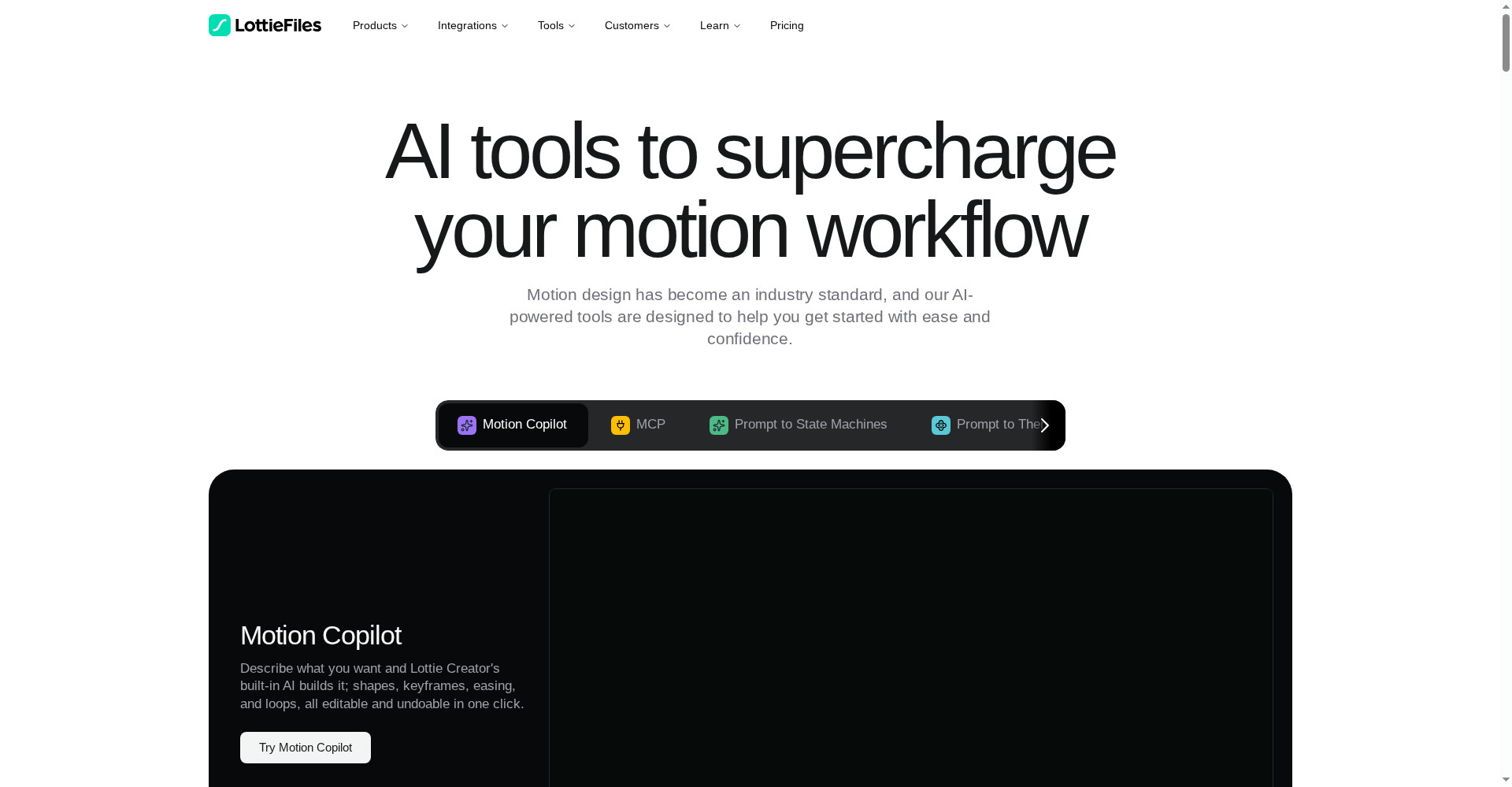
Lottie AI (LottieFiles) turns a text prompt into an editable vector animation — type “make a bouncing loading spinner”, and Motion Copilot builds the shapes, keyframes, easing and loops itself, with every change undoable in one click. The output is a Lottie JSON/dotLottie file — many times smaller than a GIF and crisp at any size. It launched on Product Hunt on 10 November 2026 and peaked at #2. There is a free plan (preview + free library), and paid Individual at $19.99/month includes 60 AI generations. Privacy is solid too — your data is never used to train AI models. But note the catches: AI generations live only on paid plans, credits can run out fast, and the launch is just 1 day old. For web designers, app developers and freelancers who need lightweight loaders, icons and UI animations, this can be the fastest way to make motion without opening After Effects — if 60 generations a month covers your work; if you need interactive, game-style animation, look at Rive instead.
What is it?
A small animation on a website or app — a loading spinner, a success tick, a button bounce — changes the whole feel. But until now, making one meant opening After Effects, exporting with the Bodymovin plugin, then optimizing the file — hours of work for a tiny animation.
Lottie AI exists to remove that. You write in plain words inside Lottie Creator what you want, and Motion Copilot draws the shapes on the canvas, sets the keyframes, applies easing and looping motion. Everything stays editable — layers, colours, timing, all of it. You can follow up too: “now make it faster” or “make it blue” — and it edits the animation you already have instead of starting over.
In short: Lottie AI is your motion designer — you just describe what you want, it builds the animation.
Key features (what makes it different)
1. Motion Copilot — write a prompt, get an animation
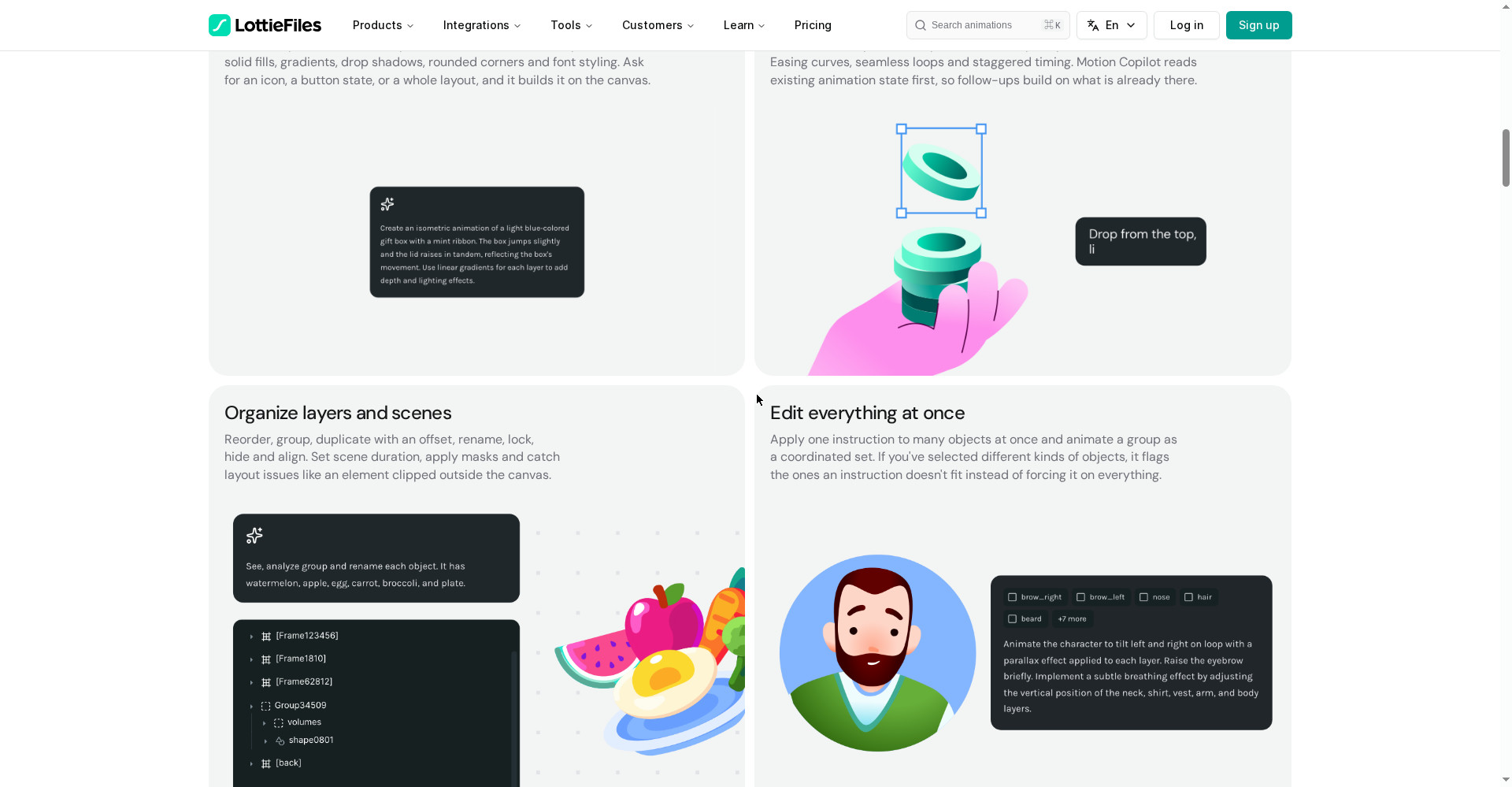
This is Lottie AI’s hero feature. Write something like “create an isometric animation of a light blue gift box with a mint ribbon; the box jumps slightly and the lid rises in tandem” — and Copilot builds the shapes, gradients, keyframes and easing on its own. It understands your selection, streams its reasoning as it works, and shows a plan for approval before bigger or destructive edits. You can write prompts in 14+ languages, Hindi included, and pick a model: Auto or one of your own choosing.
2. Prompt to Vector — text to SVG illustration
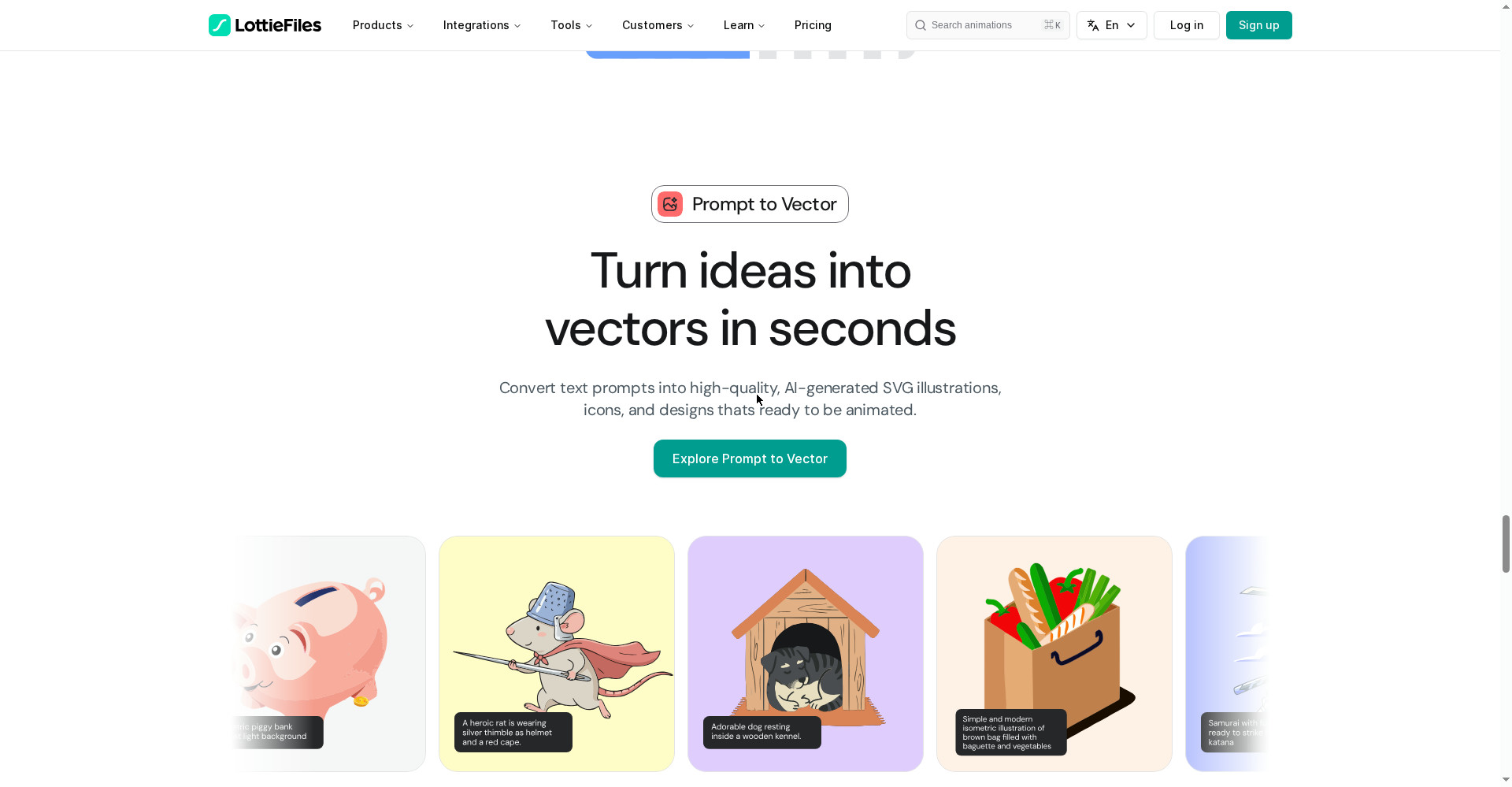
It is not only motion — Lottie AI also turns text into SVG illustrations, icons and designs you can animate afterwards. The site shows examples: a piggy bank, a heroic rat (thimble helmet and red cape), a resting dog, a grocery bag — each shown with the prompt that made it. That is gold for anyone who cannot illustrate but wants custom icons for their site.
3. Prompt to Themes — one file, many themes
Need the same animation in different brand colours? Prompt to Themes turns one animation into many brand-ready variations — and everything stays inside a single dotLottie file. An app can switch themes at runtime instead of shipping separate files. One asset serves teams, campaigns and different products.
4. Raster to Vector — turn PNG/JPG into crisp SVG
Have a PNG or JPG image and need a scalable vector? Raster to Vector converts it into a crisp SVG with AI-powered smart grouping and accurately named layers. It is the fastest way to vectorize a logo or an old image.
5. Prompt to State Machines — interactive logic, no code
Not just looping animations — interactive ones too. Prompt to State Machines builds a complete visual node map from your description: states, transitions and triggers. What happens on button hover, what happens on click — you describe the logic in a prompt, and the AI builds the state machine. The site even gives quick tips: keep layers clean, use exact segment names, and say when states should reset.
6. MCP — your AI agent animates for you
Lottie Creator’s MCP connects AI assistants like Claude, Cursor and Windsurf directly to your animation workflow. Your AI agent can create, edit and iterate on Lottie animations in natural language — inside the editor, on your behalf. WebMCP lets a browser AI agent work with Lottie Creator directly too. Generating 10+ variants in one go, checking brand fit, and exporting straight into your dev workflow all happen through MCP.
7. Privacy — your data is not used for training
Data is the biggest question with AI tools today. LottieFiles says its Groq AI engine never uses your data to train AI models. Your prompts and designs stay yours. That matters a lot for freelancers doing client work.
Pricing — how much is free?
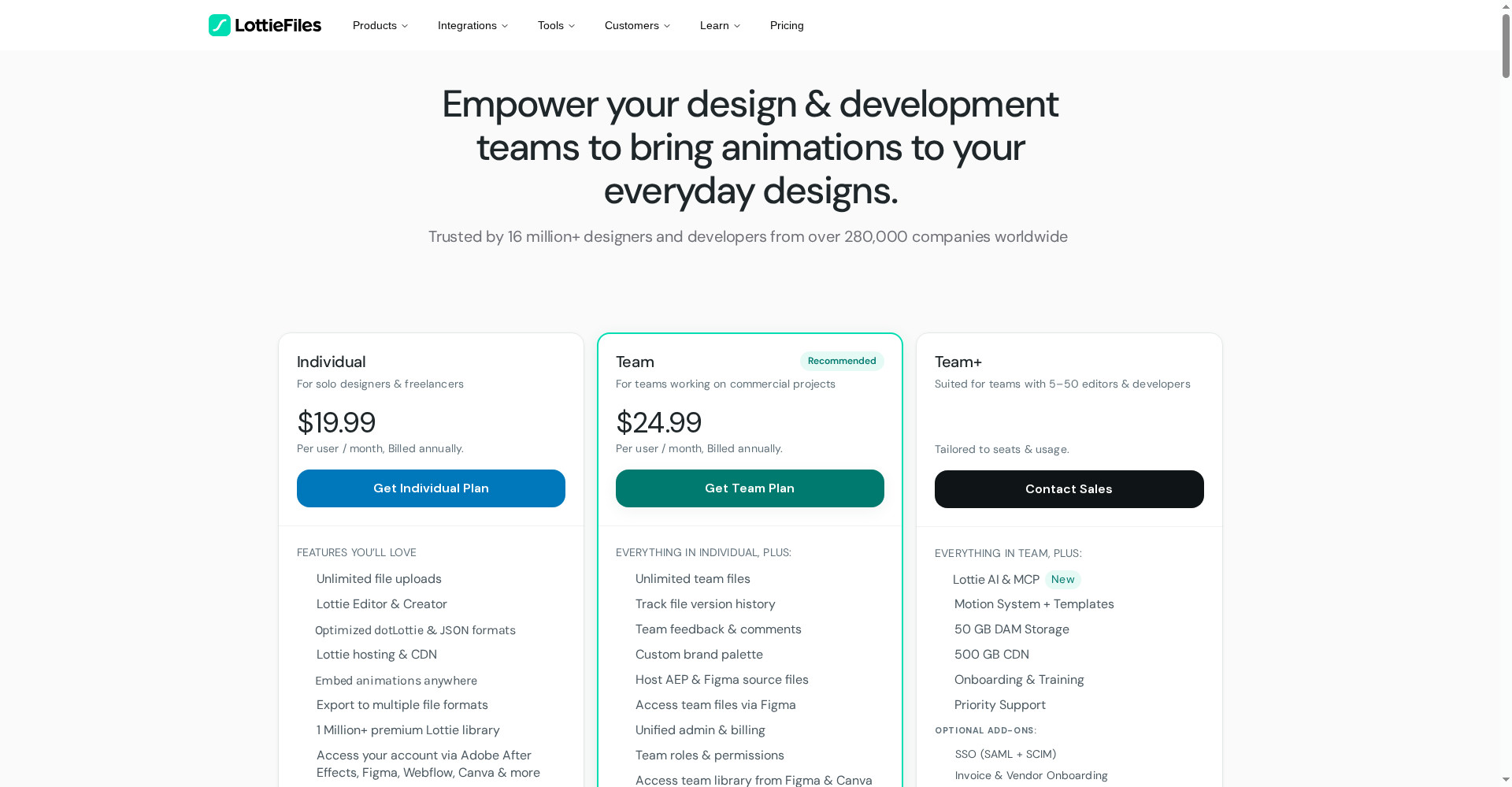
- Free ($0): Unlimited preview, testing and sharing; the free animation library; basic edits. Lottie Creator is free to use. But the free plan’s exact AI allowance is not clearly stated on the official site — AI credits are counted on paid plans.
- Individual ($19.99/user/month, annual billing): 60 Lottie AI generations, 100 Motion Copilot uses, 60 Raster to Vector, 60 Prompt to Vector; MCP free to try during beta; unlimited file uploads; Lottie Editor & Creator; optimized dotLottie & JSON (files up to 80% smaller); hosting & CDN; 1 million+ premium library; access via After Effects, Figma, Webflow and Canva. Extra generations: 20¢ per credit (packs of 50 or 100).
- Team ($24.99/user/month, annual billing): Everything in Individual, plus 120 Lottie AI generations, 200 Motion Copilot uses, 120 Raster to Vector, 120 Prompt to Vector; unlimited team files, version history, team feedback & comments, custom brand palette, unified admin & billing.
- Team+ (custom): Everything in Team, plus Lottie AI & MCP included (credits tailored to seats & usage), Motion System + Templates, 50 GB DAM storage, 500 GB CDN, onboarding & training, priority support.
The honest math: $19.99 a month for 60 generations means each generation costs about 33¢ — but if you make 2–3 animations a day, credits can run out mid-month, and top-ups cost extra. Start on the free plan with the preview and library, and upgrade to Individual only when you need AI every day.
Platforms
- Web (browser): Lottie Creator runs entirely in the browser — no install; works on Windows, Mac and Linux
- Plugins: Adobe After Effects, Figma, Webflow, Canva — plus VS Code
- Export: Lottie JSON, dotLottie, GIF, MP4, transparent WebM, MOV
- Players: Lottie animations run on web, iOS and Android through free player libraries
- Embed: oEmbed support for Notion, Medium, Ghost, Reddit, WordPress and more
- Languages: Prompts in 14+ languages — Hindi included
Who should use it, and who should not?
- Web designers / developers: You need lightweight animations for landing pages, onboarding, loaders and icons — the Lottie format was made for exactly this.
- App developers: Smooth animations in iOS/Android apps without heavy video files — a JSON file is many times smaller than a GIF.
- Freelancers: Make custom icons and UI motion for clients fast — from a prompt, without opening After Effects.
- Marketers / content creators: Branded animations for social posts and campaigns, with many themes in one file.
- Students: Learning motion design? Start on the free plan with the preview and library — learning from prompts is easier than learning a timeline.
- Do not use it if: You need interactive, game-style animation (Rive is better), you make cinematic or 3D motion (this tool is for 2D vectors), or you need 100+ AI generations a day (credit costs will add up).
Comparison: Rive / Jitter / Lottielab
- Rive: The specialist for interactive UI and game-style animation — its own .riv format with state machines built in. Free plan available, paid from $9/seat/month. It does not export Lottie (it imports it). Interactive work? Rive. Lightweight web/app animation? Lottie AI.
- Jitter: Fast motion design in the browser with Figma import. Free plan: 3 files, 720p, watermark; paid from $15/editor/month (annual). Lottie export is included even on Free. If you like designing by hand on a timeline, pick Jitter; if you want to prompt it into existence, pick Lottie AI.
- Lottielab: A Lottie editor and hosting built for product teams — unlimited files free (GIF/MP4 only), Lottie export on Pro ($12/editor/month). Good for teams, but its AI prompt features are not as deep as Lottie AI’s.
- After Effects + Bodymovin: The pro route — full control, but a learning curve and a subscription. Lottie AI makes the same Lottie format from a prompt, without After Effects.
- Lottie AI: Prompt-made editable animation + vector + themes + MCP — everything in one place, but AI credits are paid-only and the launch is just 1 day old.
🔍 People also search for
- lottie ai
- lottie ai free
- lottie ai pricing
- lottie ai vs rive
- lottie ai login
- lottie ai tutorial
- lottie ai alternatives
- lottie ai review 2026
- lottie files ai
- motion copilot
- prompt to vector
- lottie animation generator
- lottie vs gif
- free lottie animations
- woven video review
- videco review
- openvids ai review
- reelbird screen recorder review
Final verdict
Lottie AI is a genuinely useful idea — editable vector animation from a prompt, without opening After Effects, and an output file many times smaller than a GIF. Motion Copilot, Prompt to Vector, Prompt to Themes, Raster to Vector and MCP — that combination does not exist in one place anywhere else today. The honest cuts: AI generations are paid-only, 60 credits can run short for daily users, and the launch is just 1 day old.
Our rating: 4/5. If you make lightweight loaders, icons and UI animations for the web or apps and want to escape After Effects — create a free account at lottiefiles.com, start with the preview and library, and move to Individual when you need AI every day. Test it first with one small animation — see how Motion Copilot understands your prompt — before putting client or product work on it. If you need interactive or game-style animation, look at Rive; if you prefer designing by hand on a timeline, try Jitter.
Note: This first-look review is based on the official site (lottiefiles.com/ai and lottiefiles.com/pricing) and its Product Hunt launch post (10 November 2026). We will add a hands-on update after using it ourselves.