AI Tool
⚡ 30-second me faisla
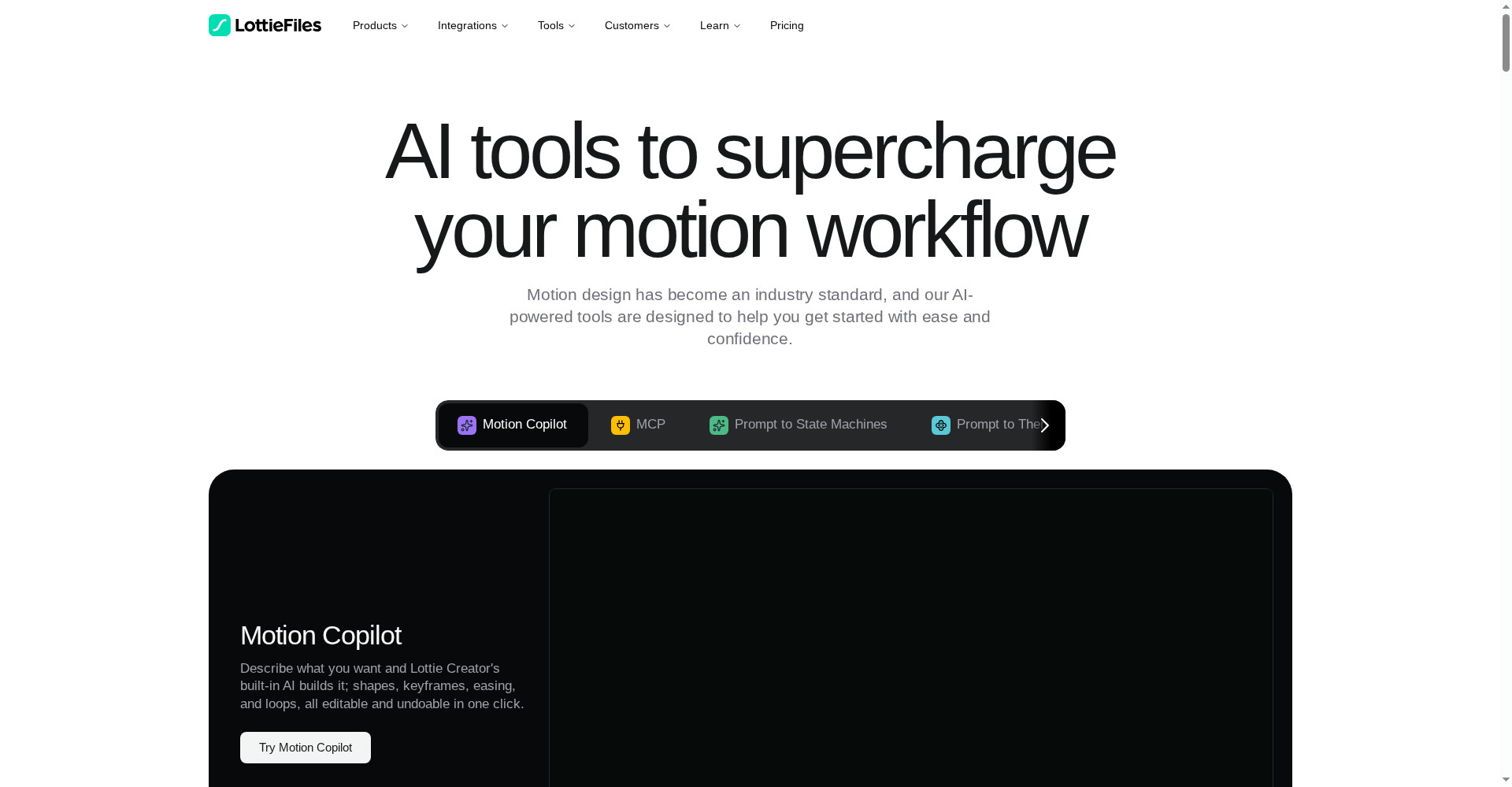
Lottie AI (LottieFiles) ek text prompt se editable vector animation bana deta hai — tum likho “ek bouncing loading spinner banao”, aur Motion Copilot shapes, keyframes, easing aur loops khud bana deta hai, har change ek click me undo hota hai. Output Lottie JSON/dotLottie file hoti hai — GIF se kai guna chhoti, kisi bhi size par crisp. Product Hunt par 10 November 2026 ko launch hua aur #2 rank tak pahuncha. Free plan hai (preview + free library), paid Individual $19.99/month me 60 AI generations milti hain. Privacy bhi achhi hai — tumhara data AI training ke liye use nahi hota. Lekin dhyaan rakho: AI generations sirf paid plans me hain, credits jaldi khatm ho sakte hain, aur ye launch sirf 1 din purana hai. Web designers, app developers aur freelancers jinhe app/website ke liye halke loaders, icons aur UI animations chahiye, unke liye ye After Effects khole bina motion banane ka sabse tez rasta ho sakta hai — agar tum mahine me 60 generations ke andar kaam kar lo; jinko interactive, game-style animation chahiye, wo Rive dekhein.
Ye tool kya hai?
Website ya app me ek chhota sa animation — loading spinner, success tick, button ka bounce — poori feeling badal deta hai. Lekin aaj tak uske liye After Effects kholo, Bodymovin plugin se export karo, phir file ko optimize karo — ek chhote animation ke liye bhi ghanton ka kaam.
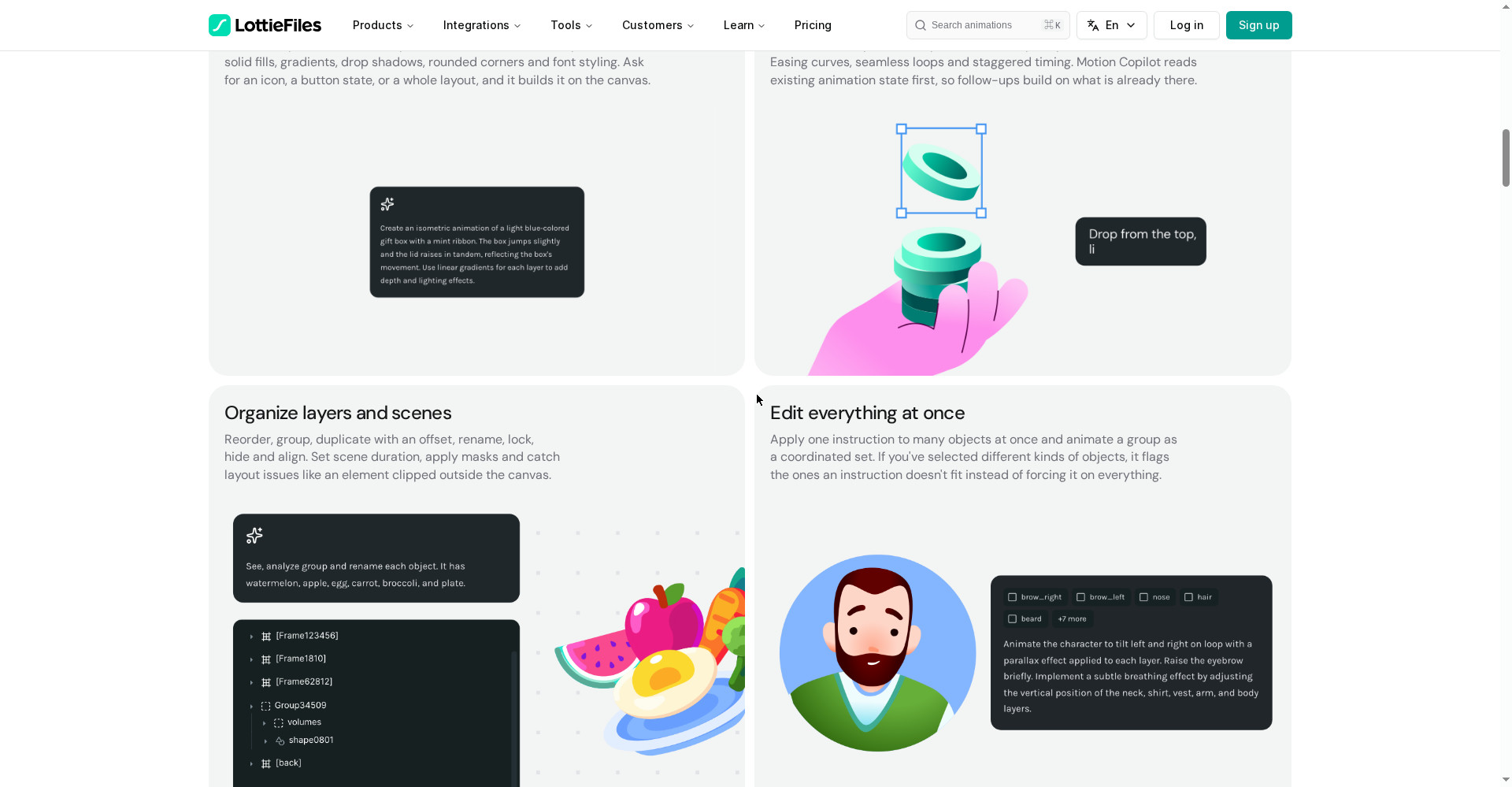
Lottie AI isi liye bana hai. Tum Lottie Creator me aam shabdon me likho kya chahiye, aur Motion Copilot canvas par shapes banata hai, keyframes lagata hai, easing aur looping motion set karta hai. Har cheez editable rehti hai — layer, colour, timing, sab. Tum follow-up bhi bol sakte ho: “ab ise tez karo” ya “colour neela kar do” — aur wo pehle se bani animation par hi badlav karta hai, dobara shuru se nahi banata.
Aasaan bhasha me: Lottie AI tumhara motion designer hai — tum sirf batao kya chahiye, animation wo banata hai.
Khaas features (jo ise alag banate hain)
1. Motion Copilot — prompt likho, animation ban jaye
Ye Lottie AI ka hero feature hai. Tum likho — “ek isometric animation banao, halke neele gift box ki, mint ribbon ke saath; box halka sa jump kare aur dhakkan usi ke saath upar uthe” — aur Copilot canvas par shapes, gradients, keyframes aur easing khud laga deta hai. Ye tumhari selection ko samajhta hai, apni reasoning stream karta hai, aur bade ya destructive edits se pehle plan dikhakar approval maangta hai. 14+ bhashaon me prompt likh sakte ho — Hindi me bhi. Aur model bhi chun sakte ho: Auto ya apni pasand ka.
2. Prompt to Vector — text se SVG illustration
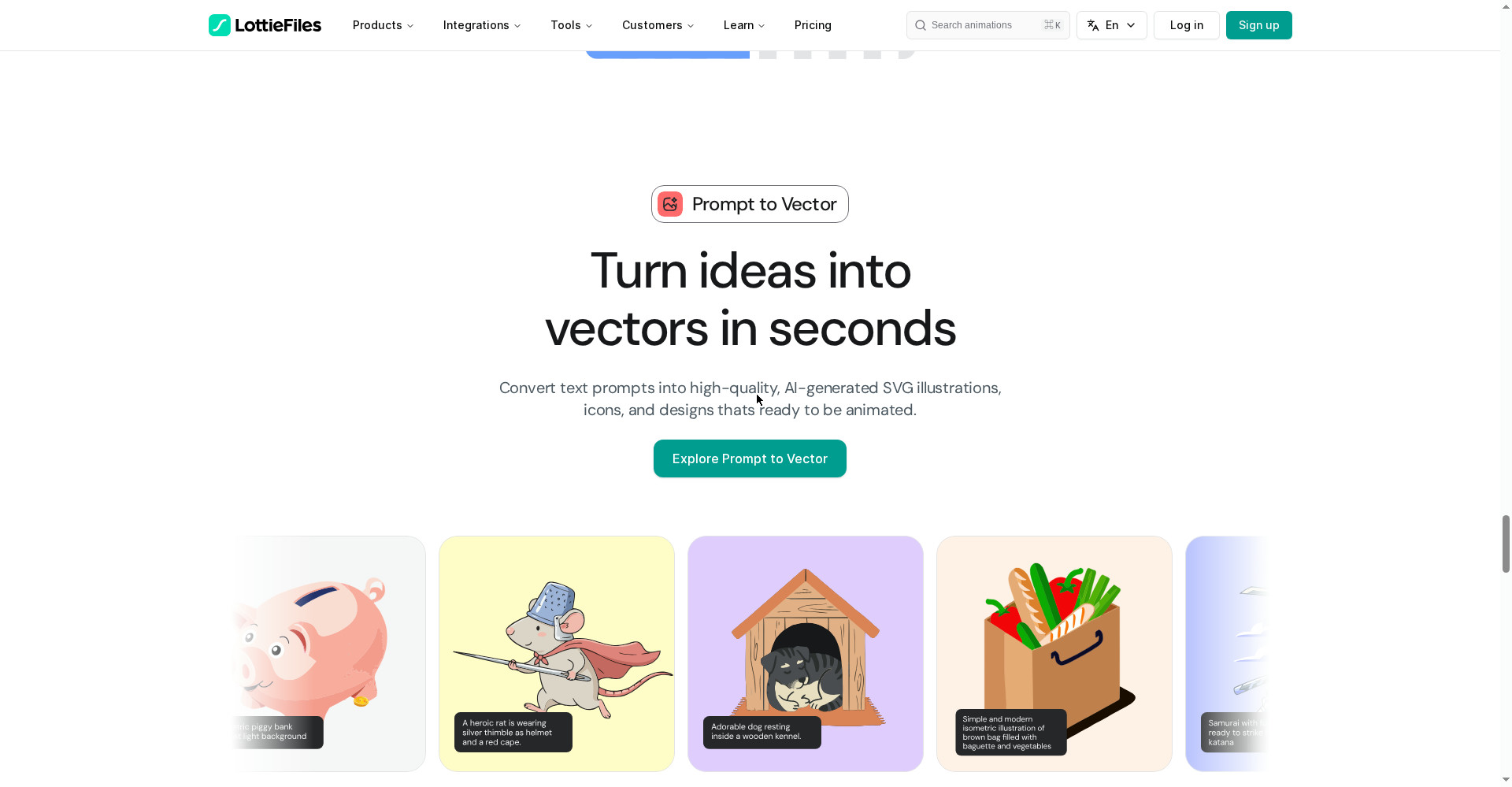
Sirf motion hi nahi — Lottie AI text se SVG illustrations, icons aur designs bhi banata hai, jinhe phir animate kar sakte ho. Site par examples: piggy bank, heroic rat (thimble helmet aur red cape ke saath), resting dog, grocery bag — har ek ke saath wo prompt bhi dikhta hai jisse wo bana. Ye unke liye gold hai jinhe illustration nahi aati lekin apni site ke liye custom icons chahiye.
3. Prompt to Themes — ek file, kai themes
Ek hi animation ko alag-alag brand colours me chahiye? Prompt to Themes ek animation ko kai brand-ready variations me badal deta hai — aur sab kuch ek hi dotLottie file me rehta hai. App me theme runtime par badli ja sakti hai, alag-alag files ship karne ki zaroorat nahi. Teams, campaigns aur alag products ke liye ek hi asset kaam aata hai.
4. Raster to Vector — PNG/JPG ko crisp SVG banao
Tumhare paas ek PNG ya JPG image hai aur use scalable vector chahiye? Raster to Vector AI se use crisp SVG me badal deta hai — smart grouping aur sahi naam wali layers ke saath. Logo ya purani image ko vector me badalne ka ye sabse tez rasta hai.
5. Prompt to State Machines — interactive logic, bina code
Sirf loop wali animation nahi — interactive bhi. Prompt to State Machines tumhare description se poora visual node map bana deta hai: states, transitions aur triggers. Jaise button hover par kya ho, click par kya ho — ye logic tum prompt se likho, AI state machine bana de. Site par quick tips bhi hain: layers saaf rakho, segment names exact likho, aur reset kab ho ye batao.
6. MCP — tumhara AI agent khud animate kare
Lottie Creator ka MCP Claude, Cursor aur Windsurf jaise AI assistants ko seedha tumhare animation workflow se jod deta hai. Tumhara AI agent natural language se Lottie animations bana, edit aur iterate kar sakta hai — editor ke andar, tumhari taraf se. WebMCP se browser AI agent bhi seedha Lottie Creator ke saath kaam kar sakta hai. Ek baar me 10+ variants generate karna, brand fit check karna, aur seedha dev workflow me export karna — sab MCP se hota hai.
7. Privacy — tumhara data training ke liye nahi
Aaj ke AI tools me data ka sawal sabse bada hai. LottieFiles kehta hai uska Groq AI engine tumhara data kabhi AI models ko train karne ke liye use nahi karta. Tumhare prompts aur designs tumhare hi rehte hain. Client work karne wale freelancers ke liye ye badi baat hai.
Pricing — free me kitna milega?
- Free ($0): Unlimited preview, testing aur sharing; free animation library; basic edits. Lottie Creator use kar sakte ho. Lekin AI generations ki exact limit free plan me official site par clearly mentioned nahi hai — AI credits paid plans me gine jate hain.
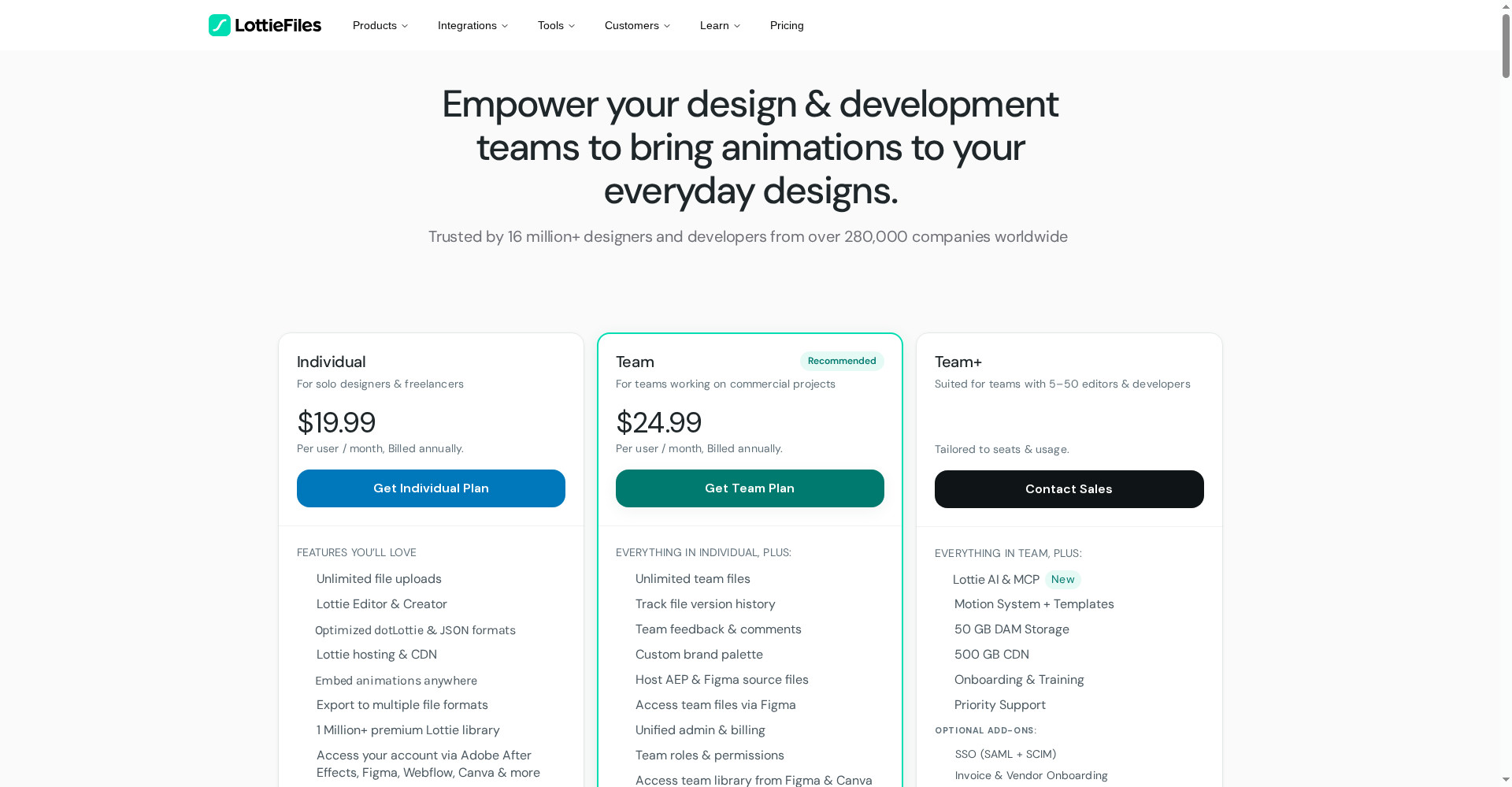
- Individual ($19.99/user/month, annual billing): Lottie AI 60 generations, Motion Copilot 100 uses, Raster to Vector 60, Prompt to Vector 60; MCP beta me free try karo; unlimited file uploads; Lottie Editor & Creator; optimized dotLottie & JSON (80% tak chhoti files); hosting & CDN; 1 million+ premium library; After Effects, Figma, Webflow, Canva access. Extra generations: 20¢ per credit (50 ya 100 ke packs).
- Team ($24.99/user/month, annual billing): Individual ka sab kuch, plus Lottie AI 120 generations, Motion Copilot 200 uses, Raster to Vector 120, Prompt to Vector 120; unlimited team files, version history, team feedback & comments, custom brand palette, unified admin & billing.
- Team+ (custom): Team ka sab kuch, plus Lottie AI & MCP included (credits seats aur usage ke hisaab se), Motion System + Templates, 50 GB DAM storage, 500 GB CDN, onboarding & training, priority support.
Imaandaar baat: $19.99/month me 60 generations ka matlab hai har generation ~33¢ ki — lekin agar tum roz 2-3 animation banate ho to mahine ke beech me hi credits khatm ho sakte hain, aur phir top-up ka kharcha alag se. Pehle free plan me preview aur library se kaam chalao, aur jab AI ki zaroorat roz padne lage tabhi Individual lo.
Platforms
- Web (browser): Lottie Creator poora browser me chalta hai — koi install nahi; Windows, Mac, Linux sab par
- Plugins: Adobe After Effects, Figma, Webflow, Canva — aur VS Code bhi
- Export: Lottie JSON, dotLottie, GIF, MP4, transparent WebM, MOV
- Players: Lottie animations web, iOS aur Android par free player libraries se chalti hain
- Embed: Notion, Medium, Ghost, Reddit, WordPress jaise platforms par oEmbed se
- Bhasha: Prompts 14+ bhashaon me — Hindi bhi
Kaun use kare, kaun na kare?
- Web designers / developers: Landing page, onboarding, loaders aur icons ke liye halki animations chahiye — Lottie format iske liye hi bana hai.
- App developers: iOS/Android apps me smooth animations, bina badi video files ke — JSON file GIF se kai guna chhoti hoti hai.
- Freelancers: Client ke liye jaldi custom icons aur UI motion banao — After Effects khole bina, prompt se.
- Marketers / content creators: Social posts aur campaigns ke liye branded animations, ek file me kai themes ke saath.
- Students: Motion design seekhna hai to free plan me preview aur library se shuru karo — prompt se seekhna asaan hai.
- Na kare: Jinko interactive, game-style animation chahiye (Rive behtar), jo cinematic ya 3D motion banate hain (ye tool 2D vector ke liye hai), ya jinko roz 100+ AI generations chahiye (credits ka kharcha badhega).
Comparison: Rive / Jitter / Lottielab
- Rive: Interactive UI aur game-style animation ka specialist — apna .riv format, state machines built-in. Free plan hai, paid $9/seat/month se. Lottie export nahi karta (Lottie import karta hai). Interactive chahiye to Rive, halki web/app animation chahiye to Lottie AI.
- Jitter: Browser me fast motion design, Figma import ke saath. Free plan me 3 files, 720p, watermark; paid $15/editor/month (annual). Lottie export free plan me bhi milta hai. Jinko timeline se haath se design karna pasand hai, unke liye Jitter; jinko prompt se banana hai, unke liye Lottie AI.
- Lottielab: Product teams ke liye Lottie editor aur hosting — unlimited files free me (GIF/MP4 only), Lottie export Pro ($12/editor/month) me. Teams ke liye achha, lekin AI prompt features Lottie AI jitne nahi.
- After Effects + Bodymovin: Pro route — poora control, lekin seekhne me waqt aur subscription ka kharcha. Lottie AI usi Lottie format ko prompt se banata hai, bina After Effects ke.
- Lottie AI: Prompt se editable animation + vector + themes + MCP — ek hi jagah sab kuch, lekin AI credits paid plans me aur launch abhi 1 din purana hai.
🔍 Log Ye Bhi Search Karte Hain
- lottie ai
- lottie ai free
- lottie ai pricing
- lottie ai vs rive
- lottie ai login
- lottie ai tutorial
- lottie ai alternatives
- lottie ai review 2026
- lottie files ai
- motion copilot
- prompt to vector
- lottie animation generator
- lottie vs gif
- free lottie animations
- woven video review
- videco review
- openvids ai review
- reelbird screen recorder review
Final verdict
Lottie AI ek genuinely useful idea hai — prompt se editable vector animation, After Effects khole bina, aur output itni halki file jo GIF se kai guna chhoti hai. Motion Copilot, Prompt to Vector, Prompt to Themes, Raster to Vector aur MCP — ye combination aaj kisi aur tool me ek jagah nahi milta. Isliye thoda kata: AI generations sirf paid plans me hain, 60 credits roz use karne wale ke liye kam pad sakte hain, aur launch sirf 1 din purana hai.
Humari rating: 4/5. Agar tum web ya app ke liye halke loaders, icons aur UI animations banate ho aur After Effects se chutkara chahte ho — lottiefiles.com par free account banao, pehle preview aur library se kaam chalao, aur jab AI ki zaroorat roz padne lage tab Individual lo. Pehle ek chhoti animation se test karo — dekho Motion Copilot tumhare prompt ko kaisa samajhta hai — uske baad hi apne client ya product ka kaam is par daalo. Jinko interactive ya game-style animation chahiye, wo Rive dekhein; jinko haath se timeline design pasand hai, wo Jitter try karein.
Note: Ye first-look review official site (lottiefiles.com/ai aur lottiefiles.com/pricing) aur uski Product Hunt launch post (10 November 2026) par based hai. Hum ise khud use karke hands-on update jald jodenge.