 AI Tool
⚡ The 30-second verdict
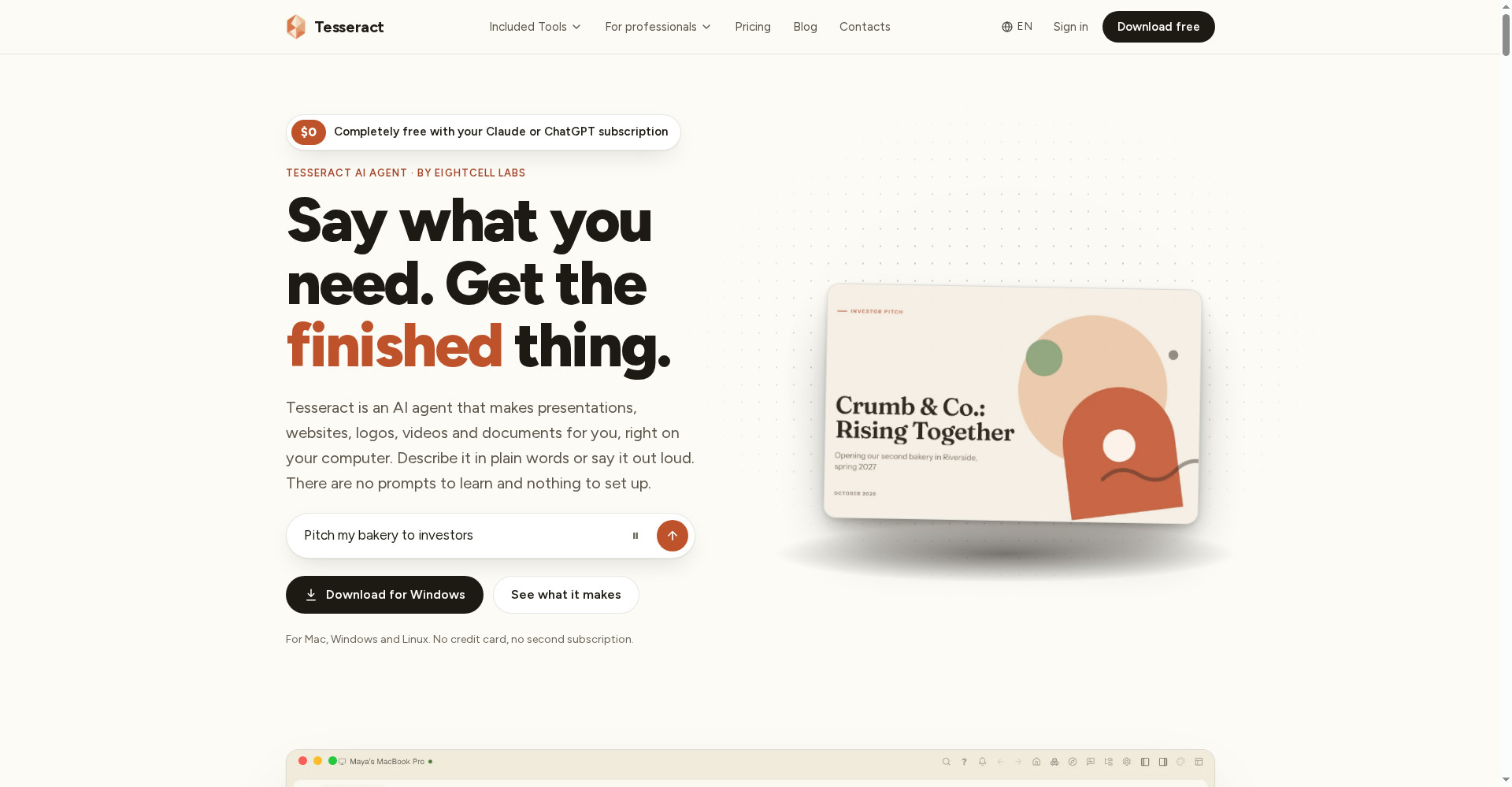
Tesseract is a free AI agent desktop app that turns one sentence into a presentation, website, logo, video or document — not just an answer, the finished file. 14 AI agents including Claude Code, Codex and Gemini CLI in one window, 33 guided makers, and plan-first safety. It runs for $0 on your own Claude or ChatGPT subscription, a free allowance is included without one, and there is no monthly subscription — top-ups start at just $10. But note the catches: serious use needs an AI subscription, the free version shows ads, and conversations are stored in the cloud. For students, freelancers and small businesses who want finished presentation, website or research work without learning the tools, this is worth trying — make one small job on the free allowance first, then decide.
What is it?
AI chatbots give you answers — but making the presentation, building the website or designing the logo is still your job. Tesseract fills that gap: you say what you need in one sentence, it shows a plan, runs tools on your computer, and hands back the finished file.
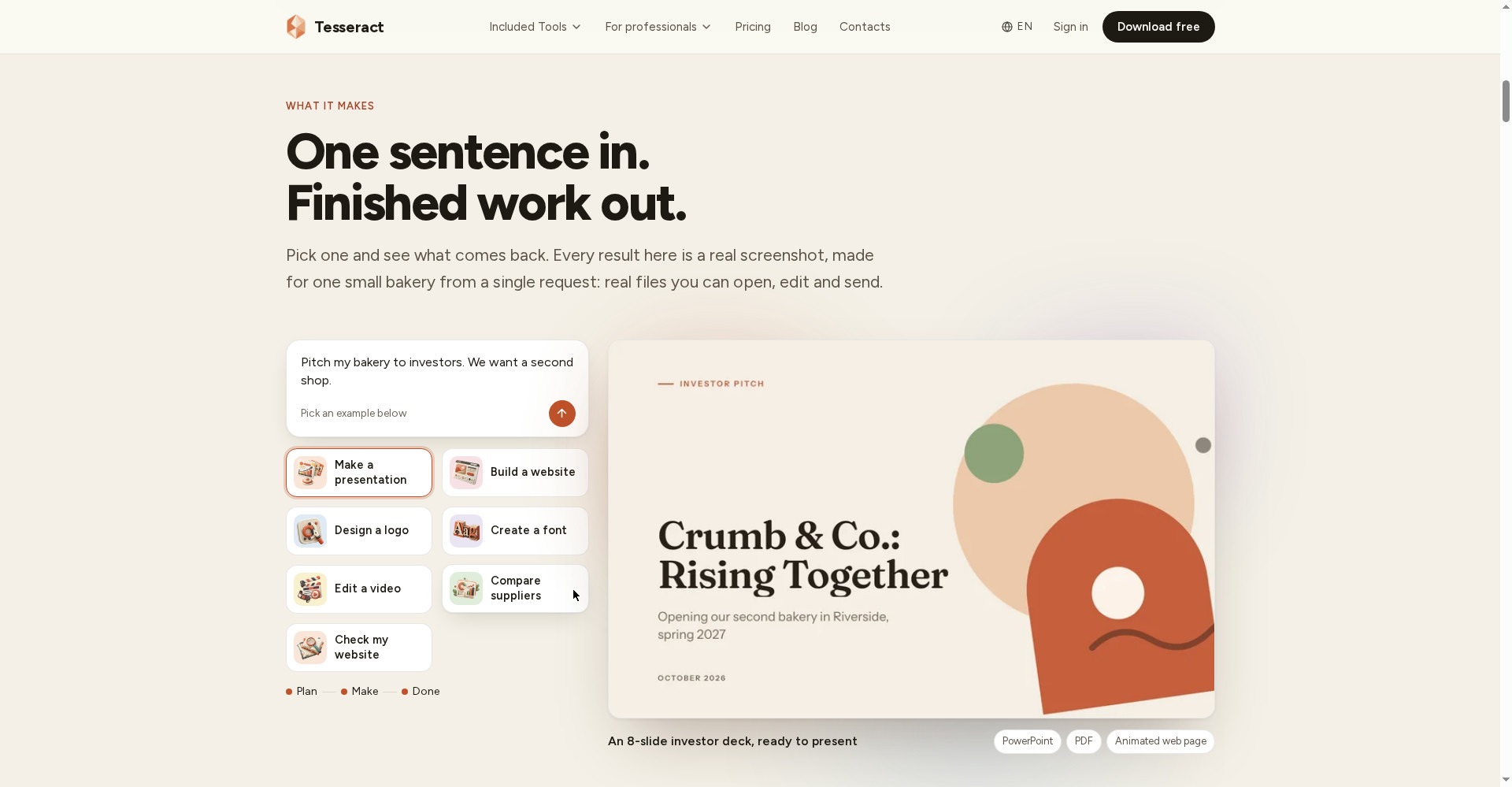
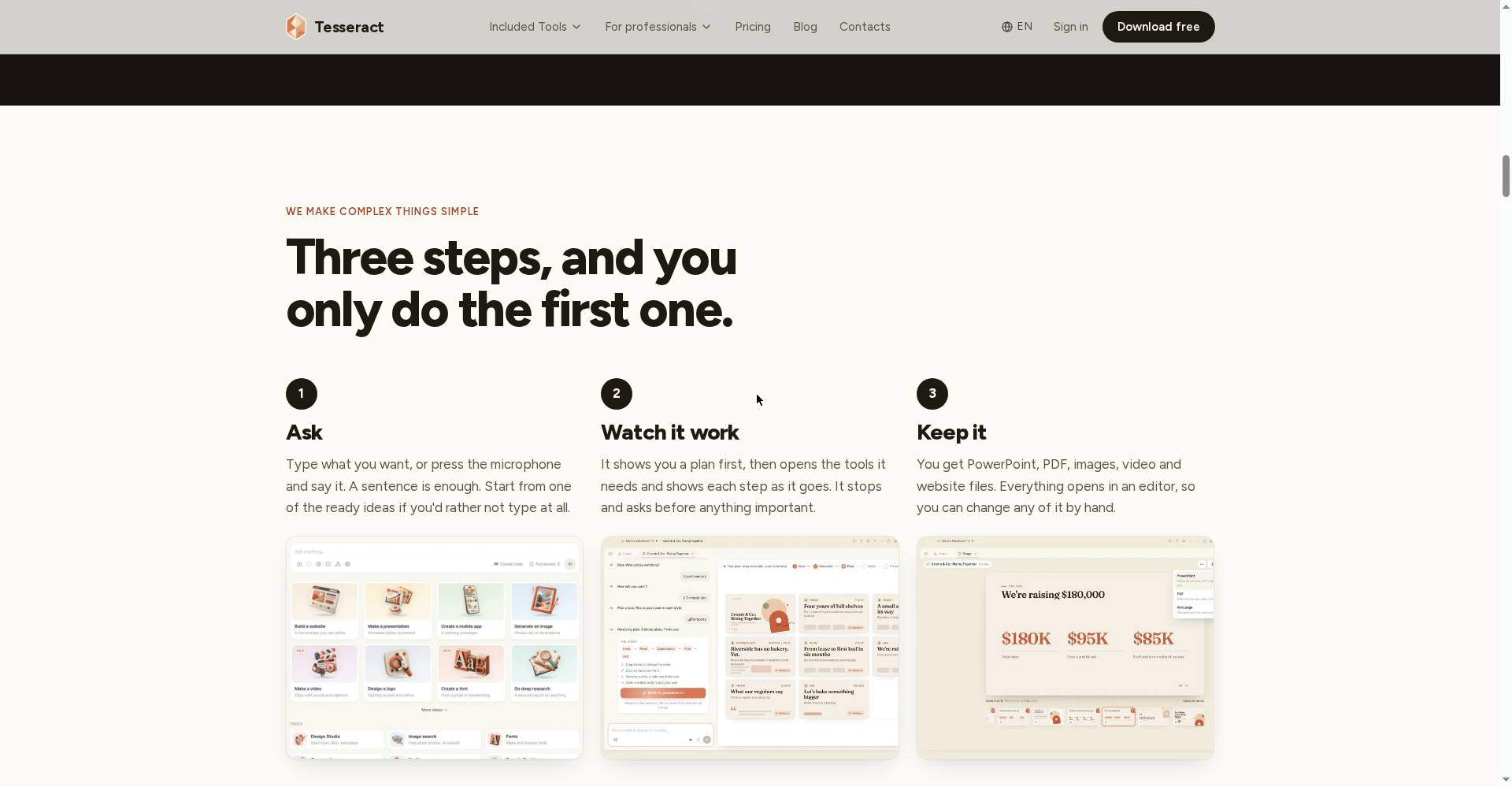
The official site shows the example itself: a bakery owner says “Pitch my bakery to investors. We want a second shop.” — Tesseract asks who will be watching and how much time there is, shows the plan, then builds an 8-slide investor deck — as PowerPoint, PDF or an animated web page.
And it does not stop at presentations — websites, videos, logos, spreadsheets, research, invoices, newsletters, games and 3D models are covered by 33 guided makers. In each maker you answer a few questions and the app makes the finished thing.
In short: Tesseract is an AI employee on your computer — say what you need, and it does the work.
Key features (what makes it different)
1. One sentence in, finished work out
This is Tesseract’s hero feature. There are no prompts to learn — describe it in plain words or say it out loud. The app makes a plan, opens the tools it needs, shows each step as it goes, and hands back a finished file that opens in an editor for changes by hand. Presentations come as PowerPoint, PDF or an animated web page; websites arrive as files ready to publish.
2. 14 AI agents, one window
Tesseract does not run its own model — it runs the agents developers already trust: Claude Code, OpenAI Codex, Gemini CLI, OpenCode, Antigravity CLI, Cursor Agent, Kimi Code, Qwen Code, Grok Build, MiniMax Code, CodeBuddy, Hermes, OpenClaw and NanoClaw. Pick a different agent per conversation, and new models appear on their own without an app update. When one account hits its limit, it switches to the next.
3. 33 guided makers — answer questions, get the finished thing
Websites, presentations, personal assistants, deep research, data analysis, videos, images, brands, social posts, mobile apps, games, spreadsheets, PDFs, diagrams, fonts, audio, songs, motion graphics, wireframes, invoices, newsletters, comics, 3D models and forms — every maker takes a few answers and returns the finished thing. It is built for people who do not want to learn the tools.
4. Plan first, then work — safety is built in
Letting an agent work on your computer sounds risky, so Tesseract shows the plan first, then works. It asks before important steps, stops at logins so you can take over, and file changes can be undone. You choose how much it may do without asking.
5. It works overnight — a report in the morning
For a long job, approve the plan and go home — Tesseract keeps working and leaves a report of every decision it made by morning. Start a job on one computer and let another finish it — work keeps going after you close the window.
6. Spotlight — over any app, one keystroke away
Press ⌥Space on Mac, Alt+Shift+Space on Windows and Linux — Tesseract opens on top of what you are doing, with a picture of your screen attached. Draft a reply, check the numbers or finish the form — it helps from what it sees. Hand it the mouse and keyboard and it can work in your other apps too.
7. Remote desktop and multi-computer — all your machines together
Run all your computers from one place — open the shop PC from home, send files, share the clipboard. Remote Desktop, Mesh (a private network) and Atrium (team chat) are part of Tesseract, and each is also available as a small free app.
8. Your own assistant — a morning brief from mail and calendar
The personal-assistant maker builds your own assistant — you pick its name, picture and personality. It reads Gmail and Google Calendar (and Microsoft 365, Teams, Notion and 50+ more) and sends you a brief every morning, answering on Atrium, WhatsApp, Telegram, Slack, email or phone calls. It asks before sending anything on your behalf.
Pricing — how much is free?
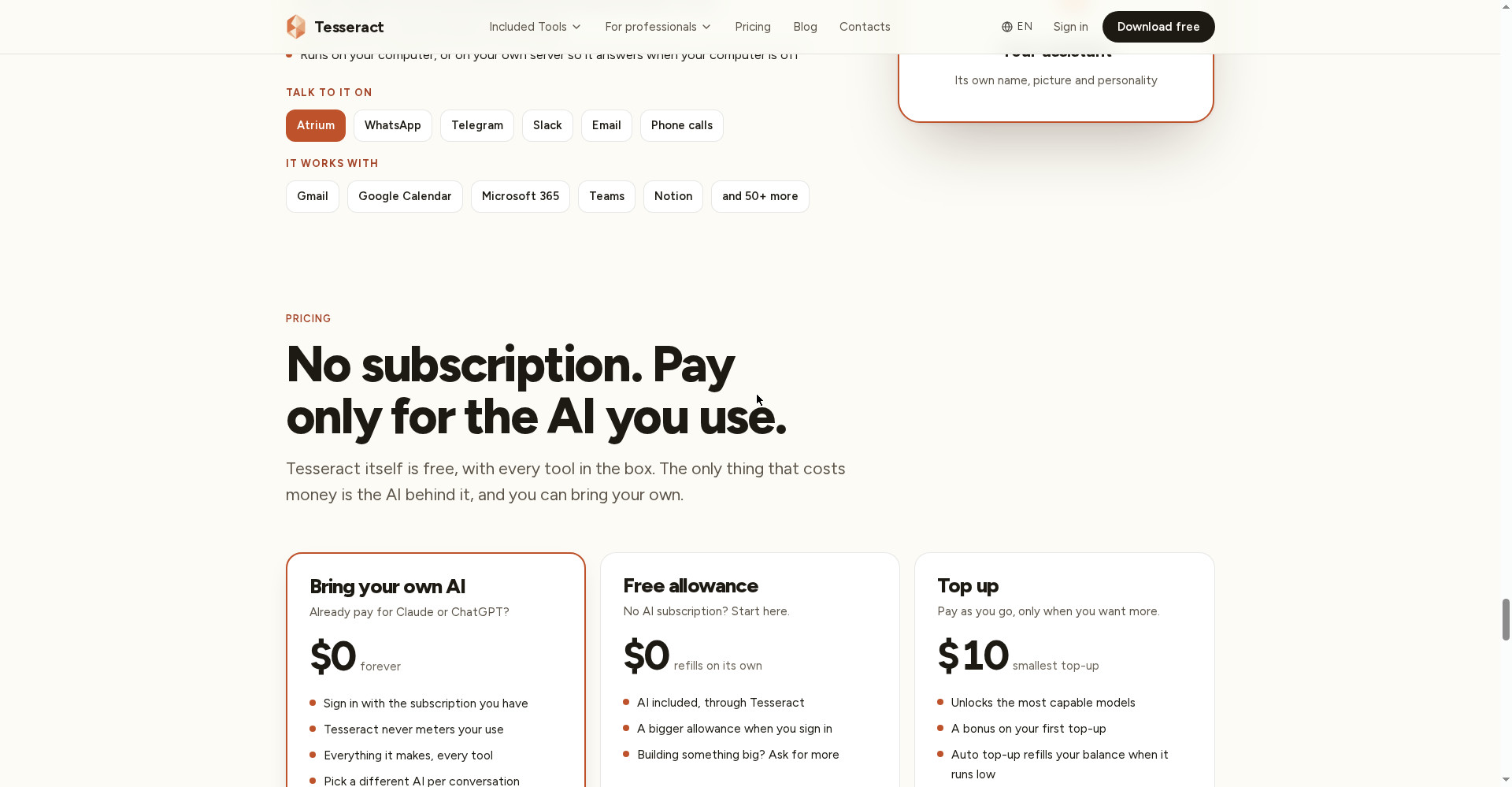
- Free Allowance ($0): AI included through Tesseract; the allowance refills on its own and is bigger once you sign in. The way to start with no AI subscription — though the exact size of the allowance is not clearly stated on the official site.
- Bring Your Own AI ($0 forever): Sign in with your own Claude or ChatGPT subscription — Tesseract never meters you, all tools included, a different AI per conversation. A Gemini API key also works.
- Top Up (from $10, one-time): Pay as you go — only when you want more; the most capable models unlock, a bonus comes with the first top-up, and auto top-up is available.
The honest math: the app itself is free and there is no monthly subscription — its biggest plus. But the real cost is the AI: without a Claude/ChatGPT subscription the free allowance only covers small jobs, and premium models need a $10 top-up. The free version shows small sponsored messages — any credit balance removes the ads.
Platforms
- Mac: Desktop app, installs and updates itself
- Windows: Desktop app, installs and updates itself
- Linux: Desktop app, installs and updates itself
- Web: app.tesseract.dev — the same app, for when you are away from your own computer
- Mobile (Android/iOS): No — no mobile app is clearly mentioned on the official site; desktop and web only
- Company: Eightcell Labs, Inc. — Founder Liviu
- Version: 0.11.36 (15 October 2026) opened it to everyone — no invite or waiting list
Who should use it, and who should not?
- Students: Presentations, assignments, research spreadsheets — finished from one sentence; start on the free allowance.
- Freelancers: Websites, logos, invoices and proposals for clients — finished files without learning the tools.
- Small businesses: Like the bakery example — pitch decks, websites, brand kits and social posts from one app.
- Creators: Videos, images, newsletters, comics — pick from the 33 makers.
- Developers / power users: 14 agents including Claude Code and Codex in one window, plus remote desktop and multi-computer control.
- Do not use it if: You only need chat (ChatGPT is enough), you want to work from a phone (there is no mobile app), or your work involves sensitive data and you would rather conversations were not stored in the cloud.
Comparison: ChatGPT / Claude Code / OpenPilot
- ChatGPT: A chat — ask a question, get an answer. Tesseract turns that same ChatGPT (or Claude) into an agent that makes files. If only answers are needed, ChatGPT is enough; if finished presentations and websites are needed, Tesseract is the layer on top.
- Claude Code: A terminal-based coding agent for developers — powerful, but on the command line. Tesseract brings that same Claude Code, plus 13 more agents, to non-developers through a GUI.
- OpenPilot: An AI agent that works for you — reviewed on this site. OpenPilot is a general-purpose agent; Tesseract focuses on finished files (decks, websites, logos, videos) plus multi-computer control, and it is free, while agents usually charge a subscription.
- Tesseract: A free app, 14 agents, 33 makers, plan-first safety, overnight work — but it depends on your own subscription or the free allowance for the AI itself.
🔍 People also search for
- tesseract ai
- tesseract ai free
- tesseract ai download
- tesseract ai pricing
- tesseract ai vs chatgpt
- tesseract ai review
- tesseract ai login
- tesseract ai for windows
- tesseract ai alternatives
- tesseract ai app
- tesseract ai agent
- free ai agent app
- claude code alternative
- ai agent for pc
- openpilot review
- hob review
- kai review
- readywhen review
- sideos review
Final verdict
Tesseract is a genuinely useful idea — an AI agent that does not just answer, it hands back finished work. A free app, no subscription, 14 agents in one window, 33 guided makers, plan-first safety and overnight work — that combination works for students, freelancers and small businesses. The honest cuts: serious use needs a Claude/ChatGPT subscription, the free version shows ads and the ad partner receives message snippets, conversations are stored in the cloud, and the name invites confusion with the OCR engine.
Our rating: 4/5. If you want finished work like presentations, websites or logos without learning the tools — download the app from tesseract.dev and make one small job on the free allowance. Test the guided makers and the plan-first flow first — those two will decide whether it fits your work. If you already pay for Claude or ChatGPT, this is a $0 no-brainer; if you only need chat, stay with ChatGPT.
Note: This first-look review is based on the official site (tesseract.dev), its blog and its Product Hunt launch post (14 November 2026). We will add a hands-on update after using it ourselves.


